°F = °C × 9/5 + 32, and °C = (°F − 32) × 5/9. Type a temperature in either scale and the answer appears right away, in big numbers and in plain words, next to a thermometer that shows how warm or cold it really is.
- 0 °C = 32 °FWater freezes
- 20 °C = 68 °FA comfortable room
- 37 °C = 98.6 °FAverage body temperature
- 100 °C = 212 °FWater boils (at sea level)
Quick Start: Convert Celsius to Fahrenheit in 3 Steps
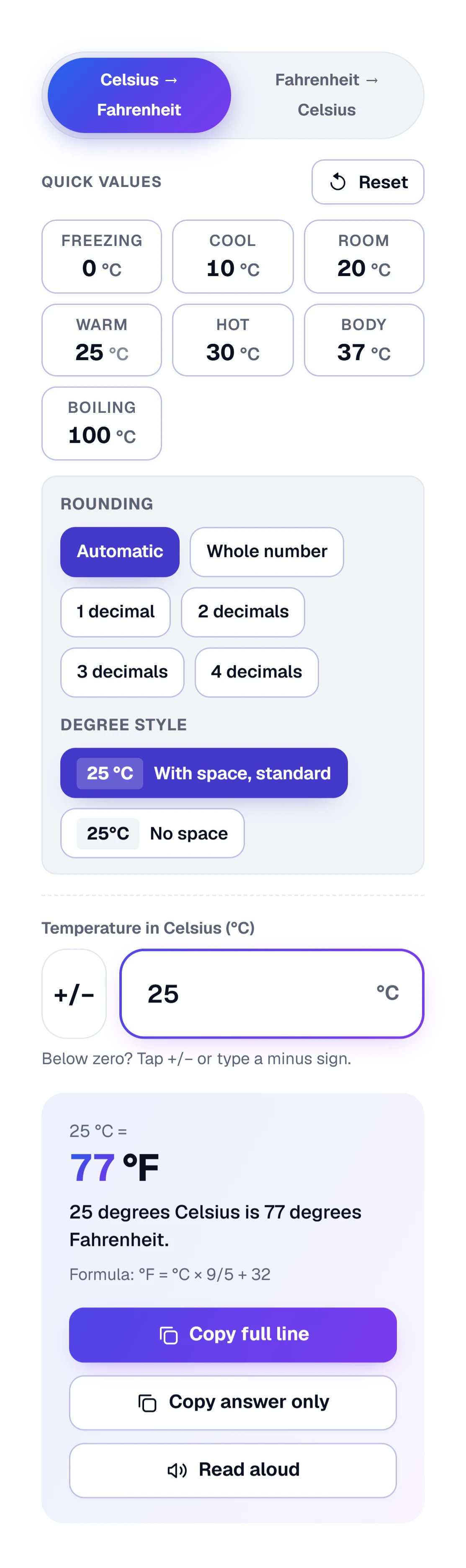
Start with the picture: each numbered badge marks a part of the converter, and the steps below point to it by that number.
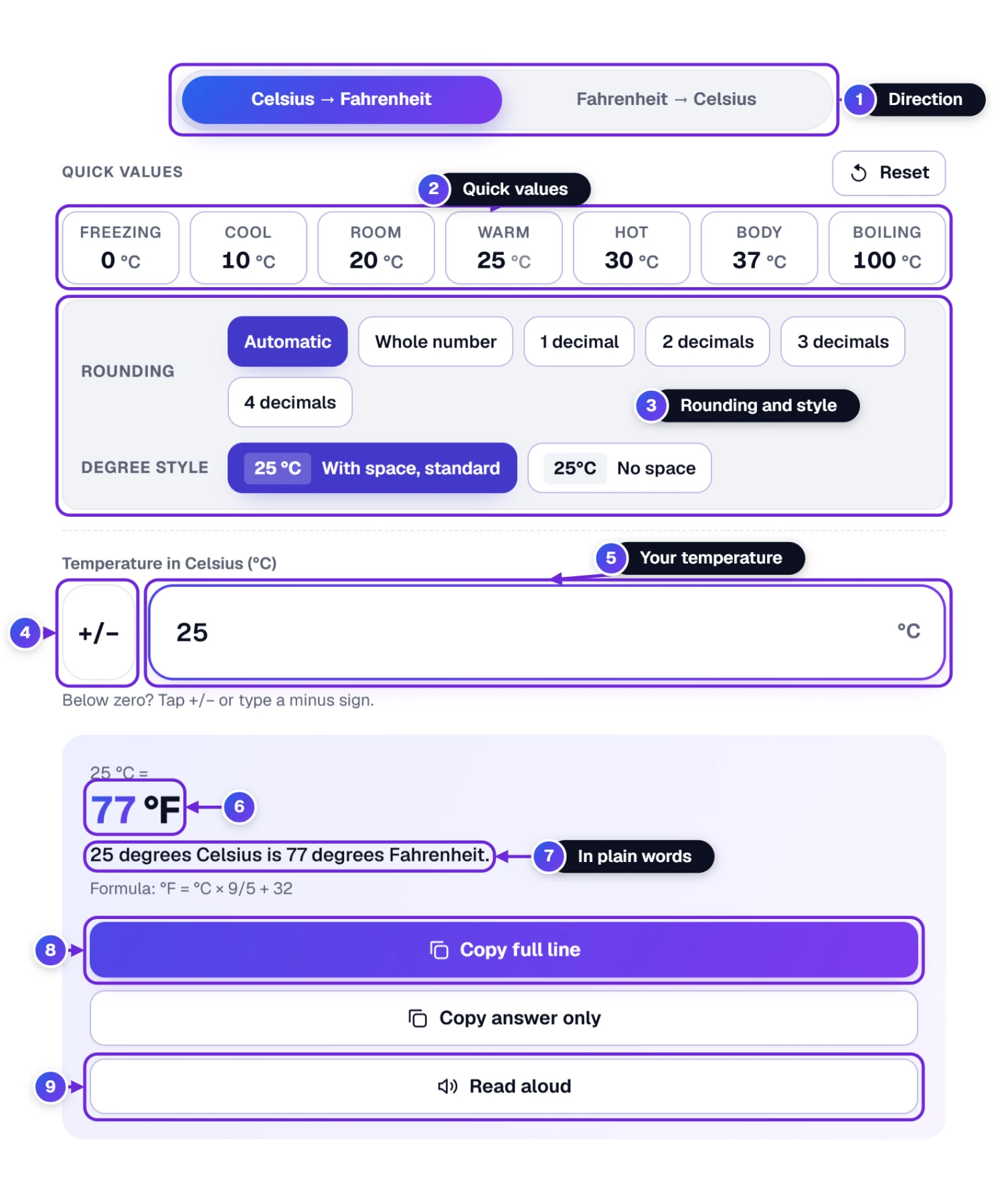
- Check the direction 1. The page opens on Celsius → Fahrenheit. If you are holding a Fahrenheit reading, tap Fahrenheit → Celsius instead.
- Type the temperature into the big box 5, or skip the typing and tap a quick value 2, for example Room 20 °C. For a number below zero, use the +/− button 4.
- Read your answer 6. Under it, one sentence 7 says the same thing in everyday words. Copy full line 8 puts “25 °C = 77 °F” on your clipboard, Copy answer only puts just “77 °F” there, and Read aloud 9 speaks it.
If you only needed one temperature, you are done. There is nothing to press, because the answer follows your typing. Below, we go through the extras, starting with the quick values, the shaded box for rounding and the degree sign 3, and Reset.
Switch Between °C and °F, and the One-Tap Temperatures
The first thing to check is the pair of buttons at the top. They decide whether you type in °C or °F, and the seven quick values follow along, so freezing, room, body and boiling are always one tap away.
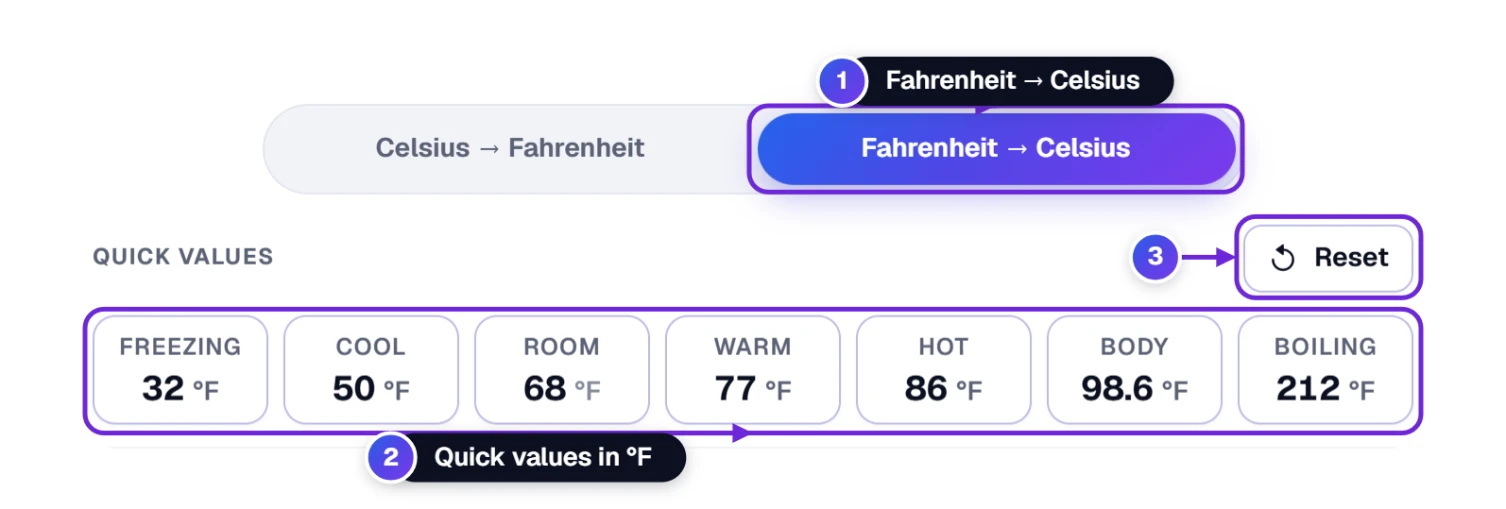
- Tap Fahrenheit → Celsius 1 to turn °F into °C. Tap Celsius → Fahrenheit to go back.
- Pick a quick value 2. Every tile has a name above its number. In °C they are Freezing 0, Cool 10, Room 20, Warm 25, Hot 30, Body 37 and Boiling 100. In °F they are Freezing 32, Cool 50, Room 68, Warm 77, Hot 86, Body 98.6 and Boiling 212. Each tile shows a short hint when you point at it.
- Press Reset 3 to start again with 1 °C to °F, automatic rounding and the standard degree sign.
The S key swaps °C and °F on a computer.
Choose How the Answer Is Written: Rounding and Degree Style
Right under the quick values sits a shaded box with two rows of choices. They never change the temperature itself, only the way the answer is written, and the choice that is switched on is the one filled with color.
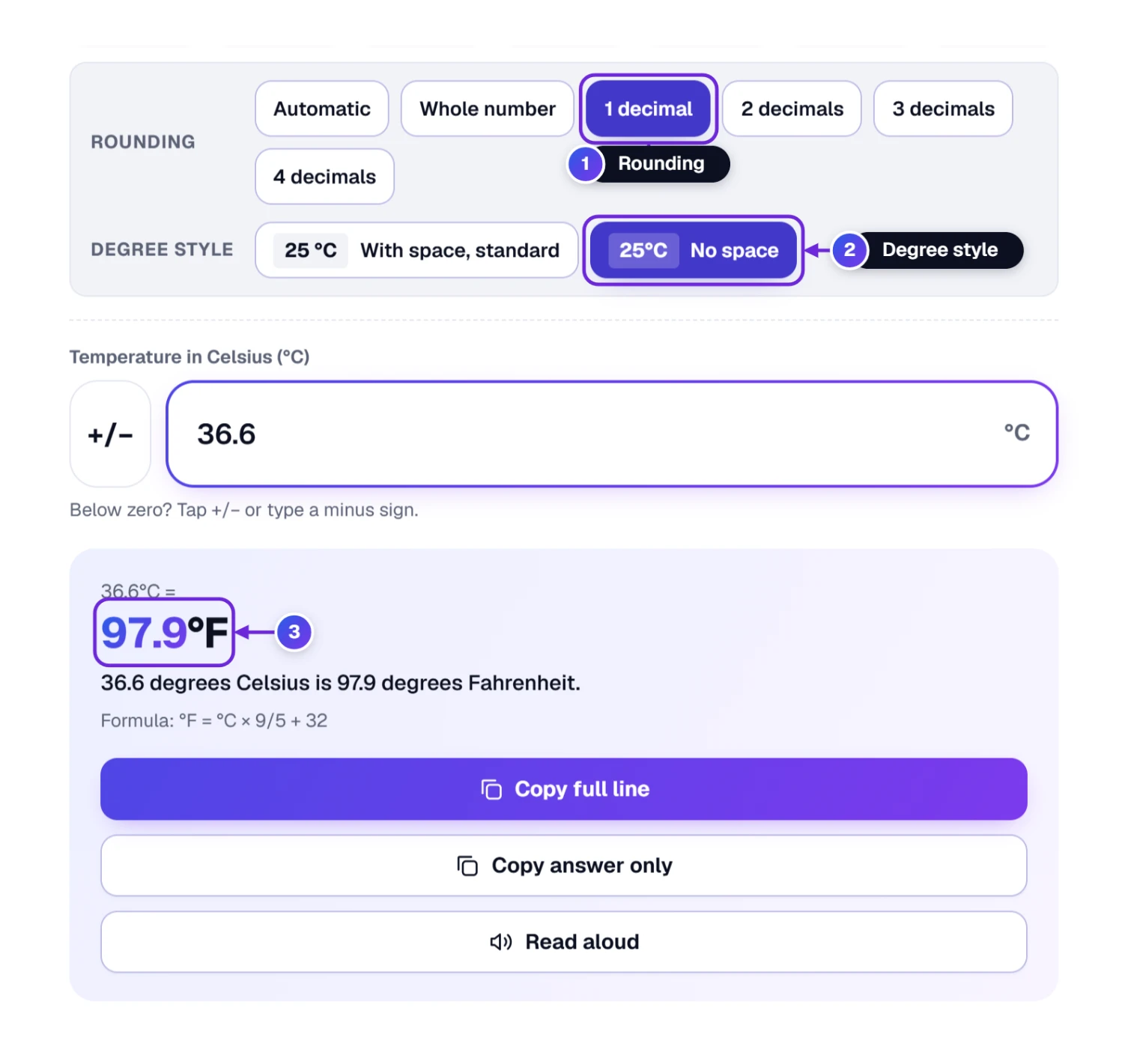
- Start with Rounding 1. Automatic keeps up to 2 decimals, like 71.6 °F. Whole number suits a weather report. Cooking, lab work or homework may call for more, so choose between 1 decimal and 4 decimals.
- Look at Degree style 2. The standard is a space, “25 °C”, the way the international SI rules and NIST print it, and it is marked With space, standard. If you prefer it tight, “25°C”, tap No space.
- Watch the answer 3. It follows your choices at once, and so do the sentence under it, the steps, the thermometer and the text you copy.
Press Reset and both rows go back to Automatic and With space, standard.
Temperatures Below Zero
Winter forecasts, freezers and ski trips all need a minus sign, but the number keypad on many phones has no minus key. That is what the +/− button is for.
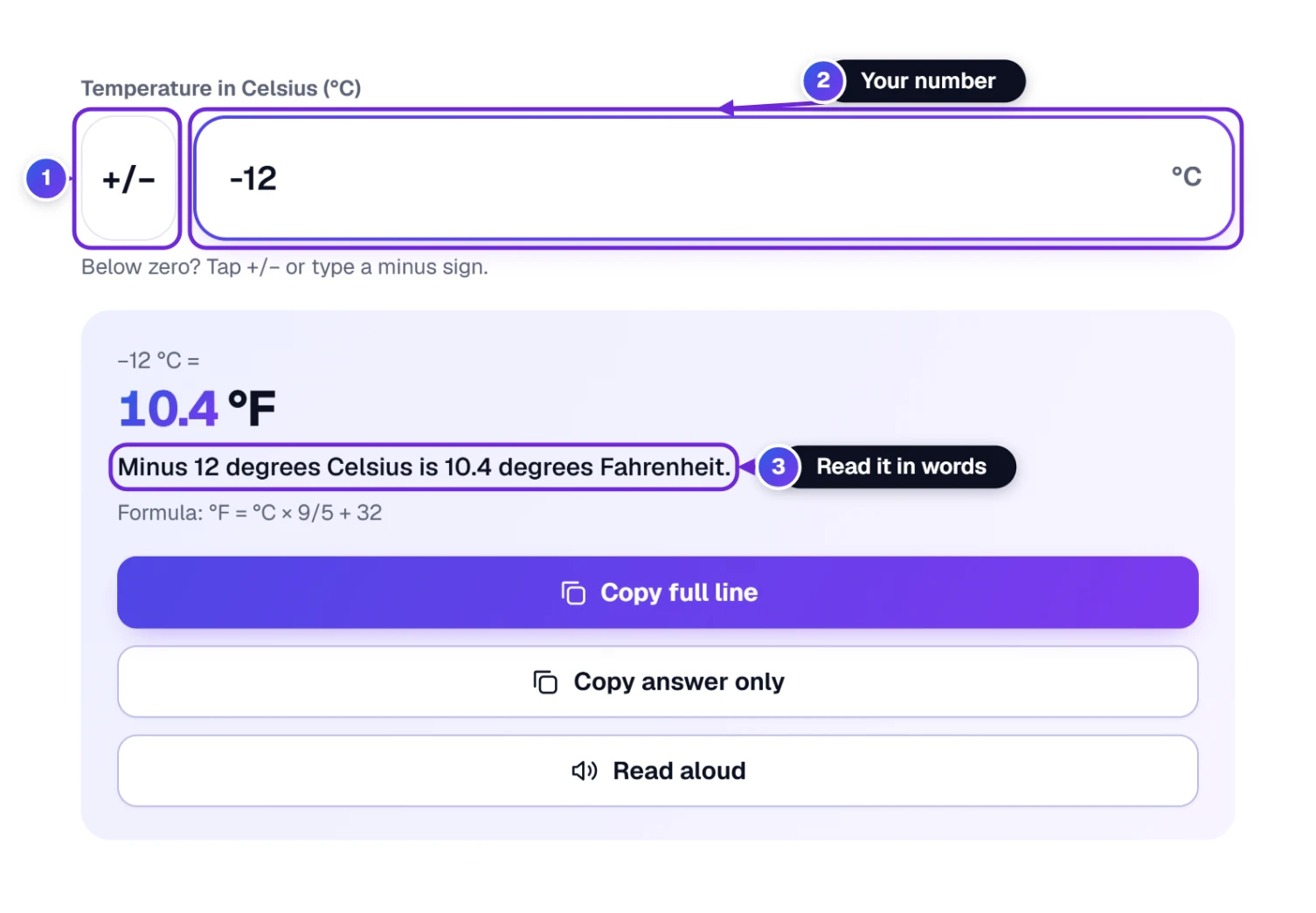
- Type the number without the minus, for example 12.
- Tap +/− 1. The box 2 now shows −12. Tap it again to take the minus away.
- Read the answer: −12 °C is 10.4 °F, and the words 3 say “Minus 12 degrees Celsius is 10.4 degrees Fahrenheit.”
On a computer you can just type the minus sign. The box also understands a comma for decimals (36,6) and a thousands comma (1,250).
The Answer, the Sentence and the Weather Word
Back to the first picture: the big number 6 is your answer, and the line below it 7 spells it out as a sentence, which is easier to read when the symbols are small.
- The formula line under the sentence shows the rule used: °F = °C × 9/5 + 32 (or °C = (°F − 32) × 5/9 the other way).
- Copy full line 8 copies a short line such as “25 °C = 77 °F” for a message, an email or a document. Copy answer only copies just “77 °F”, handy when only the new number matters.
- Read aloud 9 speaks the sentence in your device’s own voice, a little slower than normal. Tap it a second time (Stop reading) and it goes quiet.
- An empty box or a stray letter gets a short hint about what to type, never a made-up temperature.
The number in the box is selected when you tap it, so you can type over it. With a keyboard, ↑ and ↓ move the temperature one degree at a time, ten with Shift.
See It on the Thermometer
A number like 22 °C means little if you grew up with Fahrenheit. The thermometer under the answer puts it on both scales at once and tells you what it feels like outside.
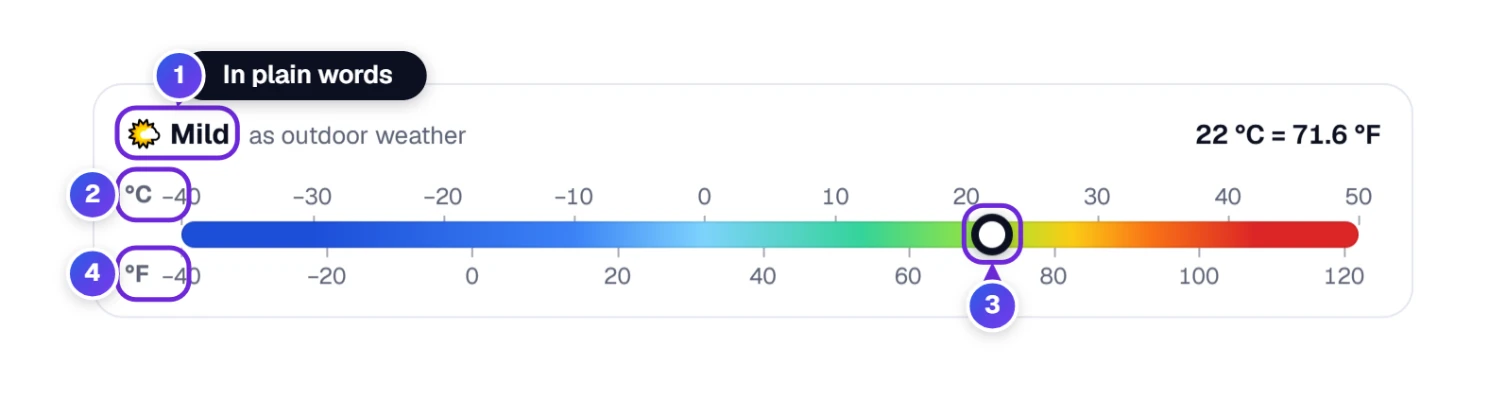
- In plain words 1: how the temperature feels as outdoor weather, from “Extremely cold” to “Extremely hot”, with the reading in both units on the right.
- The °C scale 2 runs along the top and the °F scale 4 along the bottom, so you can read the same spot in both.
- The marker 3 sits on a color bar that goes from blue (cold) to red (hot).
- For very hot or very cold numbers the scale grows to fit them. Above 60 °C it says “Hotter than any weather on Earth”.
- For a few special temperatures you also get a 💡 note. For example, 0 °C is where water freezes, and at −40 the note tells you it is the one temperature that reads the same on both scales.
| Words on the thermometer | Celsius | Fahrenheit |
|---|---|---|
| Extremely cold | below −20 °C | below −4 °F |
| Below freezing | −20 to 0 °C | −4 to 32 °F |
| Cold | 0 to 10 °C | 32 to 50 °F |
| Cool | 10 to 18 °C | 50 to 64.4 °F |
| Mild | 18 to 24 °C | 64.4 to 75.2 °F |
| Warm | 24 to 30 °C | 75.2 to 86 °F |
| Hot | 30 to 38 °C | 86 to 100.4 °F |
| Extremely hot | 38 to 60 °C | 100.4 to 140 °F |
Watch the Formula Work, Step by Step
Science homework, or a recipe you want to be sure about? Open this panel to see the formula worked through with your own temperature.
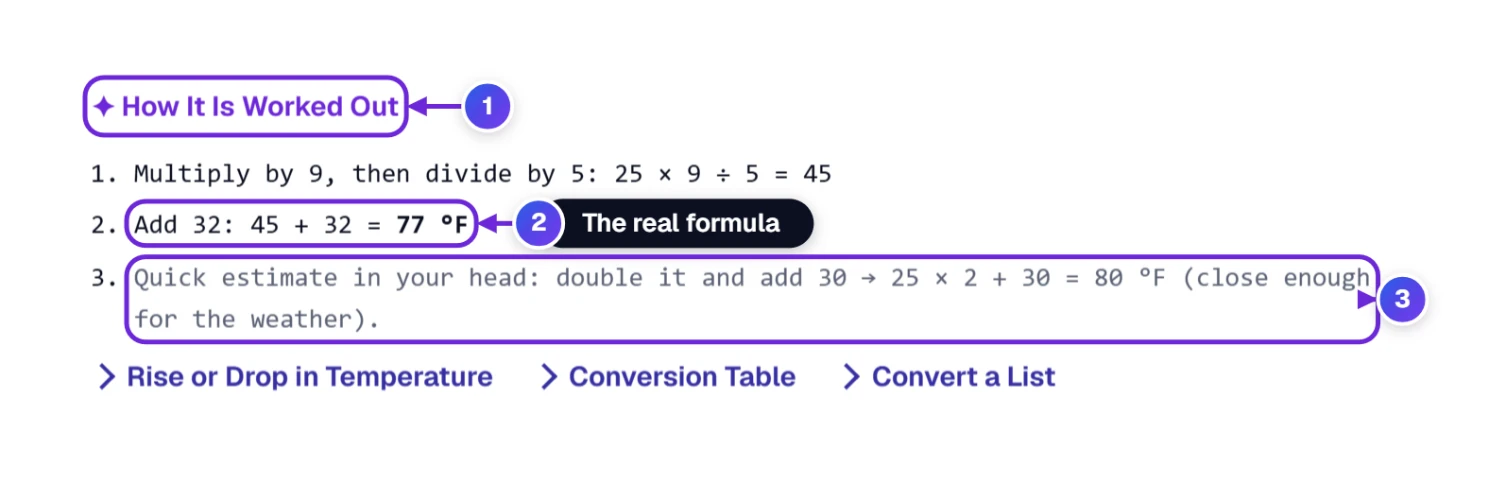
- Press the ✦ How It Is Worked Out fold 1, just under the converter.
- Read the steps: for 25 °C, 25 × 9 ÷ 5 = 45, then 45 + 32 = 77 °F 2.
- The last line 3 is a back-of-the-envelope check, no calculator needed: double the number, then add 30 (25 × 2 + 30 = 80 °F). For weather talk, that is close enough.
- Edit the number or flip the direction and every step is worked out again.
Convert a Rise or Drop in Temperature
“It will be 5 degrees warmer tomorrow.” A change in temperature is not the same as a temperature, and most converters get it wrong. Here is why, and how to do it.
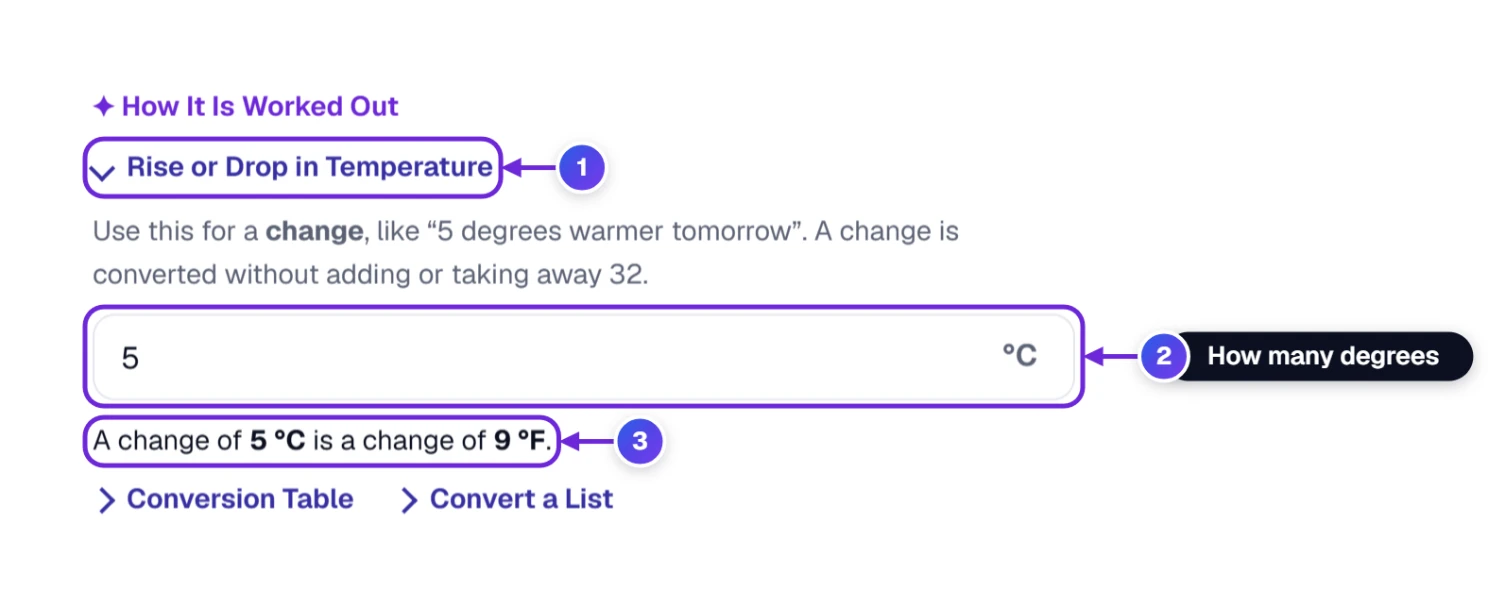
- Click Rise or drop in temperature 1 under the tool.
- Type how many degrees it goes up or down 2. It uses the direction at the top, so here the change is in °C.
- Read the answer 3: a change of 5 °C is a change of 9 °F.
Why is it not 41 °F? The +32 in the formula only moves the zero point of the scale. A difference between two temperatures has no zero point, so you only multiply: 1 °C of change = 1.8 °F of change.
| Change in °C | Change in °F |
|---|---|
| 1 °C | 1.8 °F |
| 2 °C | 3.6 °F |
| 3 °C | 5.4 °F |
| 5 °C | 9 °F |
| 10 °C | 18 °F |
| 15 °C | 27 °F |
| 20 °C | 36 °F |
Make a °C and °F Chart for the Fridge or Classroom
Need a chart for the fridge, a classroom or a spreadsheet? The table follows the direction at the top and adds the temperature you typed.
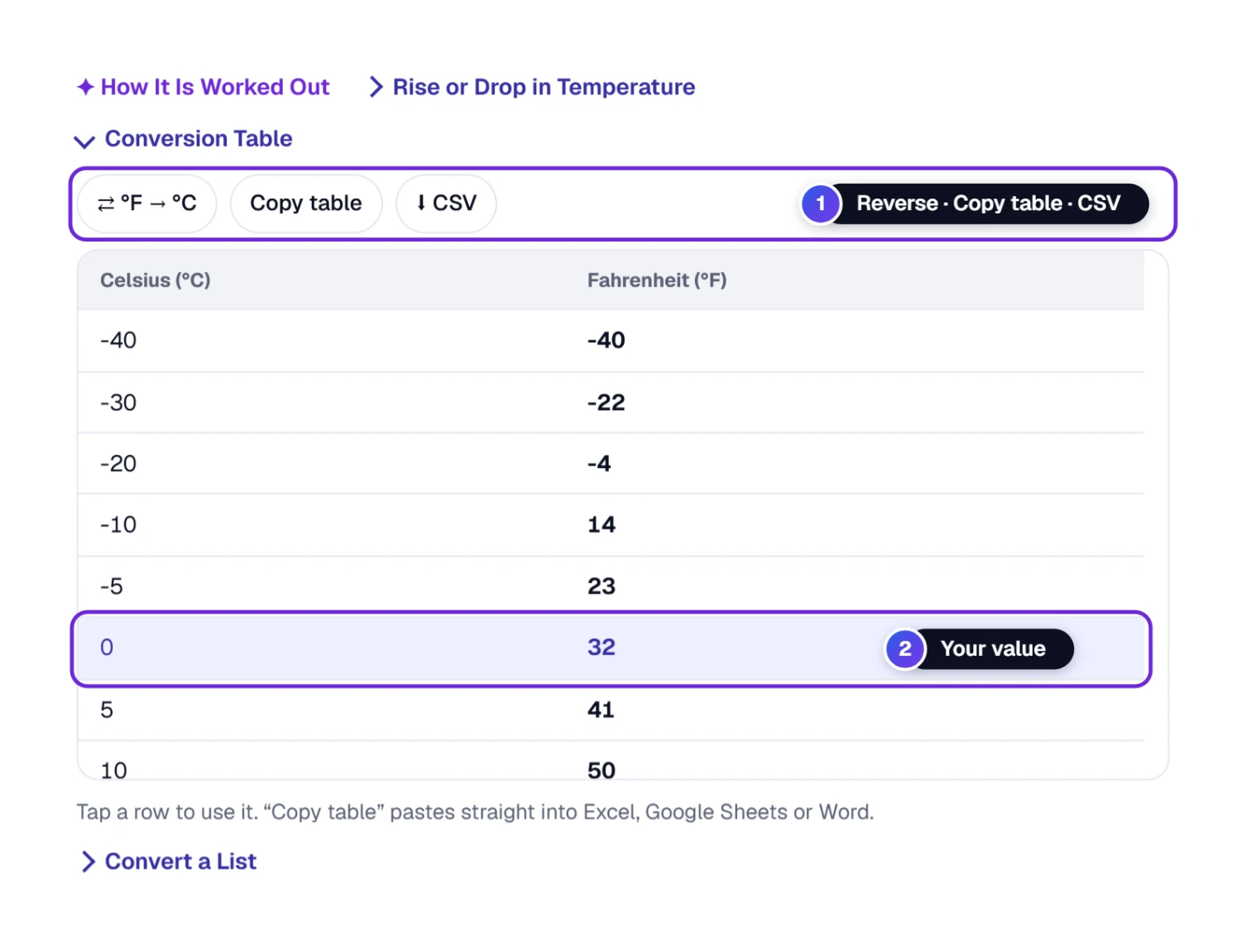
- Click Conversion table below the converter, or press T.
- Whatever you typed shows up as a highlighted row 2: here 0 °C = 32 °F.
- Want °F first? Tap ⇄ °F → °C 1 to flip the chart. Copy table pastes the whole chart, columns intact, into Excel or a Word file, and ⬇ CSV downloads it.
- A tap on any row sends that temperature back up to the converter.
Turn a Whole Week of Forecasts Into °F at Once
A 7-day forecast, a log from a room thermometer, a column from a lab sheet: paste it all and read every answer side by side.
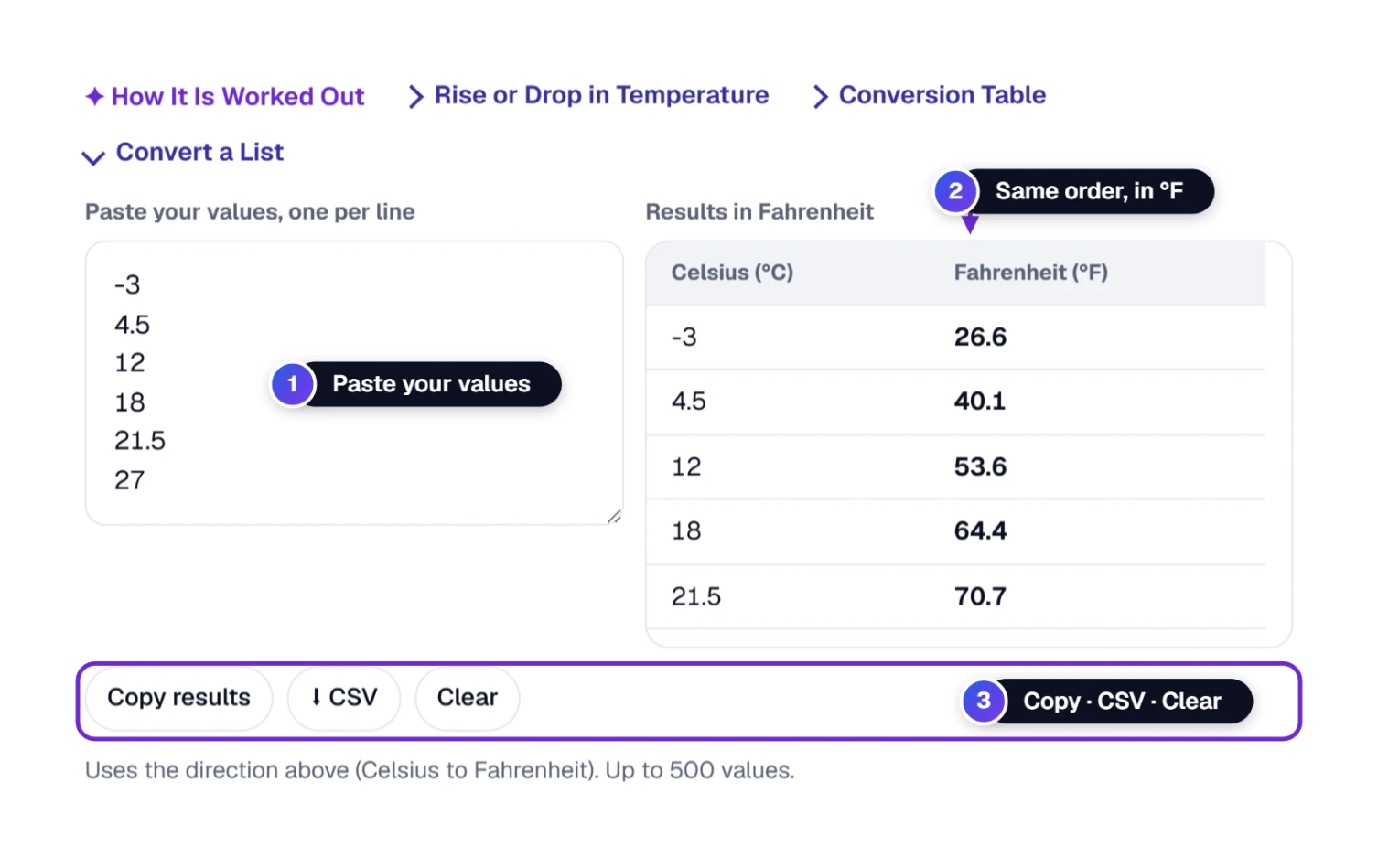
- Click Convert a list. The L key opens it too.
- Type or paste one temperature per line 1. Commas, semicolons and tabs also separate values, and entries like “−5 °C” or “20 degrees” are read as −5 and 20.
- Each temperature gets its answer 2 on the same line, in the direction chosen at the top. Anything that is not a number is flagged not a number.
- Copy results 3 puts both columns on your clipboard, ready for a spreadsheet. ⬇ CSV saves the numbers in a file you can open in Excel, and Clear wipes the box. Up to 500 values fit.
A tip from our own testing: the list understands “−5 °C” and “20 degrees”, but a European-style “36,6” is read as two temperatures, 36 and 6, because the comma splits the line. The big box above takes 36,6 without trouble. In the list, type 36.6 with a dot and you get 97.88 °F.
Recent Temperatures You Looked Up
The converter keeps a short list of the temperatures you converted on this device, handy when you check the same oven setting every week.
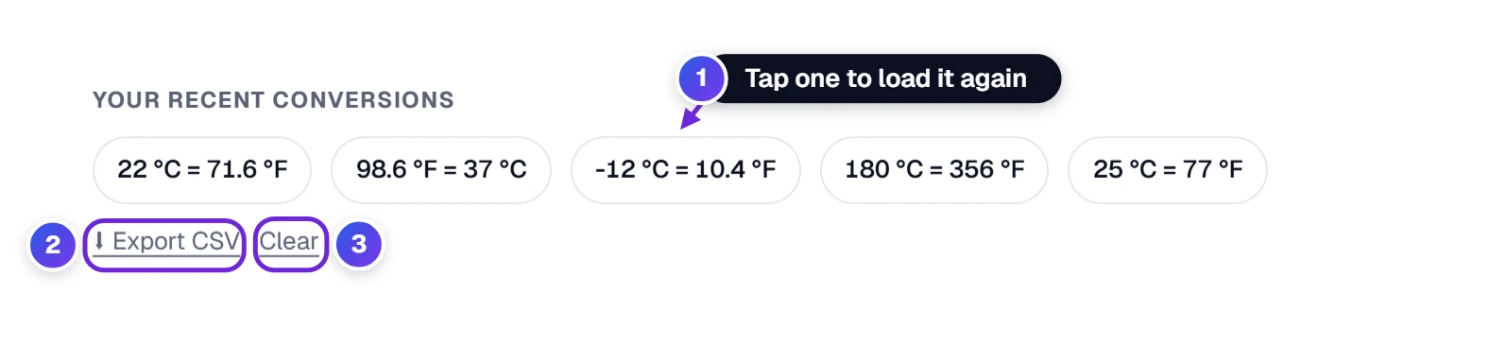
- Tap a past conversion 1 to bring it back. Five are on show, and up to twenty are kept.
- ⬇ Export CSV 2 gives you the last 20 in a file, each with its date and time.
- Clear 3 removes them.
Share a Temperature, Save the Page or Put It on Your Site
Below the converter you will find six buttons. Here is what each one does.
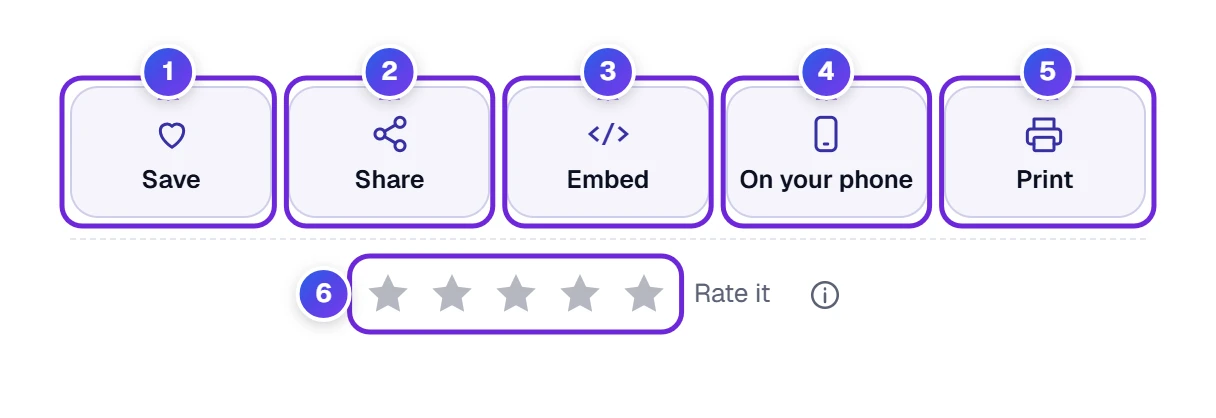
- Save 1: pins this converter to your favorites, listed under My Tools. The heart icon in the page header pins it too.
- Share 2: pops up a window with a link, a ready-made line and app choices, pictured below.
- Embed 3: provides a short embed code to paste into a school page or a travel blog, and the converter shows up there.
- On your phone 4: draws a QR code on screen; scan it with your camera and the converter opens there.
- Print 5: opens your browser’s print window, where you can send the page to a printer or save it as a PDF.
- Stars 6: rate the tool. Your rating helps the next visitor.

- Copy link 1 gives you a web address that reopens the converter with your temperature already typed in.
- Copy result 2 puts the line “25 °C = 77 °F” on the clipboard together with that same link, so one paste carries both.
- Or tap one of the app buttons 3 (WhatsApp, Facebook, X, email) to send it from there.
Using the Converter Without a Mouse
If you prefer the keyboard, press ? to see all the keys. They respond whenever the cursor is outside a text box.
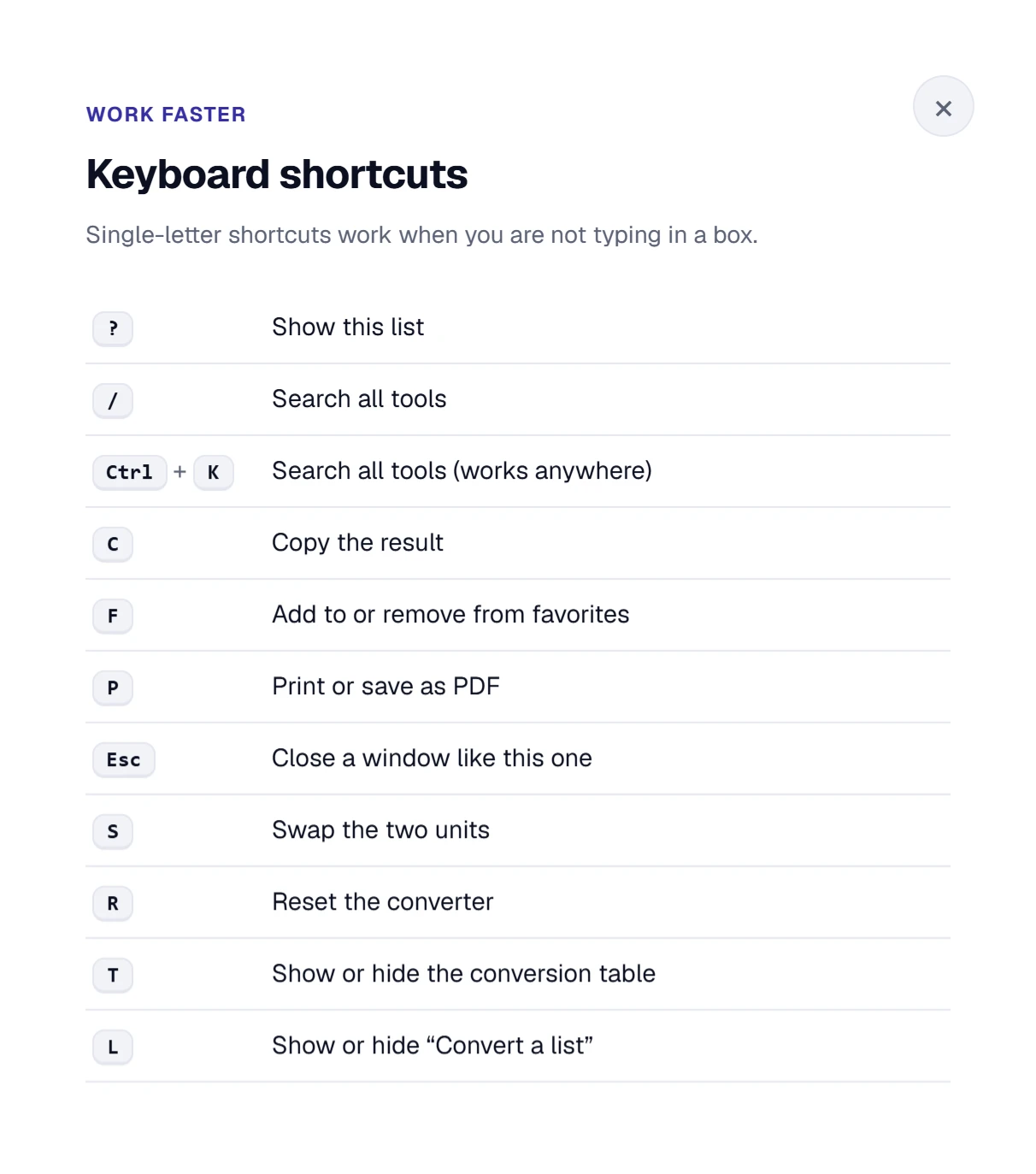
- Press S to flip between °C and °F, and R to start over.
- T opens or closes the conversion table, and L does the same for the list of temperatures.
- C copies the full line, F saves it to your favorites and P prints the page.
- To find another tool, press / or Ctrl + K. Esc closes whatever window is open.
On a Phone, Before and During a Trip
On a phone everything stacks in one column, the buttons are big enough for a thumb, and the quick values wrap into rows so you can see them all. The Rounding and Degree style choices wrap too, and the +/− button covers the missing minus key.
Traveling soon? Open this page once before you go and use your browser’s “Add to Home screen” option, so a Celsius forecast is a single tap from making sense.
How to Convert Celsius to Fahrenheit
The formula is: °F = °C × 9/5 + 32. Nine-fifths is the same as 1.8, so you can also write it as °F = °C × 1.8 + 32. Multiply first, then add 32.
Three worked examples:
- A mild day in Paris, 18 °C: 18 × 1.8 = 32.4, and 32.4 + 32 = 64.4 °F
- A hot afternoon in Rome, 33 °C: 33 × 1.8 = 59.4, and 59.4 + 32 = 91.4 °F
- A cold morning in Toronto, −8 °C: −8 × 1.8 = −14.4, and −14.4 + 32 = 17.6 °F
How to Convert Fahrenheit to Celsius
Going the other way, do the steps in reverse order: °C = (°F − 32) × 5/9. Take away 32 first, then multiply by 5 and divide by 9 (or divide by 1.8).
- A warm summer day in Chicago, 86 °F: 86 − 32 = 54, and 54 ÷ 1.8 = 30 °C
- A chilly fall morning in Denver, 41 °F: 41 − 32 = 9, and 9 ÷ 1.8 = 5 °C
- Your freezer, 0 °F: 0 − 32 = −32, and −32 ÷ 1.8 = −17.78 °C
The quicker way is the Fahrenheit → Celsius tab above the big box.
Quick Mental Conversions Without a Calculator
- °C to °F: double it and add 30. 15 °C → 30 + 30 = 60 °F (exact: 59 °F). Good for the weather; it gets less exact for high temperatures.
- °F to °C: take away 30 and halve it. 70 °F → 40 ÷ 2 = 20 °C (exact: 21.11 °C).
- Remember a few anchors: 0 °C = 32 °F, 10 °C = 50 °F, 20 °C = 68 °F, 30 °C = 86 °F. Every 10 °C is 18 °F.
- A fun one: 16 °C is about 61 °F and 28 °C is about 82 °F. The digits swap.
Celsius to Fahrenheit Table
| Celsius | Fahrenheit |
|---|---|
| −40 °C | −40 °F |
| −30 °C | −22 °F |
| −20 °C | −4 °F |
| −10 °C | 14 °F |
| −5 °C | 23 °F |
| 0 °C | 32 °F |
| 5 °C | 41 °F |
| 10 °C | 50 °F |
| 15 °C | 59 °F |
| 18 °C | 64.4 °F |
| 20 °C | 68 °F |
| 22 °C | 71.6 °F |
| 25 °C | 77 °F |
| 28 °C | 82.4 °F |
| 30 °C | 86 °F |
| 35 °C | 95 °F |
| 37 °C | 98.6 °F |
| 40 °C | 104 °F |
| 45 °C | 113 °F |
| 50 °C | 122 °F |
| 100 °C | 212 °F |
Fahrenheit to Celsius Table
| Fahrenheit | Celsius |
|---|---|
| −40 °F | −40 °C |
| −20 °F | −28.89 °C |
| 0 °F | −17.78 °C |
| 10 °F | −12.22 °C |
| 20 °F | −6.67 °C |
| 32 °F | 0 °C |
| 40 °F | 4.44 °C |
| 50 °F | 10 °C |
| 60 °F | 15.56 °C |
| 65 °F | 18.33 °C |
| 68 °F | 20 °C |
| 70 °F | 21.11 °C |
| 75 °F | 23.89 °C |
| 80 °F | 26.67 °C |
| 85 °F | 29.44 °C |
| 90 °F | 32.22 °C |
| 95 °F | 35 °C |
| 98.6 °F | 37 °C |
| 100 °F | 37.78 °C |
| 110 °F | 43.33 °C |
| 212 °F | 100 °C |
Everyday Temperatures in Both Units
| What | Celsius | Fahrenheit |
|---|---|---|
| Home freezer | −18 °C | −0.4 °F |
| Water freezes | 0 °C | 32 °F |
| Fridge | 4 °C | 39.2 °F |
| Cool spring day | 15 °C | 59 °F |
| Comfortable room | 20 °C | 68 °F |
| Warm summer day | 27 °C | 80.6 °F |
| Average body temperature | 37 °C | 98.6 °F |
| Hot bath | 40 °C | 104 °F |
| Water boils (sea level) | 100 °C | 212 °F |
Traveling Abroad: Reading a Celsius Forecast
Almost every country outside the United States gives the weather in degrees Celsius. When you plan a trip to Canada, Mexico or Europe, a forecast of “24°” sounds cold until you convert it: it is 75.2 °F, a warm day.
- Pack by the thermometer words. Type the forecast into the converter and read the word under the answer: Cool means bring a jacket, Warm means T-shirt weather.
- Check the lows too. A night of 5 °C is 41 °F, cold enough for a coat.
- Road signs change as well. Distances and speed limits there are in kilometers; our KM to Miles Converter turns them into miles.
- Luggage limits change as well. Many airlines outside the US quote baggage allowances in kilograms; 23 kg is about 50.7 lb, and our KG to Pounds Converter turns any weight into pounds.
Celsius vs Fahrenheit: What Is the Difference?
Both are scales for temperature; they just put their zero and their steps in different places. On the Celsius scale, water freezes at 0 ° and boils at 100 ° (at sea level). On the Fahrenheit scale, water freezes at 32 ° and boils at 212 °. There are 100 steps between freezing and boiling in Celsius and 180 in Fahrenheit. That is where the 9/5 (1.8) comes from.
The Fahrenheit scale was proposed by the German-born scientist Daniel Gabriel Fahrenheit in 1724. The Celsius scale comes from the Swedish astronomer Anders Celsius in 1742. In his first version, 0 was boiling and 100 was freezing; it was turned around soon after.
Today the United States and a few other places use Fahrenheit for everyday temperatures, while nearly every other country uses Celsius. Scientists also use the kelvin scale, which starts at absolute zero (−273.15 °C); this converter keeps to Celsius and Fahrenheit only.
Where °C to °F Conversions Usually Go Wrong
- Adding 32 before multiplying. For °C to °F, multiply first, then add 32. For °F to °C, take away 32 first, then multiply by 5/9.
- Using the formula for a change. “5 degrees warmer” is a change: multiply by 1.8 only (9 °F), never add 32. Use Rise or drop in temperature.
- Reading the wrong direction. Check which button at the top is highlighted before you trust the answer.
- Forgetting the minus sign. −10 °C is 14 °F, but 10 °C is 50 °F. On a phone, use the +/− button.
Who Converts Celsius to Fahrenheit, and Why
- Travelers read forecasts in Canada, Mexico and Europe and know what to pack.
- Home cooks follow recipes from other countries that give temperatures in °C.
- Students and teachers check science homework with How it is worked out, which shows every step.
- Families with relatives abroad understand the weather they talk about on the phone.
- People who find small digits hard to read can use the plain-words line, or let Read aloud say the answer.
What Is Saved, and What a Shared Link Contains
- Read aloud speaks with your device’s or browser’s own voice.
- This device remembers your recent conversions and favorites until you press Clear.
- If you pick No space, your Degree style is remembered on this device too, until you press Reset.
- A shared link carries the temperature and the direction, for example ?v=25&from=C&to=F.
When the Converter Does Not Do What You Expect
- I cannot type a minus sign on my phone. Type the number, then tap +/− next to the box.
- The box says “That is not a number”. Remove any letters or symbols and type only the temperature, such as 25 or 36.6. A decimal comma is fine in this box.
- No sound from Read aloud. Turn the volume up and check the mute switch. A few browsers have no voice installed, so try another browser or use Copy full line.
- Whole numbers only? Rounding is probably set to Whole number. Tap Automatic under Rounding, or press Reset.
- The degree sign touches the number? Degree style is set to No space. Tap With space, standard, or press Reset.
- Recent conversions disappeared. Did you use a private window or clear your browsing data? Both remove the history on this device.
Celsius and Fahrenheit Questions
What Is 20 °C in Fahrenheit?
20 °C is 68 °F, a comfortable room temperature. The math: 20 × 9 ÷ 5 = 36, and 36 + 32 = 68.
What Is 180 °C in Fahrenheit?
180 °C is 356 °F. Many recipes from outside the US use 180 °C; US recipes for the same dish usually say 350 °F.
At What Temperature Are Celsius and Fahrenheit the Same?
At −40 degrees: −40 °C is exactly −40 °F. It is the only temperature where both scales show the same number.
What Is 0 °F in Celsius?
0 °F is about −17.78 °C, a little colder than a typical home freezer.
How Do I Convert Fahrenheit to Celsius in My Head?
Take away 30 and halve the rest. 80 °F → 50 ÷ 2 = 25 °C (the exact answer is 26.67 °C). For the exact answer, take away 32 and divide by 1.8.
Why Is a 5-Degree Rise in Celsius 9 Degrees in Fahrenheit?
A change has no zero point, so you only multiply by 1.8: 5 × 1.8 = 9. The +32 is used only for a temperature itself, not for a difference between two temperatures.
Do You Write a Space Between the Number and °C?
The international standard does: 25 °C, with a space before the degree sign. Both forms are widely understood, and some style guides prefer the tight 25°C. The converter writes the spaced form unless you tap No space under Degree style.