The Best Deal Calculator shows which choice costs least for the same amount. Type the price and the size of each choice, and it works out the price per ounce, pound, liter or item, marks a Winner, and tells you how much more the others cost. It also handles packs of 12, “buy 2, get 1 free” deals, coupons and rolls of paper towels.
You’re in the cereal aisle. A small box costs $4.99 and a big box costs $6.49. The big one costs more, so it must be the worse deal, right? Not always. The fair question isn’t “which price is lower?” It’s “which one costs less for each ounce?” That takes a little division, and nobody wants to divide while another cart waits behind them.
This tool does the division for you. You may know this kind of tool as a unit price calculator. A unit price is what one ounce, one pound, one liter or one item costs. You don’t need that word to use it. Type what the tag says and the tool names the better buy.
We’ll walk through it like a shopping trip, one aisle at a time. Our shopper is Ray, a made-up shopper who gives the numbers a face. Ray and his prices are pretend, but the results are real: every number below came out of the tool after we typed it in ourselves. Each numbered circle on a picture has a twin in the text, so your eyes can hop from one to the other.
Aisle 1, Cereal: Type Two Boxes and See Who Wins
Ray picks up two boxes. The store brand is $4.99 for 12 ounces. The big box is $6.49 for 18 ounces. Below is his first choice, already typed into the first card.
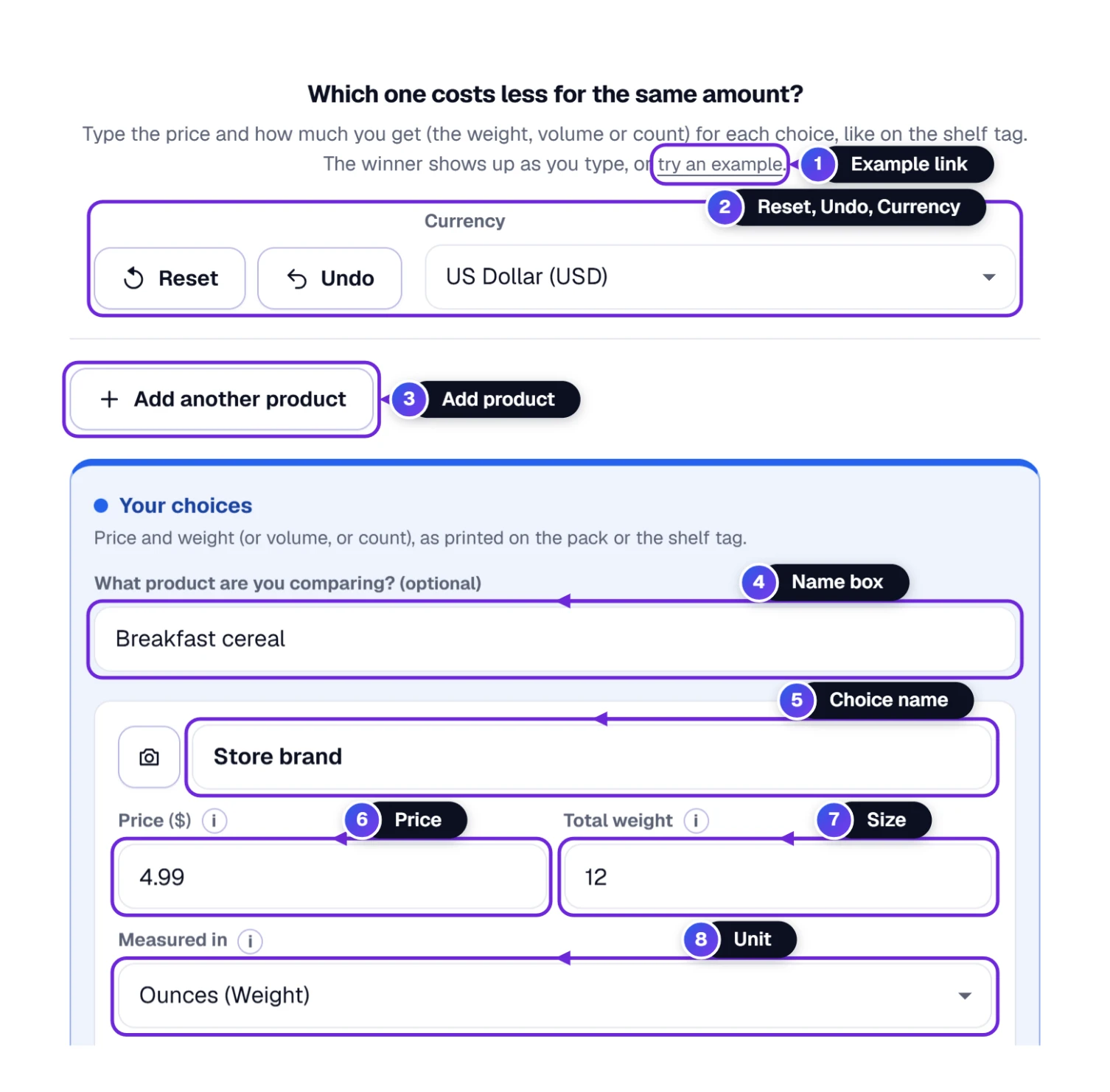
- 1 try an example fills in washing powders, soft drinks and paper towels, so you can watch the tool work before you type anything of your own.
- 2 Reset empties everything you typed. Undo brings it all back if you pressed Reset by mistake. The Currency box beside them starts on Automatic, which follows your time zone (US Dollar in the US). Pick any of about 160 currencies instead, or No sign. If your device can’t draw a currency’s sign, the tool shows its three-letter code.
- 3 Add another product starts a second comparison, such as cooking oil after cereal. Every product gets its own tab.
- 4 What product are you comparing? is the name of the product you are checking, like Breakfast cereal. You can leave it empty.
- 5 to 8 are the boxes for one choice: its name, the price on the tag, how much you get, and what that amount is counted in.
- Click the name box 4 and type Breakfast cereal. It’s only a label. If you skip it, the list calls the comparison “Product 1”.
- In the first card, type a name for the choice 5, like Store brand. A name helps you tell the cards apart later.
- Type the price 6 the way it’s printed on the tag: 4.99. You don’t need a dollar sign.
- Type how much you get in Total weight 7, which is 12 here. Then open Measured in 8 and pick what that 12 counts. For cereal it’s Ounces (Weight).
- Fill the second card the same way: Big box, 6.49, 18, ounces.
Nothing to press. The answer appears as soon as both cards are full. Ray’s result: the store brand costs $0.416 per ounce and the big box costs $0.361 per ounce. The big box wins, and it is 13% cheaper per ounce. Next to 18 ounces of store brand, the big box saves him $1.00.
The Measured in list is longer than you might expect. It has weight (pounds, ounces, kilograms, grams, milligrams), liquid volume (fluid ounces, milliliters, liters, cups, pints, quarts, gallons, teaspoons, tablespoons, plus UK versions of fluid ounces, pints, quarts and gallons), counts (items, dozens, pairs, loads, servings, sheets, tablets, rolls), length and area. Pick the one printed on the package. If two choices use different units of the same kind, the tool does the converting. We typed 2 lb for $5 in one card and 40 oz for $4 in the other, and it priced both per pound: $2.50 against $1.60, with the 40 oz bag the winner.
Don’t see a unit like “box”? Use Items (Each). If a box holds 40 tea bags, type 40 and pick items.
Reading the Winner Box, Line by Line
The Your winner box sits under your choices. Here is Ray’s cereal again.
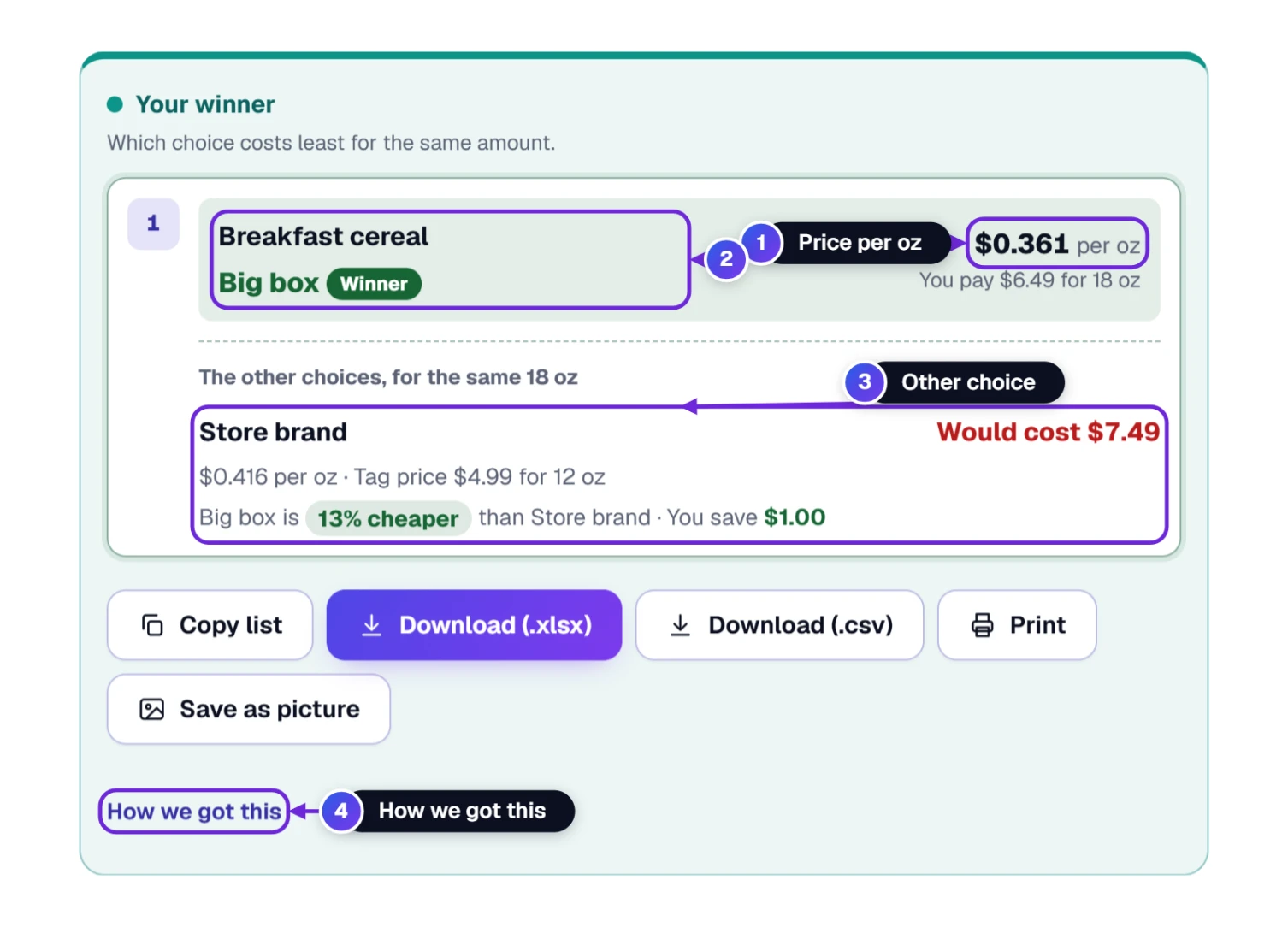
- 1 The price per ounce is the large number on the right, and what you pay sits under it: You pay $6.49 for 18 oz.
- 2 The left side names the comparison, then the winning choice with a green Winner tag.
- 3 The other choices, for the same 18 oz is the trick that makes the comparison fair. Each loser is priced for the same amount as the winner. The store brand would cost $7.49 for 18 ounces, shown in red as Would cost $7.49, with its own price per ounce and tag price, and a sentence saying how much cheaper the winner is and how much you save.
- 4 How we got this opens the arithmetic for every choice, step by step, so you can check it with a pencil.
With more than two choices, the others are listed from cheapest to dearest. The first one is tagged Next best and the last is tagged Most expensive. The example list shows both tags.
The winner is the choice that costs least per unit, not the one that costs least on the shelf. Read the green tag, not the price tag.
Typing Is Slow? Paste the Shelf Tag Instead
Shelf tags are full of numbers. If the tag’s words are already on a screen, such as a store’s website, an email or a list you keep, you can paste them in and let the tool pick the numbers out.
- Copy the tag text, for example $4.99 for 12 oz.
- Click the Price box. The name box and the Total weight box accept a paste too.
- Paste. On Windows press Ctrl and V together. On a Mac press Command and V together.
- The price 1, the size 2 and the unit 3 appear on their own. A short answer 4 shows right below the card.
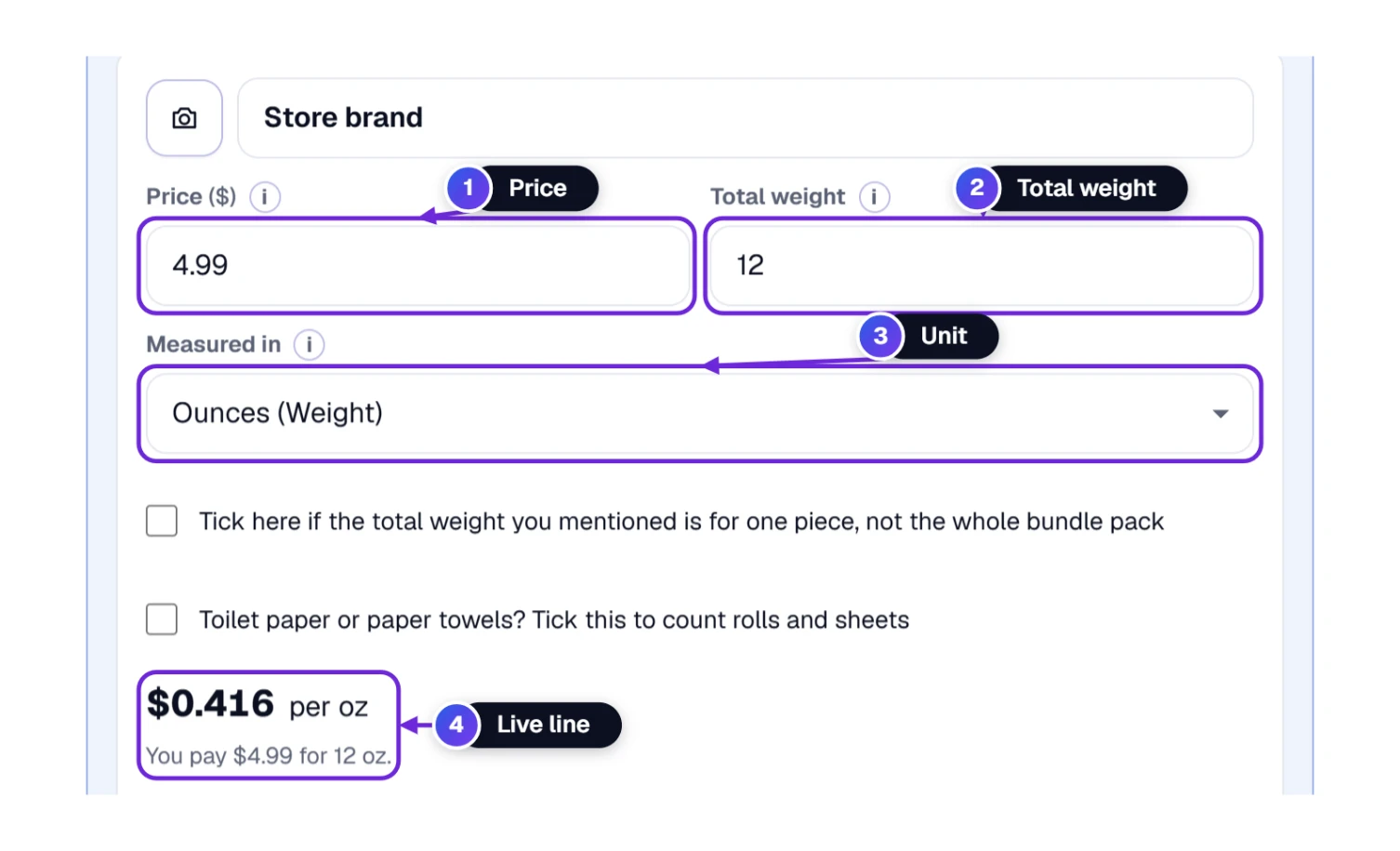
Real tags are messier. Take 2 for $5 16 oz. We pasted it into the second choice and the tool did the thinking. The price 1 became 5. The weight of one piece 2 became 16. The pack tick 3 got ticked, the number of pieces 4 became 2, and the line 5 said 2 × 16 oz = 32 oz.
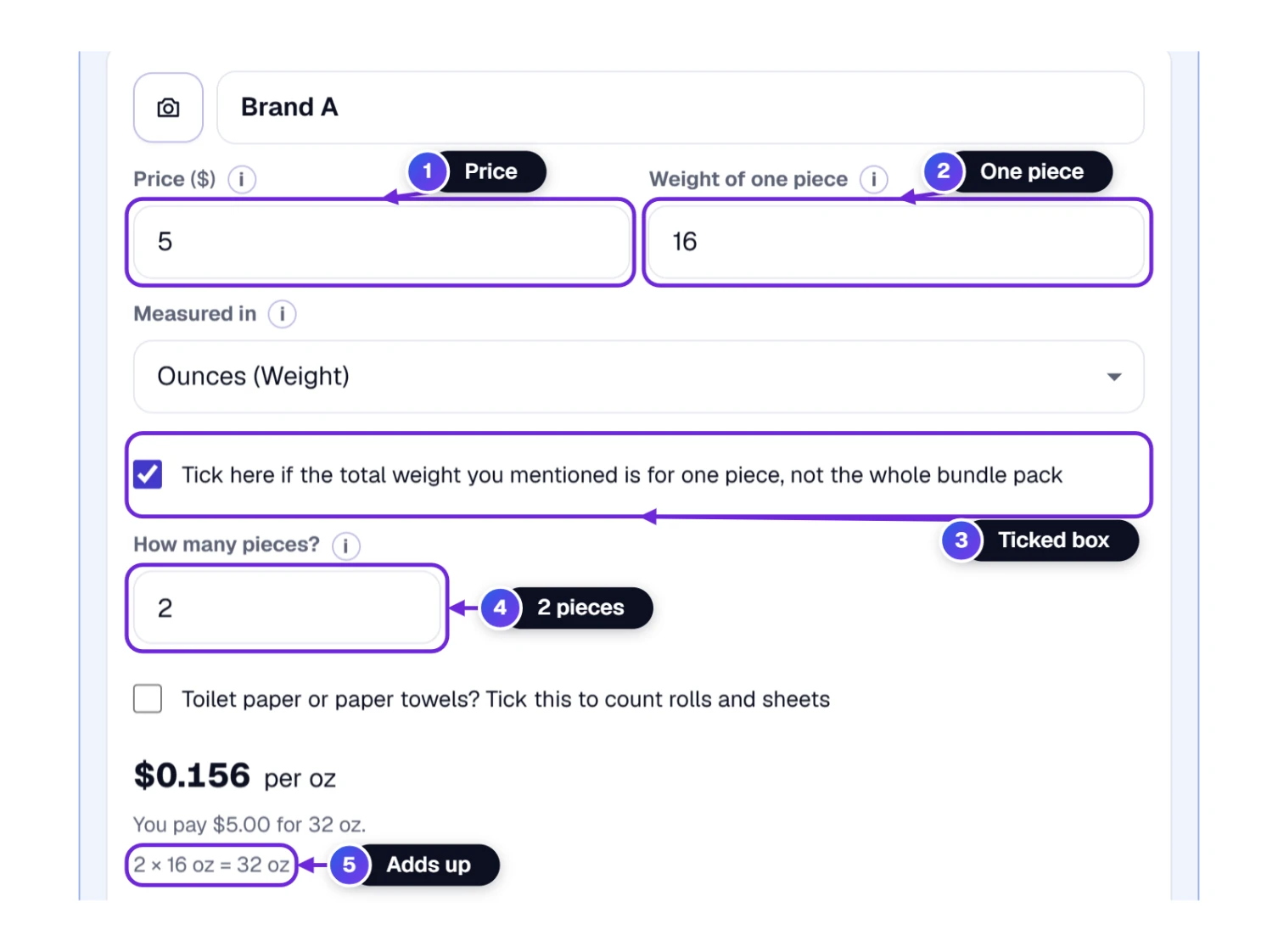
That two-jar deal came out at $0.156 per ounce. The regular jar, $4.99 for 12 ounces, came out at $0.416 per ounce, so the two-jar deal was 62% cheaper per ounce. For 32 ounces the regular jar would cost $13.31, against $5.00.
If you type the whole tag by hand: when we typed $4.99 for 12 oz into the Price box, a red line flashed for a moment while we typed. After about a second’s pause the tool read the whole tag, just as it does with a paste, and filled in the price, the size and the unit. If you’d rather not wait, put only the price in this box and the size in the next one.
Aisle 2, Soda: When Twelve Cans Are One Pack
Soda comes in packs, and the tag says something like 12 × 12 fl oz. That means twelve cans, and each can holds 12 fluid ounces. Ray wants to know if the 12-pack beats a 2-liter bottle.
- In the first card, type 12-pack cans as the name and 6.99 as the price.
- In the size box, type the size of one can, which is 12, and pick Fluid ounces (Liquid) as the unit.
- Tick the box that begins Tick here if the total volume you mentioned is for one piece 1. A new box called How many pieces? 2 opens.
- Type 12 there. The line under the card 3 now reads 12 × 12 fl oz = 144 fl oz.
- In the second card, type 2-liter bottle, 1.89, 2, and pick Liters (L).
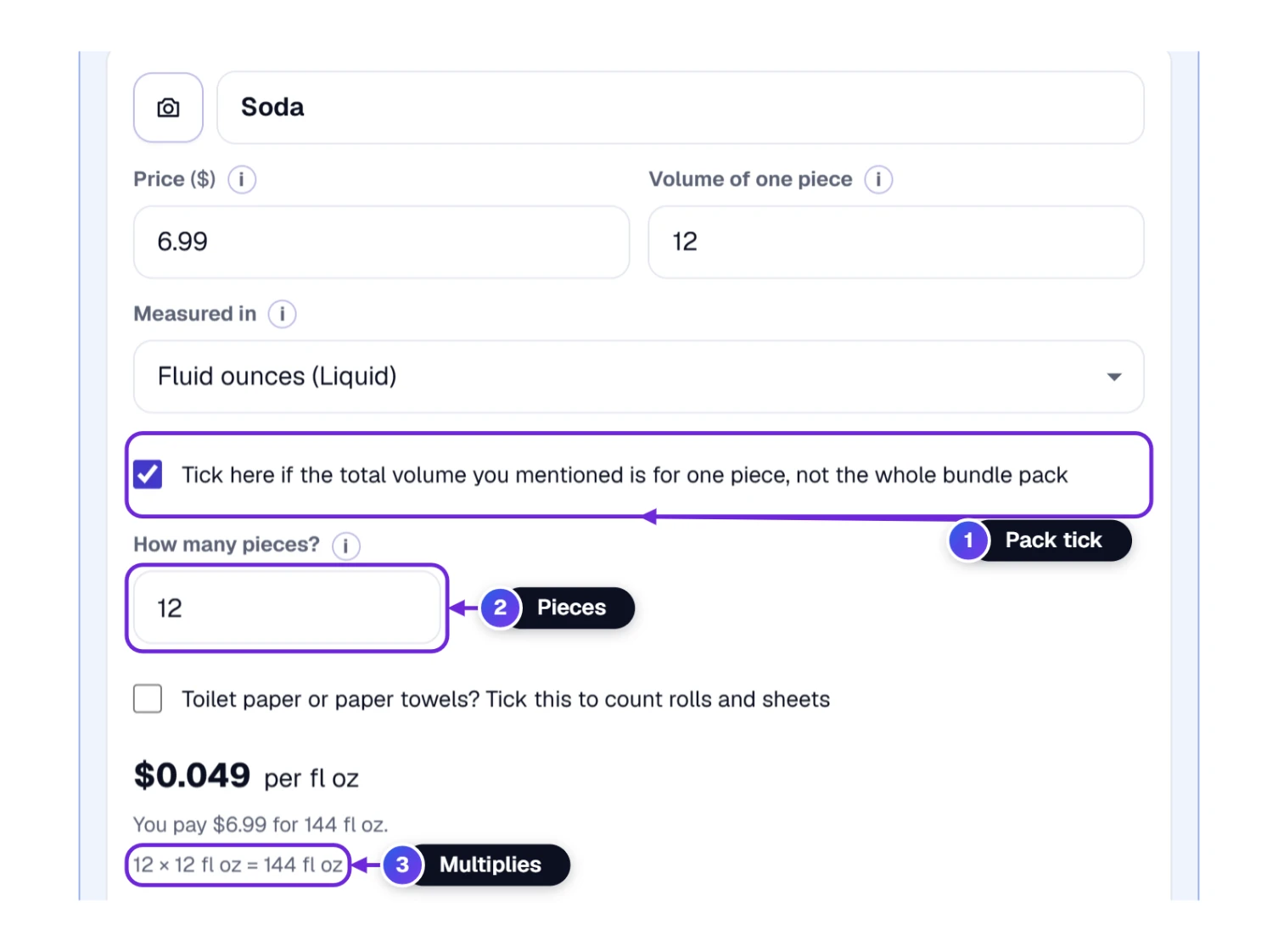
The cans cost $6.21 per gallon. The bottle costs $3.58 per gallon, so the bottle wins by 42%. For the same 2 liters, the cans would cost $3.28 against $1.89, which saves $1.39. Look at what happened here: one card was measured in fluid ounces and the other in liters. The tool converted both with exact values, so Ray didn’t have to.
The tick has one rule. Tick it when the size you typed belongs to one piece. Leave it empty when the size is for the whole pack, like a 24 oz bag of rice.
Rice Next to Juice? Why Ounces and Fluid Ounces Are Not Friends
Here is a trap that catches many shoppers. An ounce measures weight, how heavy something is. A fluid ounce measures room, how much space a liquid takes up. A bag of rice is counted in ounces or pounds. A bottle of juice is counted in fluid ounces. They sound alike, but they measure different things, so they can’t be compared with each other.
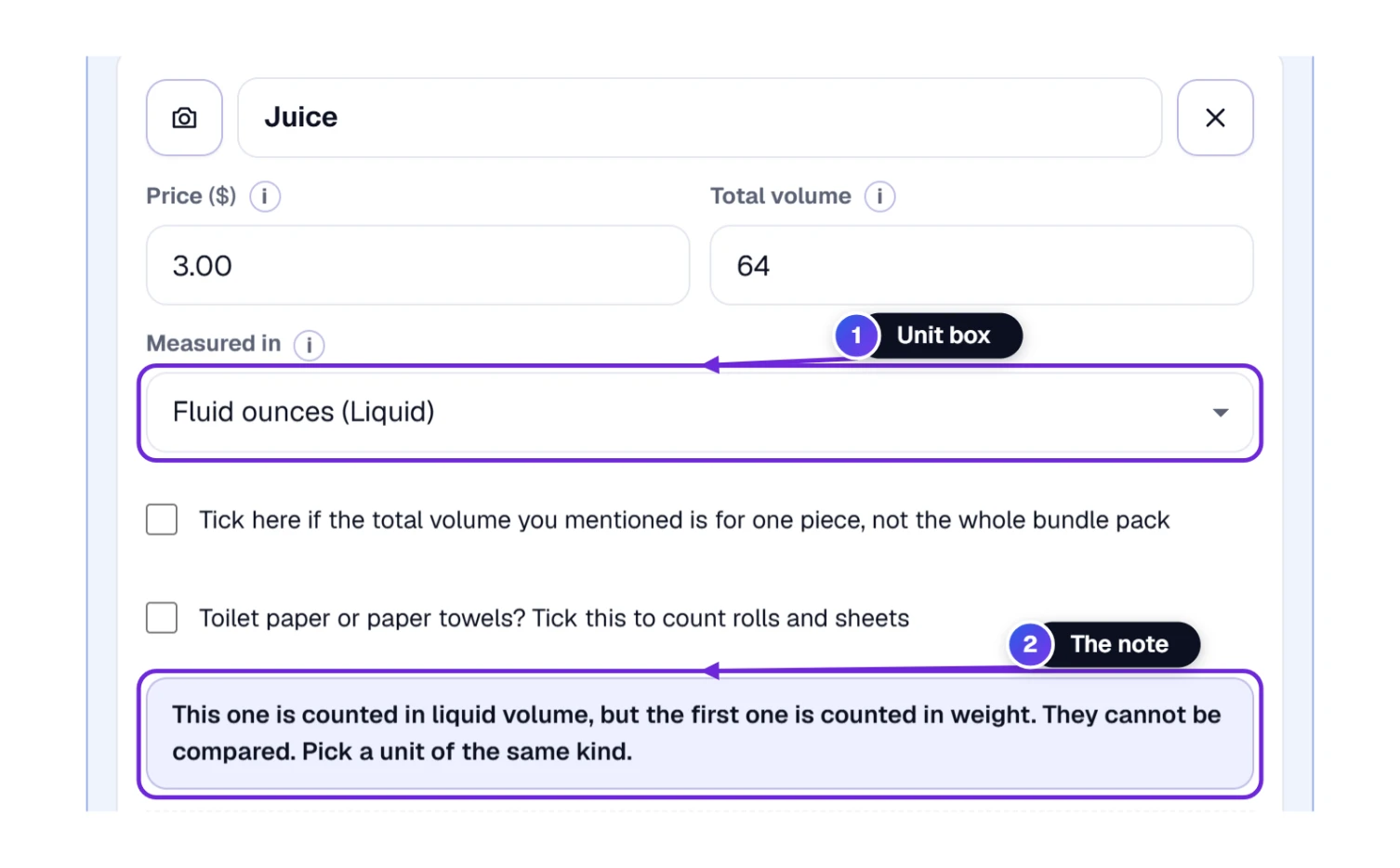
We tried it. Rice at $5 for 2 lb went in the first card, and juice at $3 for 64 fl oz went in the second, with its unit box 1 set to fluid ounces. The tool didn’t guess. The note 2 under the juice card said This one is counted in liquid volume, but the first one is counted in weight. They cannot be compared. Pick a unit of the same kind. The juice stayed out of the ranking, and the rice kept its own price of $2.50 per lb.
The tool keeps five kinds apart: weight, liquid volume, count, length and area. If your two packages really are different kinds, look for a unit they share. A box of tea bags and a tin of loose tea can both be counted in servings, if the labels say how many each one makes.
Aisle 3, the Deal Shelf: Buy 2 Get 1, Extra Free and Coupons
Tags love offers. An offer changes two things: what you pay and what you get. The Special offer? fold under each choice handles both, so you type the offer the way it’s printed and the tool does the rest.
- Open Special offer? 1. It says Now: no deal until you pick one.
- In Which offer is on the tag? 2 choose one of five: Buy 2, get 1 free; Buy 1, get 1 half price; Extra free (+20%, +500 g); Percent off (20% off); or Money off (like a coupon).
- Type the numbers 3. For “buy 2, get 1 free” you type 2 in You buy and 1 in You get.
- Read the line 4. It shows what you pay, what you get, and how much off the regular price the deal really is.
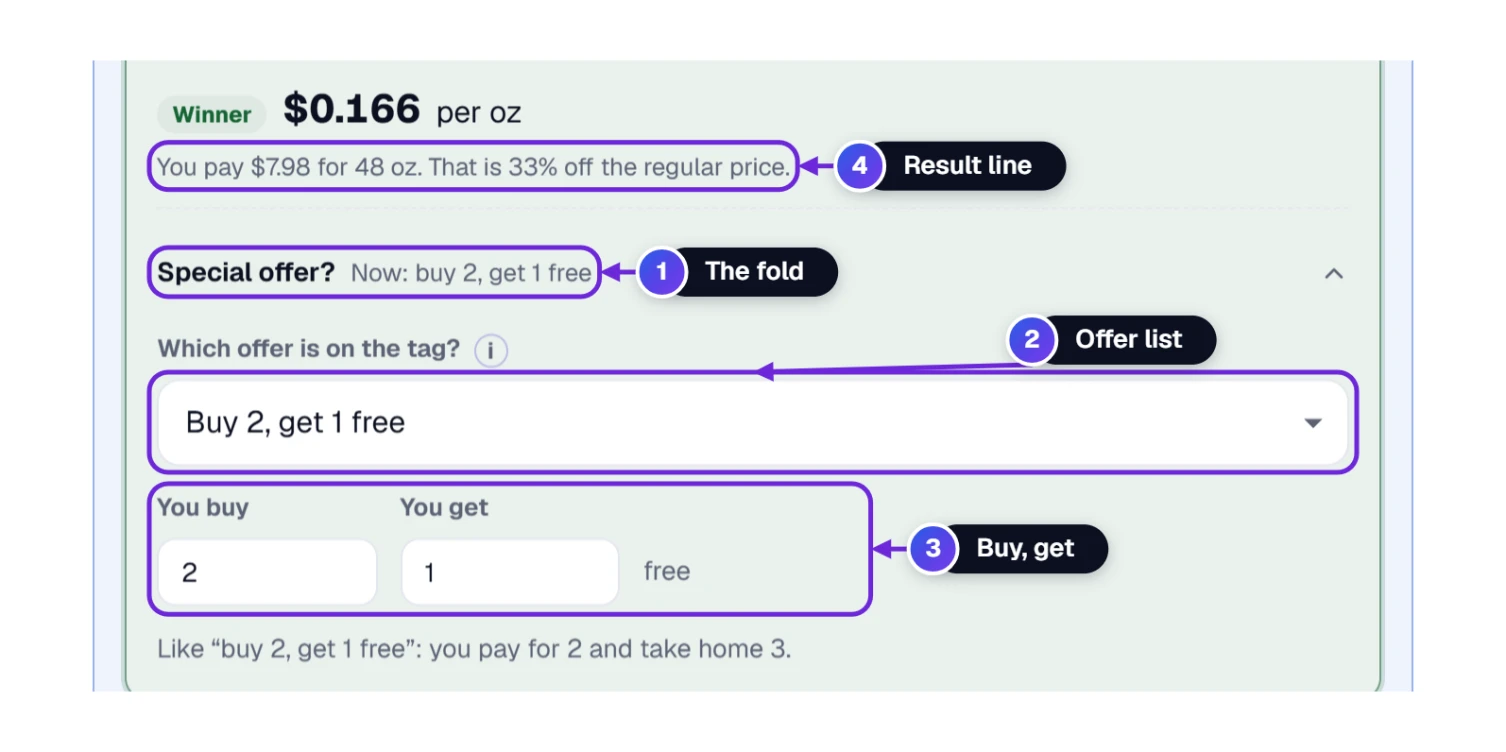
Ray’s test uses two peanut butters, 16 ounces each. Brand A is $3.49. Brand B is $3.99. With no deal, A costs $0.218 per ounce and B costs $0.249, so A wins. Then Brand B goes on offer. Here is what each offer did to B in the tool.
| Offer on Brand B’s tag | You pay | You get | Price per ounce | Against Brand A ($0.218) |
|---|---|---|---|---|
| No offer | $3.99 | 16 oz | $0.249 | A is cheaper |
| Buy 2, get 1 free | $7.98 | 48 oz | $0.166 | B is 24% cheaper |
| Buy 1, get 1 half price | $5.99 | 32 oz | $0.187 | B is 14% cheaper |
| Extra free, +20% | $3.99 | 19.2 oz | $0.208 | B is 4.7% cheaper |
| 25% off | $2.99 | 16 oz | $0.187 | B is 14% cheaper |
| Money off, a $1 coupon | $2.99 | 16 oz | $0.187 | B is 14% cheaper |
Two things stand out. The “+20% free” offer was the weakest of the five, and it only just beat Brand A. And a $1 coupon on a $3.99 jar came out almost exactly like 25% off, $2.99 either way, because $1 is about a quarter of $3.99. The Money off choice subtracts the coupon from the total price, which is the order University of Illinois Extension recommends when you have a coupon.
Aisle 4, Paper Goods: Rolls, Sheets and Square Feet
Toilet paper and paper towels are the hardest things to compare. One brand sells 6 big rolls, another sells 8 small ones, and every sheet has its own size. Counting rolls isn’t fair, and counting sheets isn’t fair either. The fair measure is the amount of paper, in square feet, and a helper in the tool works that out.
- In the choice card, tick Toilet paper or paper towels? Tick this to count rolls and sheets 1.
- Type the Rolls in the pack and the Sheets in each roll 2. Both numbers are printed on the package.
- Under Size of one sheet 3 type the width and the length, and choose inches or centimeters.
- Read the line 4. It multiplies everything for you: 6 rolls × 150 sheets × 11 × 10.4 in = 715 sq ft.
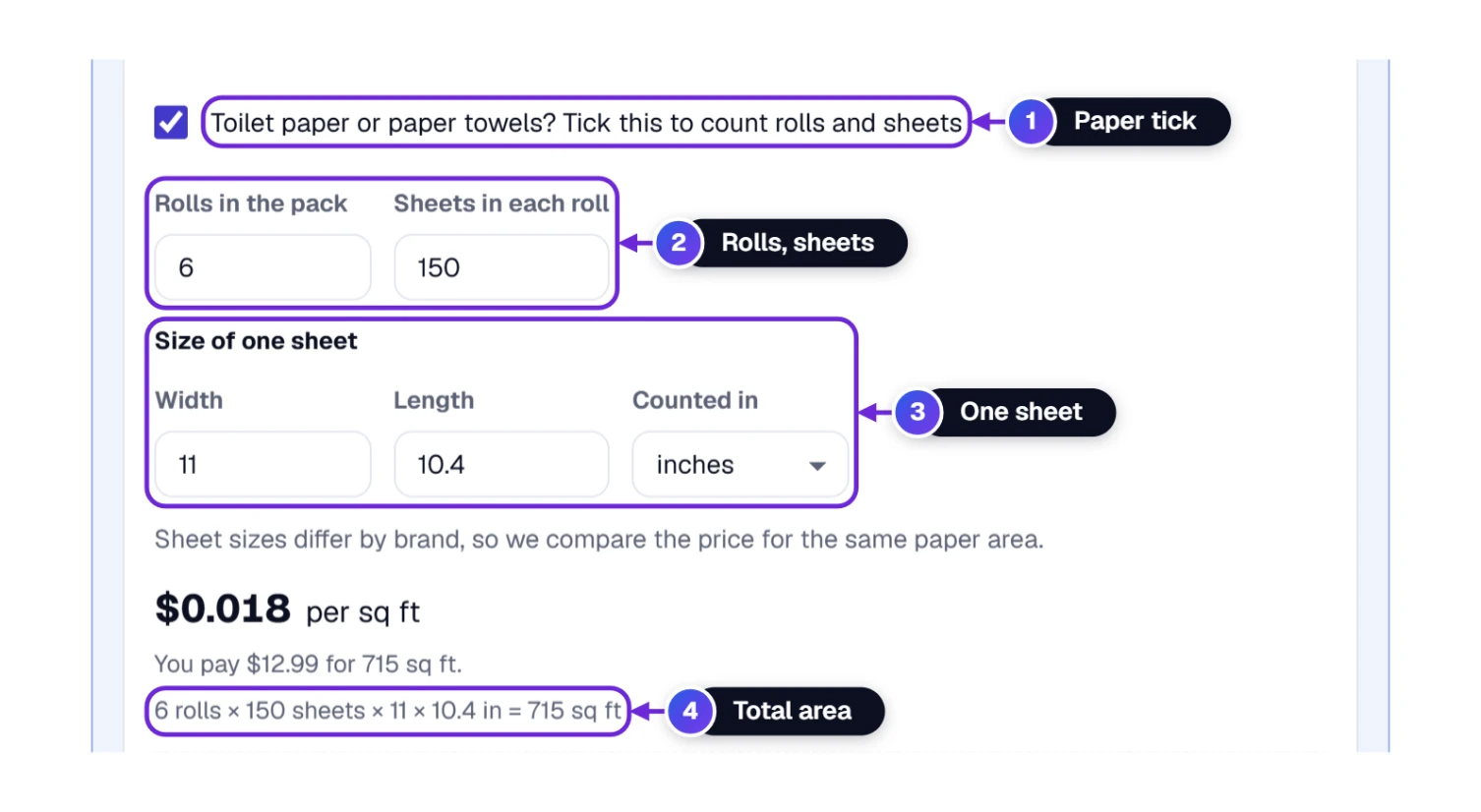
Ray’s two brands: Brand X is $12.99 for 6 rolls of 150 sheets. Brand Y is $9.49 for 8 rolls of 100 sheets. Both sheets measure 11 by 10.4 inches. Brand X holds 715 square feet and costs $0.018 per square foot. Brand Y holds 636 square feet and costs $0.015 per square foot. Brand Y wins by 18%. For the same 636 square feet, Brand X would cost $11.55, so Brand Y saves $2.06.
Notice that the pricier brand also had more paper in the pack. A bigger pack isn’t automatically a better deal; only the price for each square foot tells you that. A small note under the helper says it too: sheet sizes differ by brand, so the tool compares the price for the same paper area.
Buying laundry detergent? Count loads instead. Pick Loads (Washes) as the unit and type the number of loads printed on the box.
Aisle 5, the Pantry: Will You Use the Big Bag Before It Runs Out?
The lowest price per pound can still be the wrong buy. A 10-pound bag of rice sounds like a bargain, but if your household eats 3 pounds a month, you’ll be eating from that bag for months. University of Minnesota Extension and University of Illinois Extension say the same thing on their unit pricing pages: a bigger package usually costs less per unit, but it saves money only if you use it up before it spoils. The How long will it last? fold does that check for you.
- Open How long will it last?. It’s optional, so it starts folded.
- In How often do you buy it? 1 pick a rhythm: every week, every 2 weeks, every month, every 2 months, every 3 months, every 6 months, once a year, or another rhythm that you type yourself.
- Type how much you need 2 and choose the unit 3. The label follows your pick, like I need monthly.
- Read the sentence 4 and the table 5 under it.
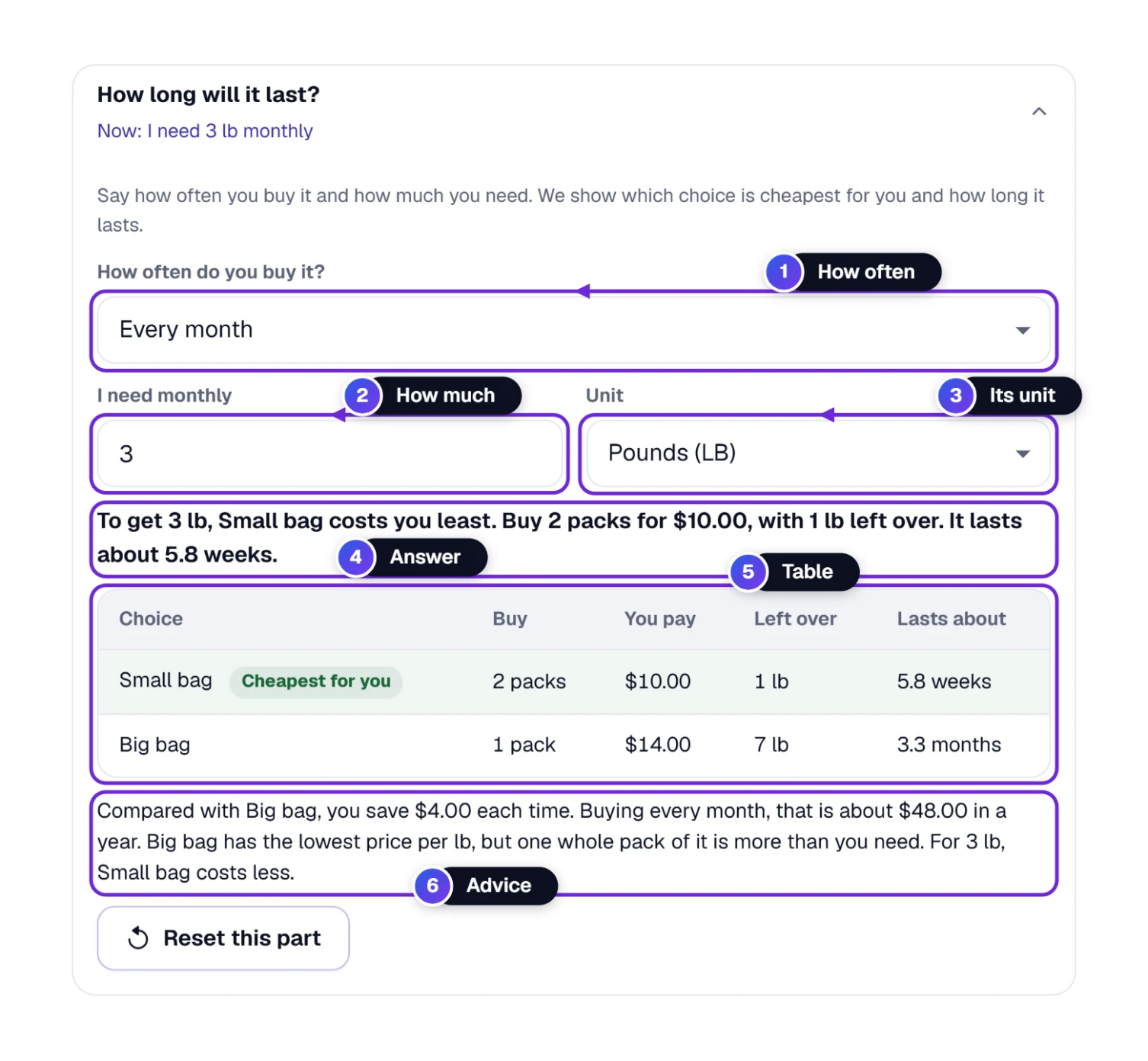
Ray’s rice: the small bag is $5 for 2 pounds, which is $2.50 per pound. The big bag is $14 for 10 pounds, which is $1.40 per pound. He needs 3 pounds a month. The tool answered: To get 3 lb, Small bag costs you least. Buy 2 packs for $10.00, with 1 lb left over. It lasts about 5.8 weeks. The big bag costs $14.00, leaves 7 pounds over and lasts about 3.3 months.
Then comes the closing advice 6: Big bag has the lowest price per lb, but one whole pack of it is more than you need. Buying small bags saves $4.00 each time, which is about $48.00 in a year of monthly shopping. The tool counts whole packs only, because a store won’t sell you half a bag. That is why the small bag shows 2 packs. What it can’t know is how well rice keeps in your cupboard, and that part is yours to judge.
Want to try another rhythm? Reset this part is the last button in the fold. It empties how often you buy and how much you need, and your prices stay where they are.
Too Close to Call: When the Answer Is About the Same
Sometimes two choices come out nearly even. Ray finds two pasta sauces. Brand A is $2.00 for 10 ounces and Brand B is $4.01 for 20 ounces. Both come to about 20 cents an ounce.
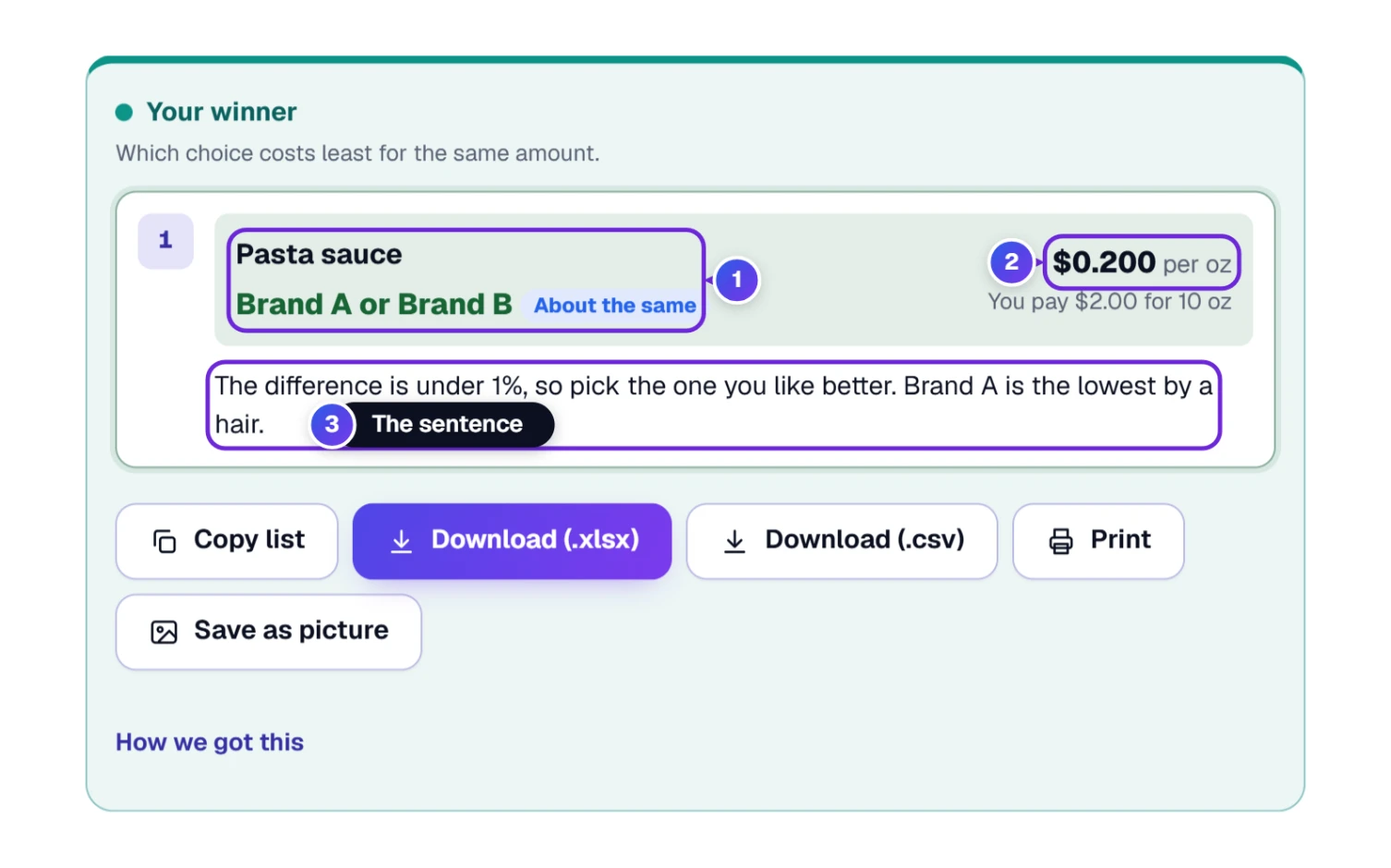
The tool didn’t crown a winner. It showed Brand A or Brand B with an About the same tag 1, one price per ounce 2, and this sentence 3: The difference is under 1%, so pick the one you like better. Brand A is the lowest by a hair. The rule is simple. When the two best choices are within 1% of each other, the tool says so and doesn’t force a winner. A gap that small is worth less than your time, so pick the brand you prefer or the size that fits your fridge.
The Whole Cart: Several Products and One Savings Total
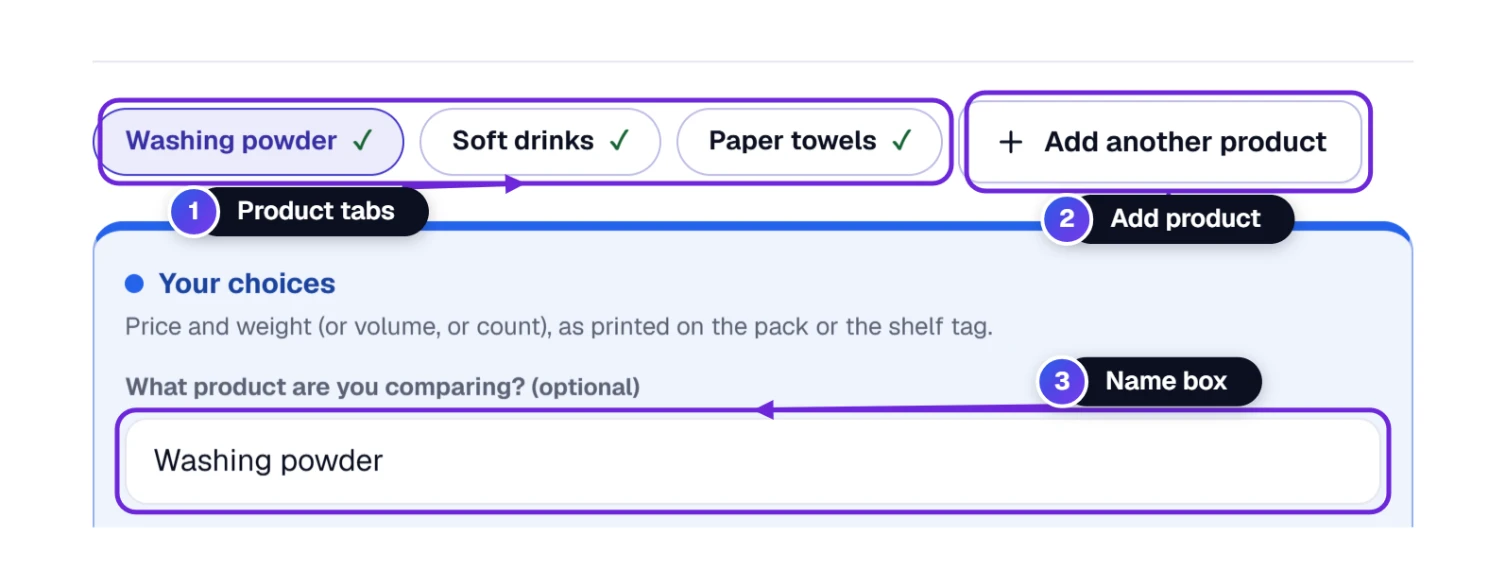
Ray isn’t buying only cereal. The product tabs 1 sit in a row, and Add another product 2 starts a new comparison in a new tab. Each tab has its own name box 3 and its own choices, and a check mark appears on a tab once it has an answer. You can keep up to 20 products with up to 10 choices in each. A Remove this product button takes one whole tab out, and the small × beside a choice’s name removes just that choice.
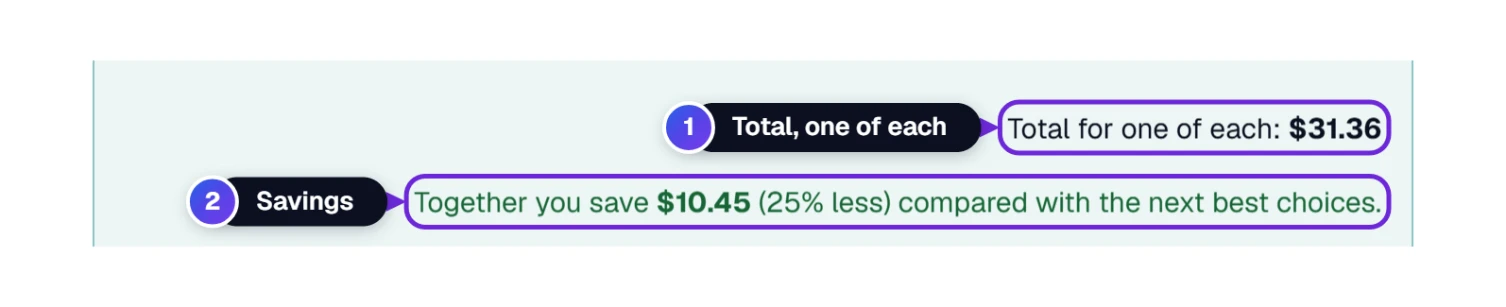
When two or more products have answers, the winner box ends with a total. In the example list (washing powder, soft drinks and paper towels) it said Total for one of each: $31.36 1, then Together you save $10.45 (25% less) compared with the next best choices. 2 The second line compares your winners with the runner-up in each product.
At the Checkout: Copy, Download, Print or Save a Picture
When Ray has his answer, he can take it with him. Five buttons sit under the winner box.
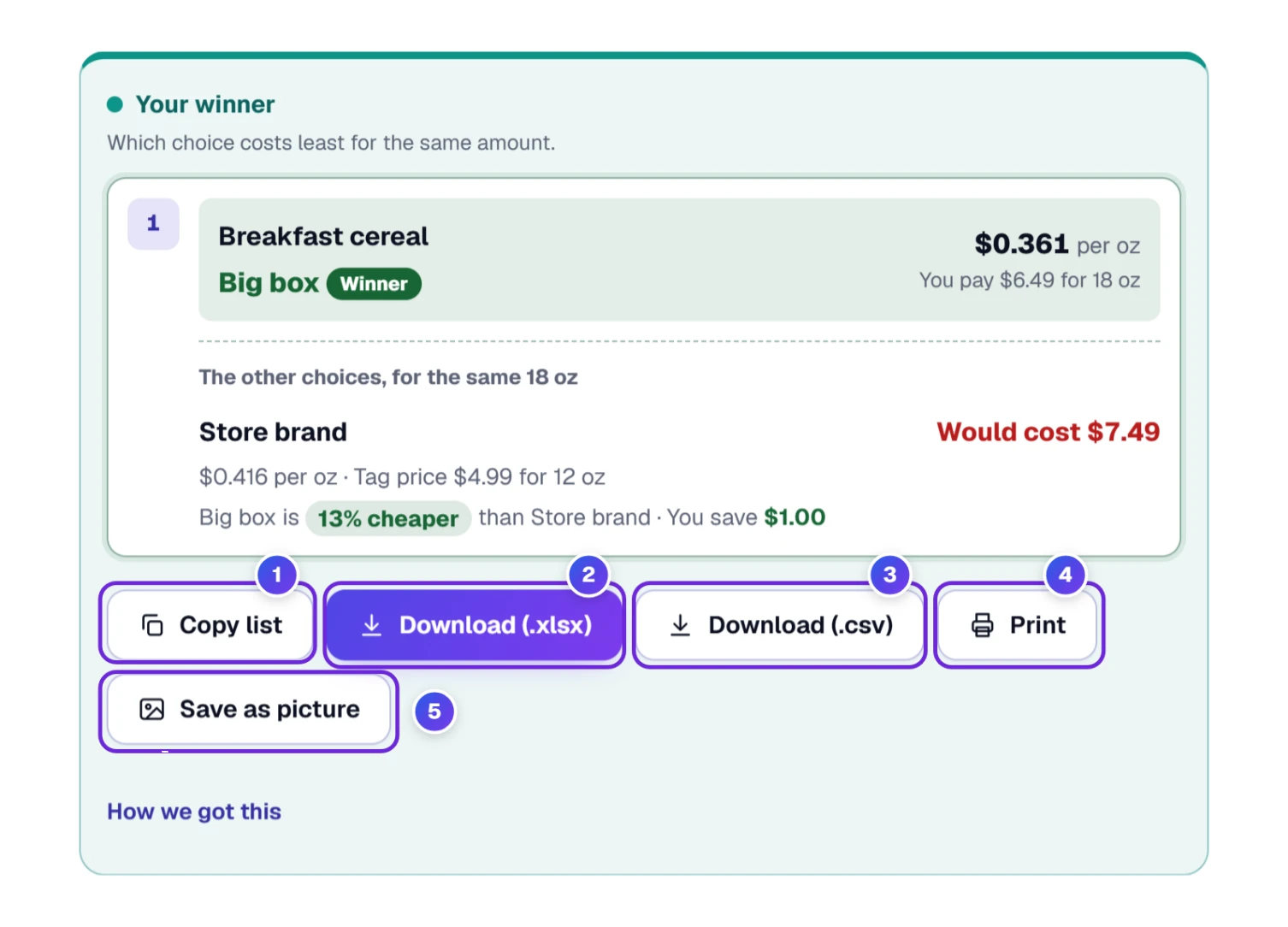
- 1 Copy list copies a short shopping text. It starts with Buy these today (cheapest per unit):, then gives one numbered line for each product with the winner, its price per unit and what you pay, and a sentence on how much you save. Paste it into a text message, a note on your phone or your grocery list.
- 2 Download (.xlsx) saves a spreadsheet called unit-price-comparison.xlsx.
- 3 Download (.csv) saves unit-price-comparison.csv, which opens in Excel and Google Sheets. Both files hold one row for every choice, with columns for the product, the choice, the price, the size, the unit, the packs, the deal, what you pay, what you get, the price per unit, the rank, how much more than the best it costs in percent, and whether it is the winner.
- 4 Print prints this list. For a file instead of paper, send it to “Save as PDF”.
- 5 Save as picture makes a picture of the list to keep or to send to someone.
Taxes and Rounding: The Settings Fold
Most people never need this part. Settings starts folded. Its summary line shows the current choices, like Now: Best, per lb · rounded like a store tag · price as shown. Open it when you want the answer to look different. The money sign isn’t in here: the Currency box sits at the top, next to Reset and Undo, so you can set it before you type a price.
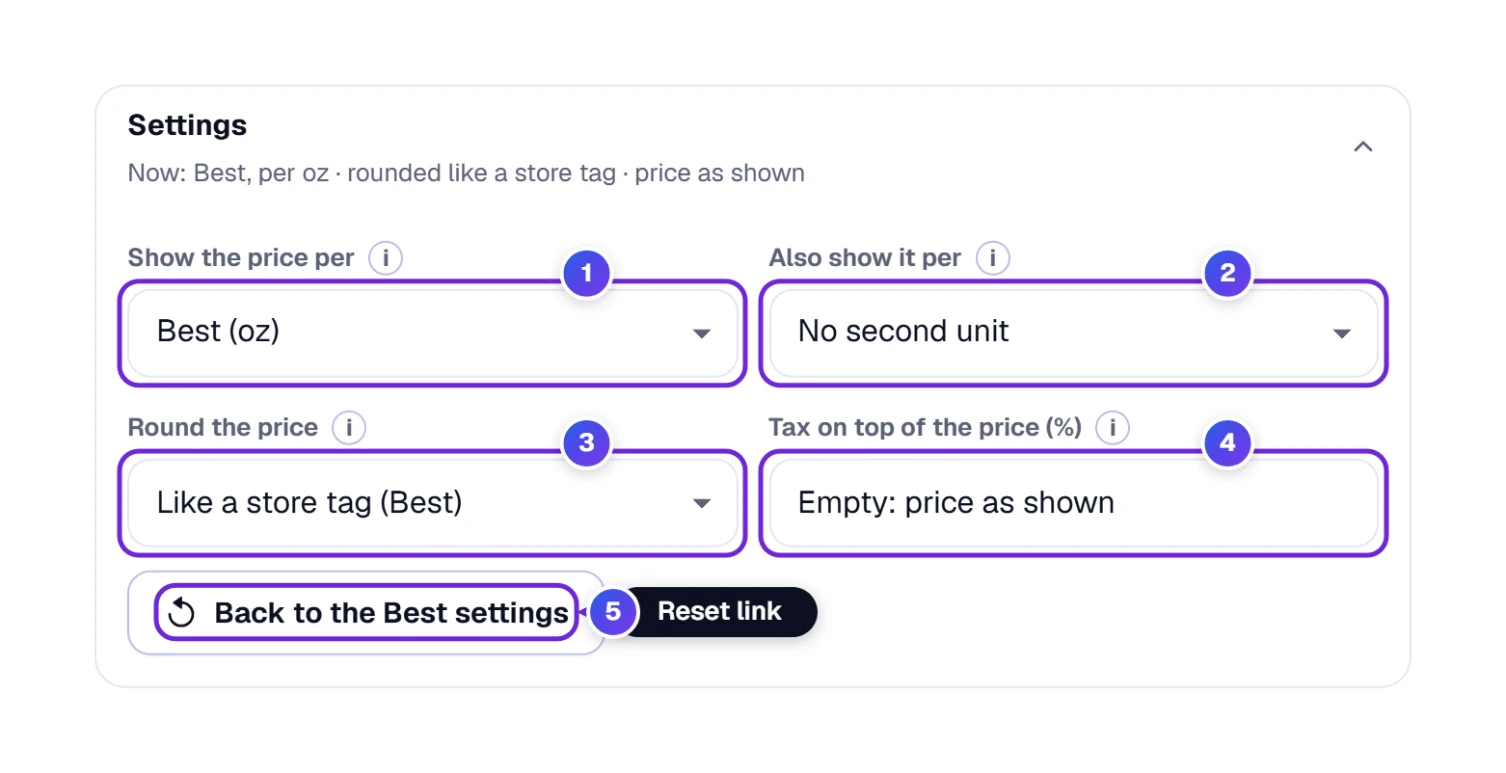
- 1 Show the price per picks the unit for the big number: Best (the tool chooses), ounces, pounds, grams, 100 grams or kilograms.
- 2 Also show it per adds a second unit beside the first.
- 3 Round the price offers Like a store tag (Best), 2, 3 or 4 decimals, or all the digits.
- 4 Tax on top of the price (%) adds sales tax to every choice. Leave it empty and the tool uses the prices as shown.
- 5 Back to the Best settings puts all of it back. The Currency box at the top goes back to Automatic too.
Ray tries 8% sales tax on the cereal. The store brand goes from $4.99 to $5.39 and the big box from $6.49 to $7.01. Open How we got this and you can see the sum for each: $5.39 ÷ 12 oz is $0.4491, shown as $0.45 at two decimals. Once you type a tax, every choice gets a box called Tax is added to this one, ticked, inside its Special offer? fold. Untick it for an item that carries no tax.
The “like a store tag” rounding follows the NIST rule for unit prices: a price of a dollar or more is shown to the nearest cent, and a price under a dollar is shown to a tenth of a cent (a price under a cent keeps two digits, like $0.0031). That’s why cereal reads $0.361 per ounce and a big bag of rice reads $1.40 per pound.
Two small catches from our run. At 2 decimals, our big bag of rice showed $0.09 per ounce where the Best setting showed $0.088, so a little detail got lost. And when we asked for a second unit of grams, the tool showed $0.0031 per g: right, but tiny numbers like that are hard to compare at a glance. 100 grams is the friendlier choice for a second unit.
Where Your Numbers Live: Drafts, Recent Comparisons and Photos
The tool keeps your boxes in this browser, so closing the tab doesn’t lose your work. We checked it: we filled in the cereal comparison, opened the page again with the same saved data, and the names, the prices and the comparison name were all back in their boxes.
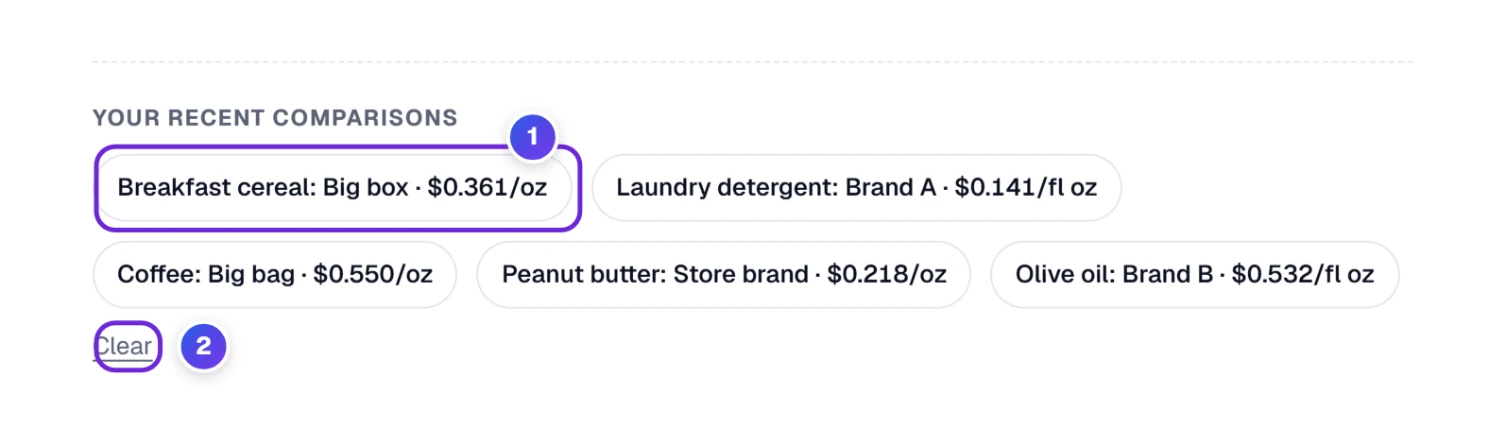
Your recent comparisons sits under the tool. Each small chip 1 holds a product, its winner and the price, like Soda: 2-liter bottle · $3.58/gallon. Tap a chip and the whole comparison comes back. The last five show, and Clear 2 empties them, which is worth pressing on a shared computer.
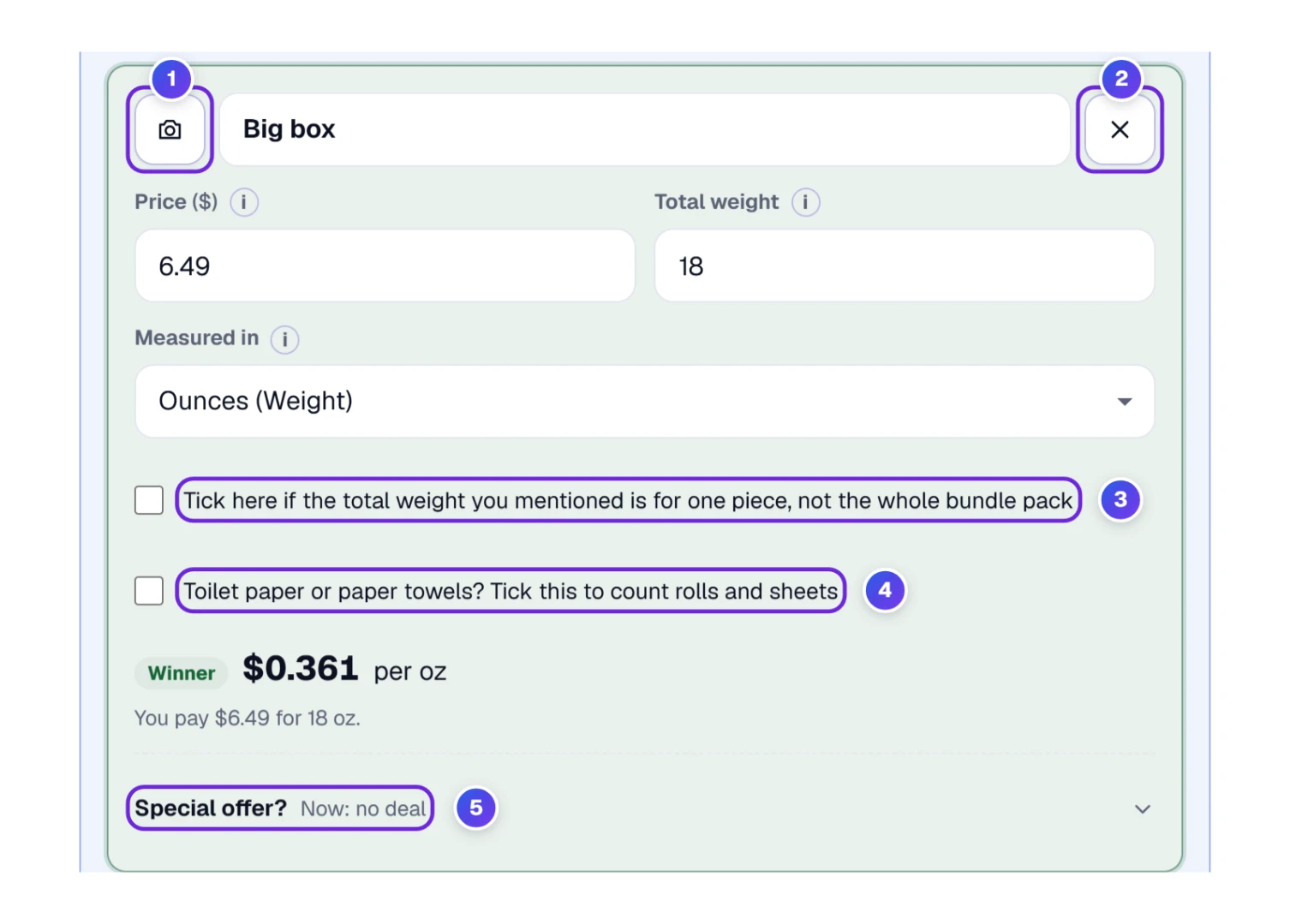
Look just under the unit box of any choice card. The small camera button 1 lets you take a photo of the item, so you remember which one it was, and the tool says the photo stays on this device. We didn’t try the camera in our test, because our test window blocks cameras. The × 2 beside a choice removes that choice. The two tick boxes 3 and 4 and the Special offer fold 5 are the ones you met in the soda, paper and deal aisles.
The arithmetic happens in your browser, and the tool makes no request to a server to work out an answer. One thing to know: the code behind On your phone is a web link that holds your choices, so anyone who scans it or receives the link can see what you typed.
Keep It, Send It or Scan It: The Row Under the Tool
Below the tool sits a row of six small parts. Going from left to right, this is what each part does.
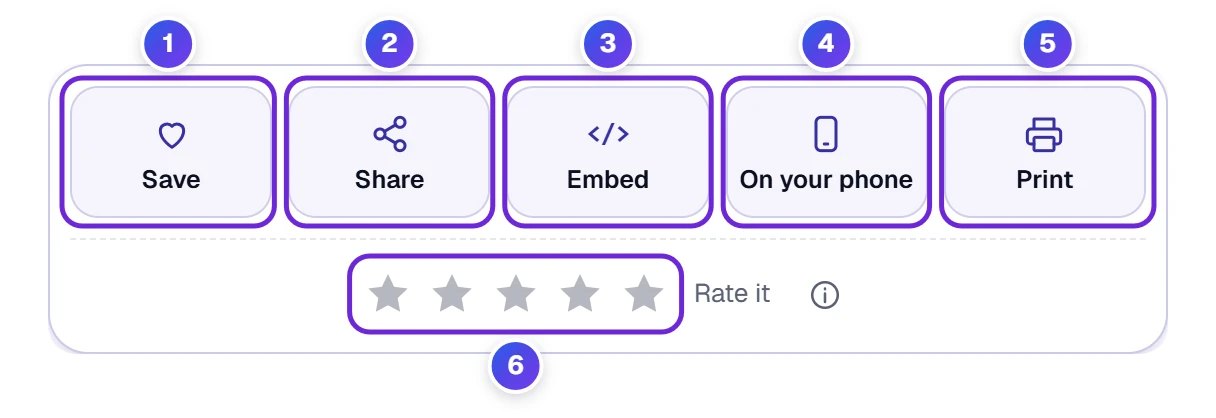
- 1 Save files this tool under My Tools, so you can reach it again from the home page or from the phone menu. Favorites are kept only in this browser.
- 2 Share pops open the little window pictured next.
- 3 Embed gives out a code snippet, so the tool can sit on a web page of your own.
- 4 On your phone draws a square barcode (a QR code). Scan the square with your camera and the tool appears on that screen, choices already typed in. We opened it and read the link inside: it contained Ray’s cereal.
- 5 Print prints the result. A PDF works here too.
- 6 A tap on a star rates the tool.
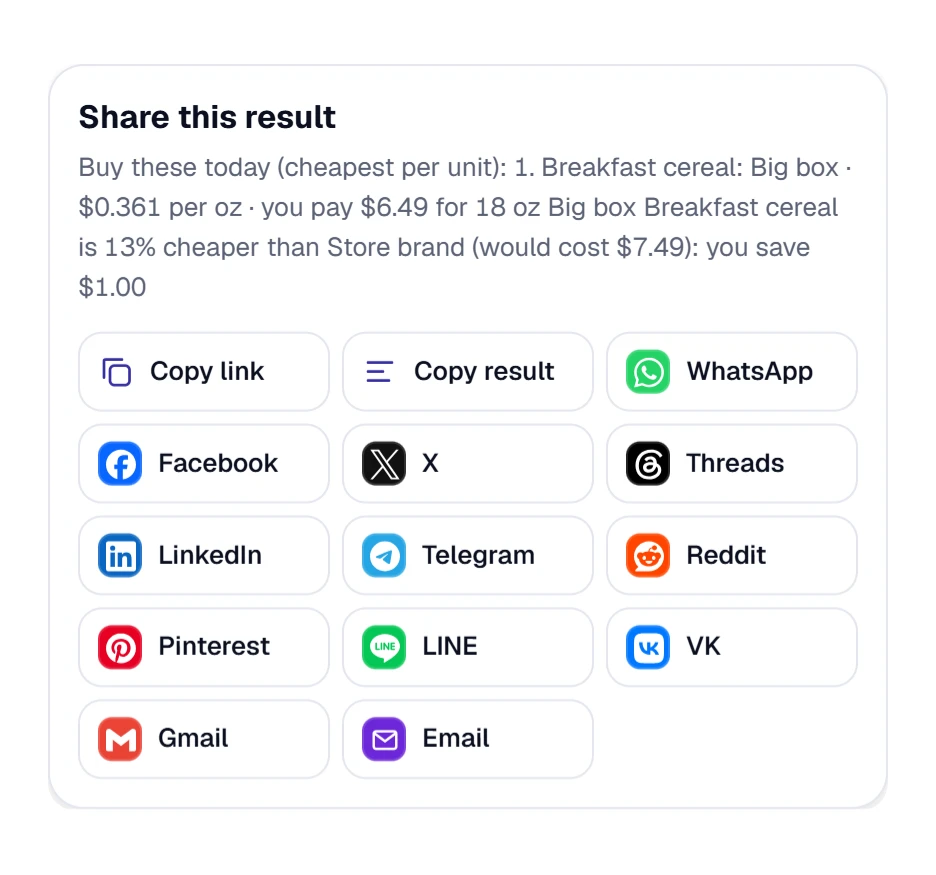
The window opens with two copy buttons, one for the link and one for the result. Below them come the apps: WhatsApp, Facebook, X, Threads, LinkedIn, Telegram, Reddit, LINE, Bluesky, VK, Tumblr and Email.
With choices on the screen, the line under the title shows the first words of your list, and Copy link carries every choice you typed, so whoever opens it sees the same comparison. In our picture the tool was still empty, so that line holds the page title.
Shortcut Keys for People Who Like the Keyboard
With the cursor out of the boxes, press ? and a list of shortcuts opens on screen.
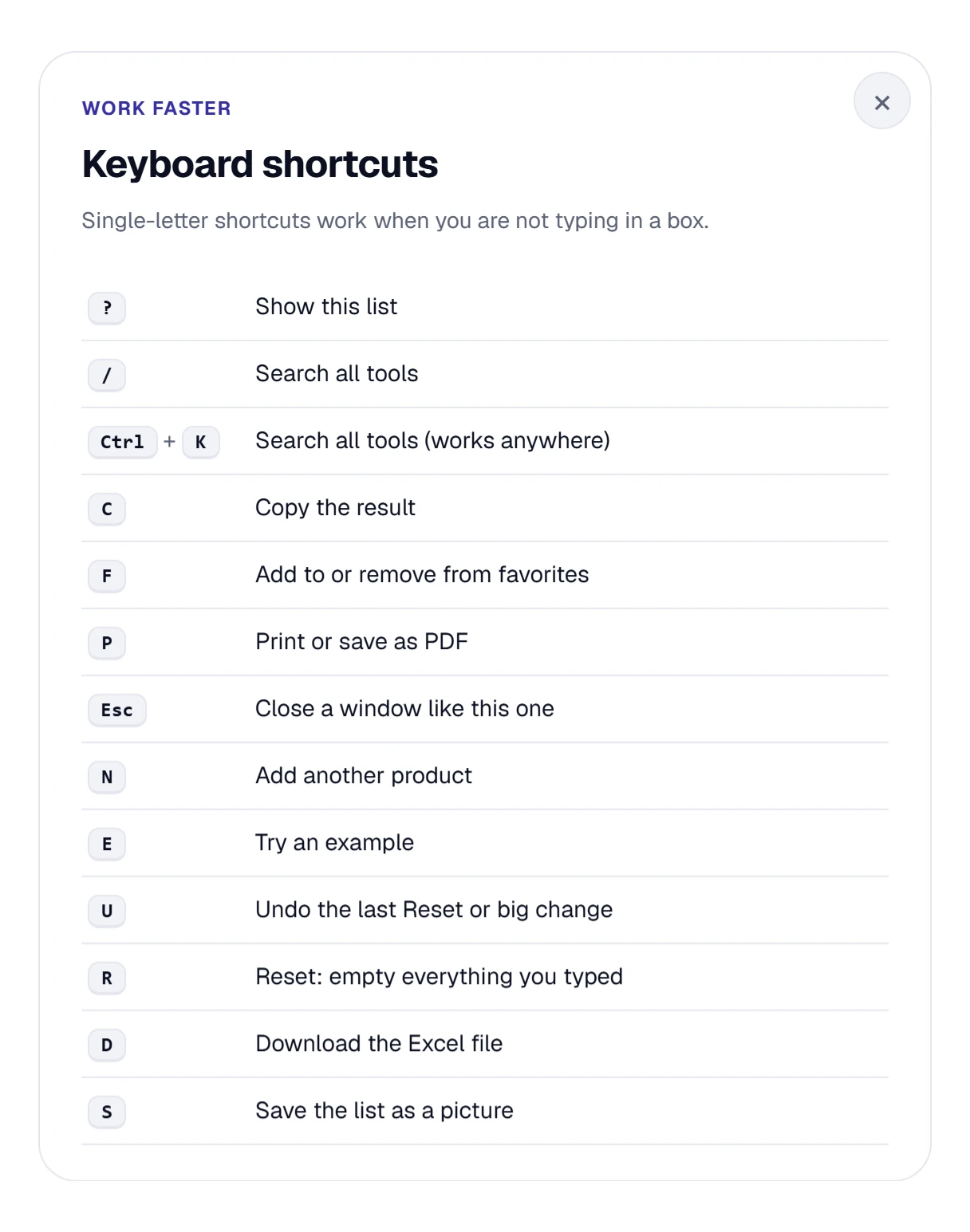
- The list says N adds a product, E loads the example, U undoes a Reset or other big change and R clears what you typed.
- D gets the Excel file and S makes the picture.
- C copies the result. F makes the tool a favorite. P starts printing.
- / or Ctrl + K opens search across the site, and Esc shuts any open window.
The letter keys wait until your cursor is out of the boxes. Typing a price won’t set one off.
Shopping with a Phone: What the Narrow Screen Does
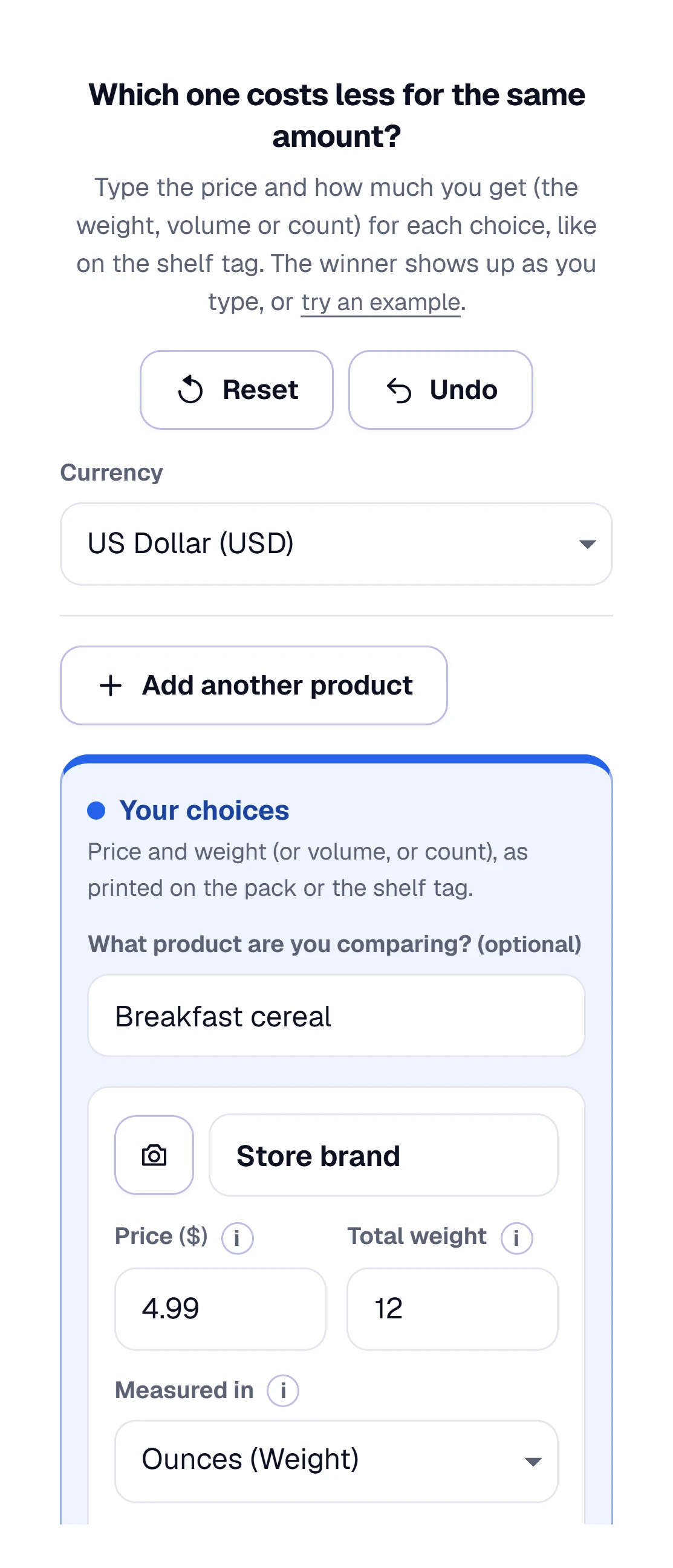
On a narrow phone screen the parts line up in one column, top to bottom, as they do on a computer. Reset and Undo sit side by side, the Currency box sits under them, the choice cards stack one under the other, and nothing scrolls sideways. We measured the page at 375 pixels wide, and it was exactly 375. The price and size boxes ask your phone for a number keypad, so you tap digits and don’t have to hunt for them.
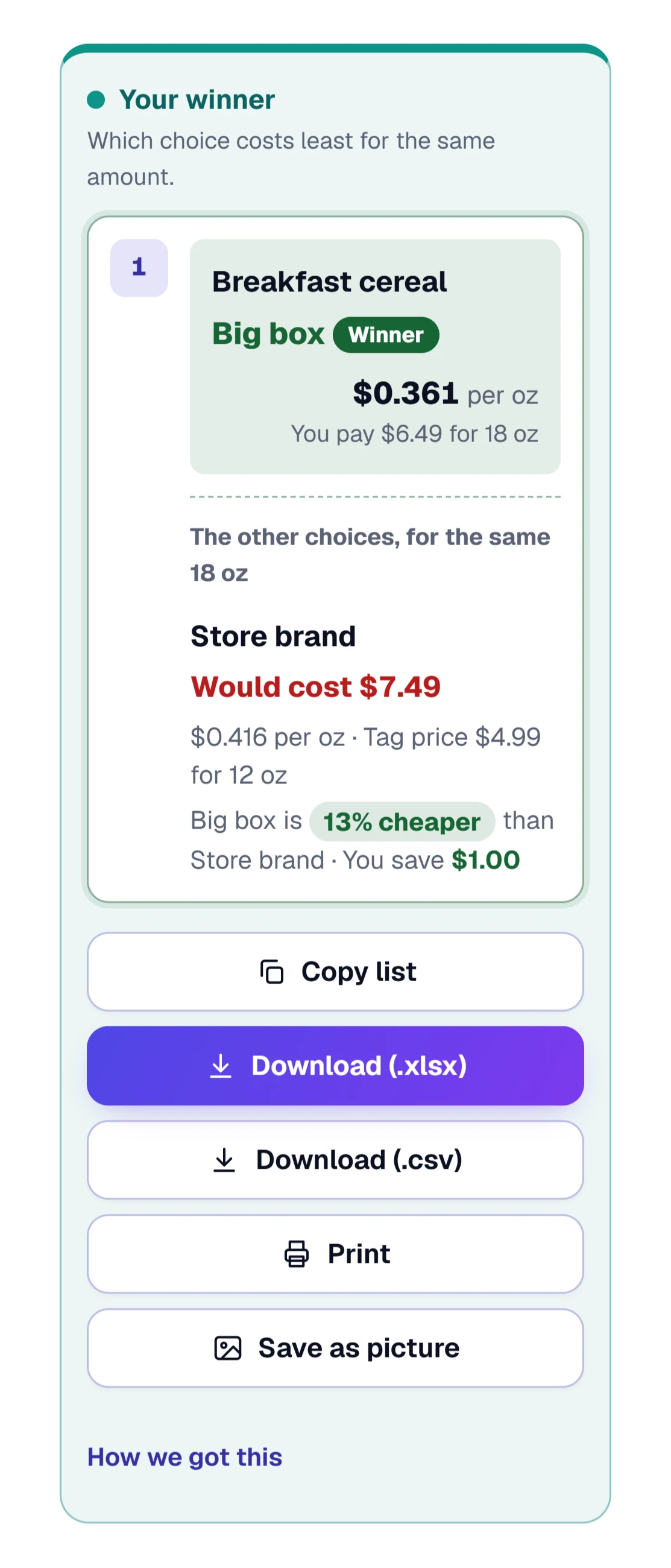
The winner box has the same parts as on a computer, only taller. If you’d rather start on a computer at home and finish in the store, use On your phone under the tool and scan the code.
Standing in the aisle with a cart? Type the price and size, and read the green tag. Everything else on this page can wait until you’re home.
When the Tool Says No: Red Lines and a Quiet Winner Box
Sooner or later you’ll type something the tool can’t read. Nothing breaks. Type letters into the price box 1 and a short red line 2 appears under it, while your other choices stay where they are. Fix the one box and the red line goes away.
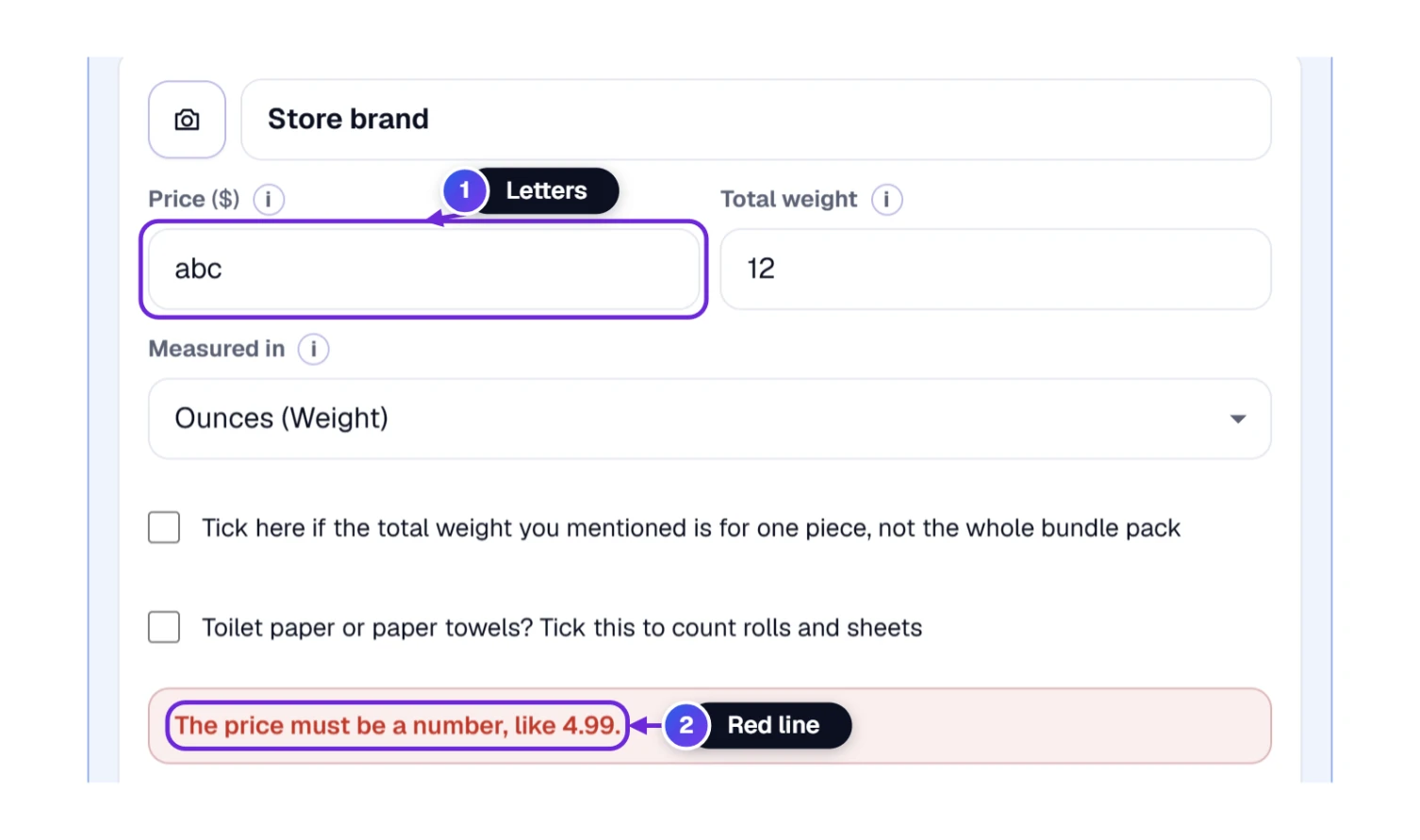
Four red lines are worth knowing. Here’s each one in plain words.
| What the red line says | What it usually means | What to do |
|---|---|---|
| “The price must be a number, like 4.99.” | The price box has letters or words in it. | Type digits only. A comma, as in 4,99, is read as 4.99, so that one is fine. |
| “A price cannot be less than zero.” | The price was typed as a negative number, for example with a minus sign. | Delete the minus sign. |
| “The total weight must be a number above zero, like 12.” | The size box is empty, zero or not a number. | Type the size printed on the package. A fraction such as 1/2 is read as 0.5. |
| “The number of pieces must be a whole number, like 12. If the size is for the whole pack, untick the box.” | The pieces box holds 2.5, a word, or nothing. | Type a whole number, or untick the box if the size on the label already covers the whole pack. |
The second thing that looks like a problem is a winner box that never shows up. With only one choice filled in, the tool says “Add one more choice above to compare” and shows what you have so far. The same message stays on screen while the second choice is missing its price or its size. So if the winner box is quiet, look at the second choice first.
Here’s one we didn’t expect: a price of 0 is accepted. The choice shows $0.000 per oz and wins, which makes sense for a free sample. It also means a zero typed by accident will win every time, so if one choice looks too good to be true, glance at its price box.
If a number still looks wrong after all that, open “How we count” under the tool. It lists every rule the tool follows, and the next section walks through them in the same order.
How We Count: One Formula, Exact Unit Values and a Store-Tag Rounding Rule
Scroll to the foot of the tool and you’ll find a small “i” fold named “How we count” (1). It holds the rules behind every number you’ve seen so far. Here they are, one by one, with the badges from the picture.
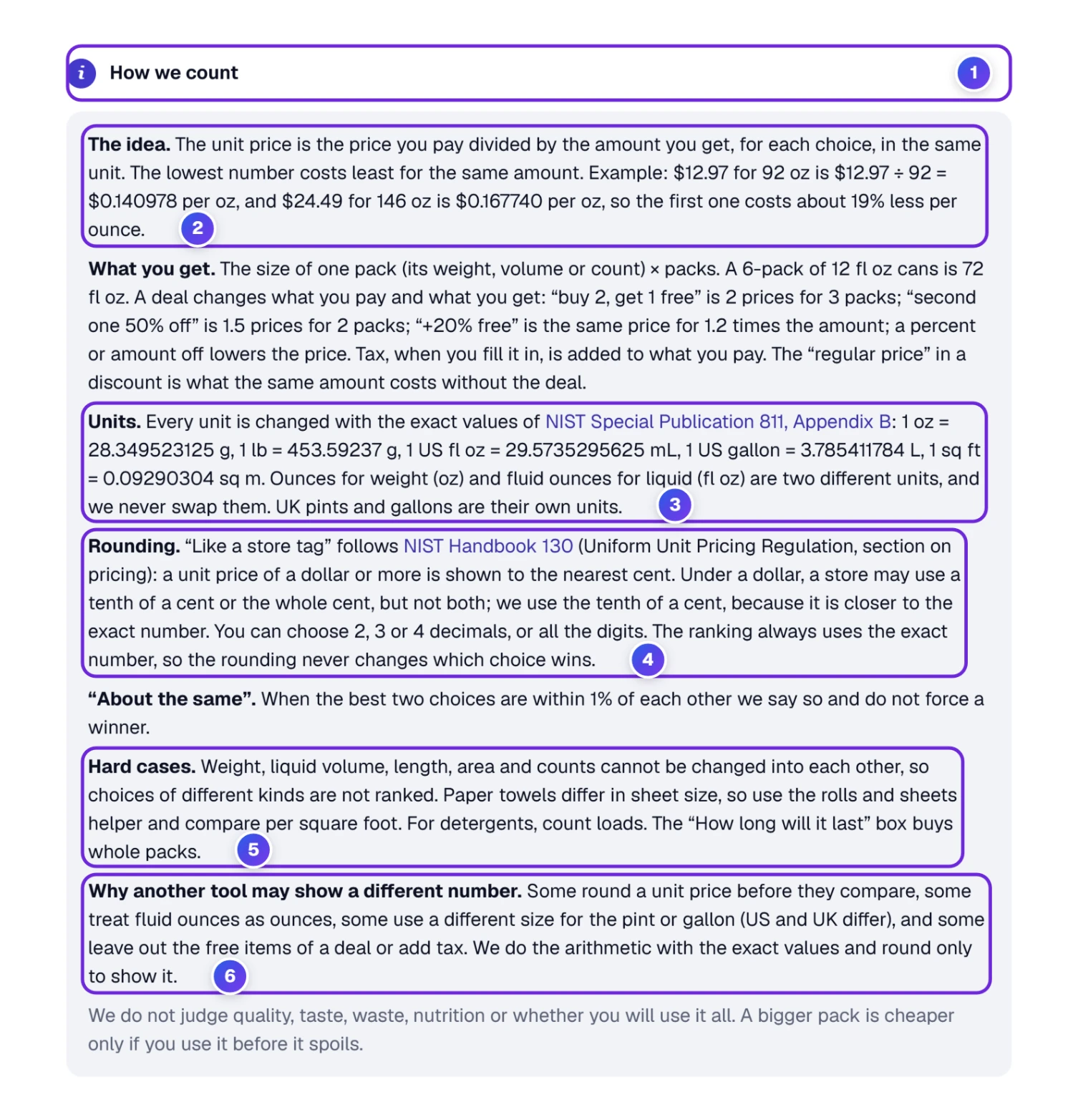
The idea (2). The unit price is what you pay divided by what you get, counted in the same unit for every choice. Take a $12.97 bag that holds 92 ounces: $12.97 ÷ 92 is $0.140978 per ounce. A $24.49 bag with 146 ounces comes to $0.167740 per ounce. The first costs about 19% less per ounce, and no mental math was needed. You can check it on any calculator: divide the price by the amount. That one division sits behind every unit price, whether it’s per ounce, per pound or per item.
The units (3). Before comparing, the tool turns every unit into one exact base value. It uses the official numbers from the National Institute of Standards and Technology (NIST), not rounded ones:
| Unit | Exact value used |
|---|---|
| 1 ounce (weight) | 28.349523125 grams |
| 1 pound | 453.59237 grams |
| 1 US fluid ounce | 29.5735295625 milliliters |
| 1 US gallon | 3.785411784 liters |
| 1 square foot | 0.09290304 square meters |
An ounce of weight and a fluid ounce of liquid are different units, and the tool never treats one as the other. UK pints and gallons are their own units too, because they’re not the same size as US ones.
The rounding (4). “Like a store tag” copies the way unit prices are printed on shelves. NIST Handbook 130 says a unit price of a dollar or more goes to the nearest cent. Below a dollar, a store may use the whole cent or a tenth of a cent, and the tool uses the tenth, because it sits closer to the real number. You can switch to 2, 3 or 4 decimals, or show all the digits, in Settings. Rounding is only for display. The ranking uses the exact numbers, so a rounding choice can never change who wins.
Hard cases (5). Weight, liquid, length, area and counts can’t be turned into each other, so a mixed pair isn’t ranked at all. Paper towels need the rolls-and-sheets helper, and you compare them per square foot. The “How long will it last” box buys whole packs, which is why the rice example left a pound over.
Why another tool may disagree (6). Some tools round the unit price before they compare, and two prices that look equal may not be. Some treat a fluid ounce as an ounce. Some use the UK gallon for a US jug. Some forget the free item in a deal, or add tax without telling you. We do all the arithmetic with the exact values and round only when we show the number.
Two things the tool doesn’t judge: how good a product tastes, and whether you’ll use all of it. That part is up to you. The two Extension pages from Aisle 5 are listed in the Sources box below.
What Is a Unit Price, and Where Do I Find It?
The unit price is the cost of one ounce, one pound, one sheet or one count. Many stores print it in small type on the shelf tag, near the big price. If the tag doesn’t show it, type the price and the size into the Best Deal Calculator and it works the number out for you.
Is the Bigger Package Always the Better Deal?
No. A big bag often costs less per pound, but only if you use all of it. In our rice example the big bag saved $4.00 on paper, yet seven pounds were still in the cupboard after a month. The “How long will it last” box shows you that before you buy.
Can I Compare a 12-Pack of Cans with a 2-Liter Bottle?
Yes. Tick the box that says the size is for one piece, type the pieces, and the tool turns both into the same unit. In our run the cans came to $6.21 per gallon and the 2-liter bottle to $3.58 per gallon.
Why Won’t the Tool Compare Ounces with Fluid Ounces?
Ounces measure weight and fluid ounces measure how much space a liquid fills. A cup of honey and a cup of water take the same space but don’t weigh the same. Rather than guess, the tool tells you the two choices are different kinds and asks you to pick matching units.
How Do I Compare Toilet Paper with Different Sheet Sizes?
Tick the paper box, type the rolls and the sheets per roll, then add the size of one sheet. The tool compares the paper per square foot. In our example one pack held 715 square feet and the other 636, and the cheaper one cost about 18% less per square foot.
Does the Tool Keep or Send the Prices I Type?
The comparison runs in your browser, and the tool’s own code makes no network calls while you type. Your last boxes stay saved in this browser, so they’re there when you return. A number leaves your device only when you send it yourself, for example with Copy list or the On your phone code.
Can I Use It with Euros, Pounds or Other Money Signs?
Yes. The Currency box at the top, next to Reset and Undo, has about 160 choices and starts on Automatic, which follows your time zone. It changes the sign shown next to every number. It does not convert money from one currency into another, so type all prices in the same money.