This free Age Calculator tells you exactly how old someone is, in years, months and days, from their date of birth. See the age today or on any day you choose, the next birthday, and the same age in weeks, days, hours and seconds. It also works for a whole list of people at once.
Sometimes you just need a number you can trust: for a form, a doctor’s visit, a school sign-up, a birthday card, or just because you are curious. Doing it in your head is easy until the months and leap years get in the way. So let’s go through it together, one small step at a time, with a screenshot beside each one.
All the way through, we will use one example: Dorothy, a grandmother from Ohio, born on March 14, 1946. The pictures show her date, so you can compare them with your own screen.
Which Question Brings You Here?
Most people come with one of these questions. Find yours, and you will know which part of the tool (and which section below) answers it.
| Your question | Where the answer is in the tool | Read the section |
|---|---|---|
| How old am I today? | Type the date of birth, press Show my age | How old am I today? |
| How old will I be on a certain day, or how old was I then? | How old on which day? → Pick a date | On a certain day |
| How old will I be in a certain year? | How old on which day? → In a year…, or the table Your age by year | On a certain day · Your age by year |
| I only know the year someone was born, or just the year and month | I only know the year or I only know the year and month | Only know the year? |
| How many days (or seconds) old am I? | Your age in other units | Days, hours and seconds |
| When is my next big birthday? | Big birthdays and Round-number milestones | Big birthdays |
| Ages for a whole class, team or family | The tab A group of people | Ages for a whole group |
How Old Am I Today? Three Boxes and One Button
Here is the whole tool as it looks when you open the page. Each number in the picture comes back in the steps that follow, so you can glance back whenever you like.
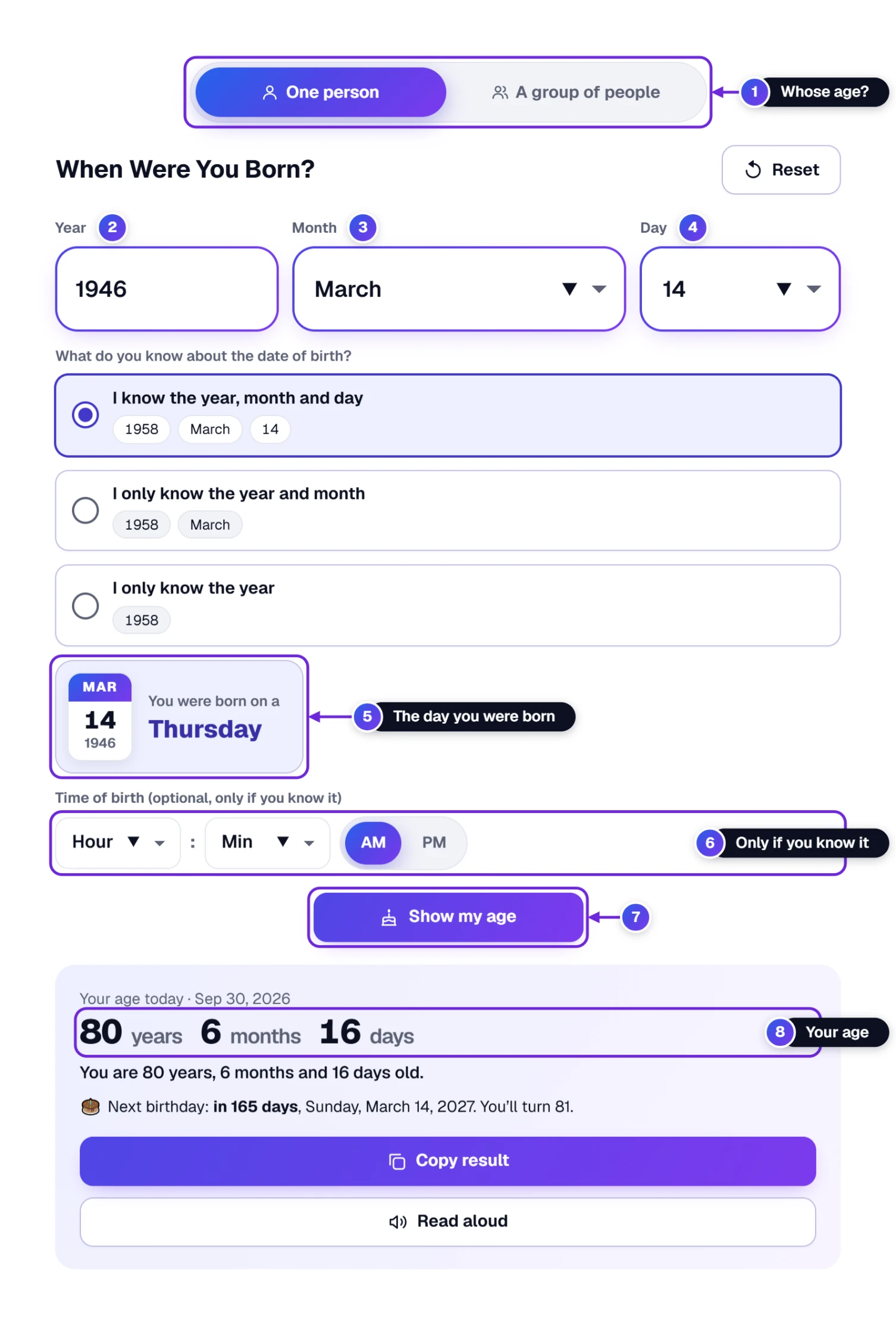
- Make sure One person is chosen at the very top 1. The page starts that way.
- Click in the Year box 2 and type the year of birth with all four digits. Dorothy types 1946. As soon as the fourth digit is in, the tool moves on to the month by itself.
- Choose the Month 3: the months are written as words, so there is no guessing whether 3 means March.
- Choose the Day 4. Only days that really exist in that month are offered, so a mistake like February 30 cannot happen.
- Press the big Show my age button 7. The answer 8 is right below it. (On a phone, the page scrolls down to it for you.)
Did you notice the little calendar card 5? It shows the day of the week the person was born. Dorothy was born on a Thursday. The Time of birth boxes 6 are optional; leave them empty unless you want your age in hours and minutes (more about that further down).
Have the date written somewhere already, like 3/14/1946 or March 14, 1946? Copy it and paste it into the Year box. The tool fills in the year, the month and the day all at once.
Choosing the Month and Day Without Squinting
Tiny drop-down calendars are hard to use, especially with a mouse that likes to slip. So on a computer, the Month and Day boxes open a big, calm grid instead.
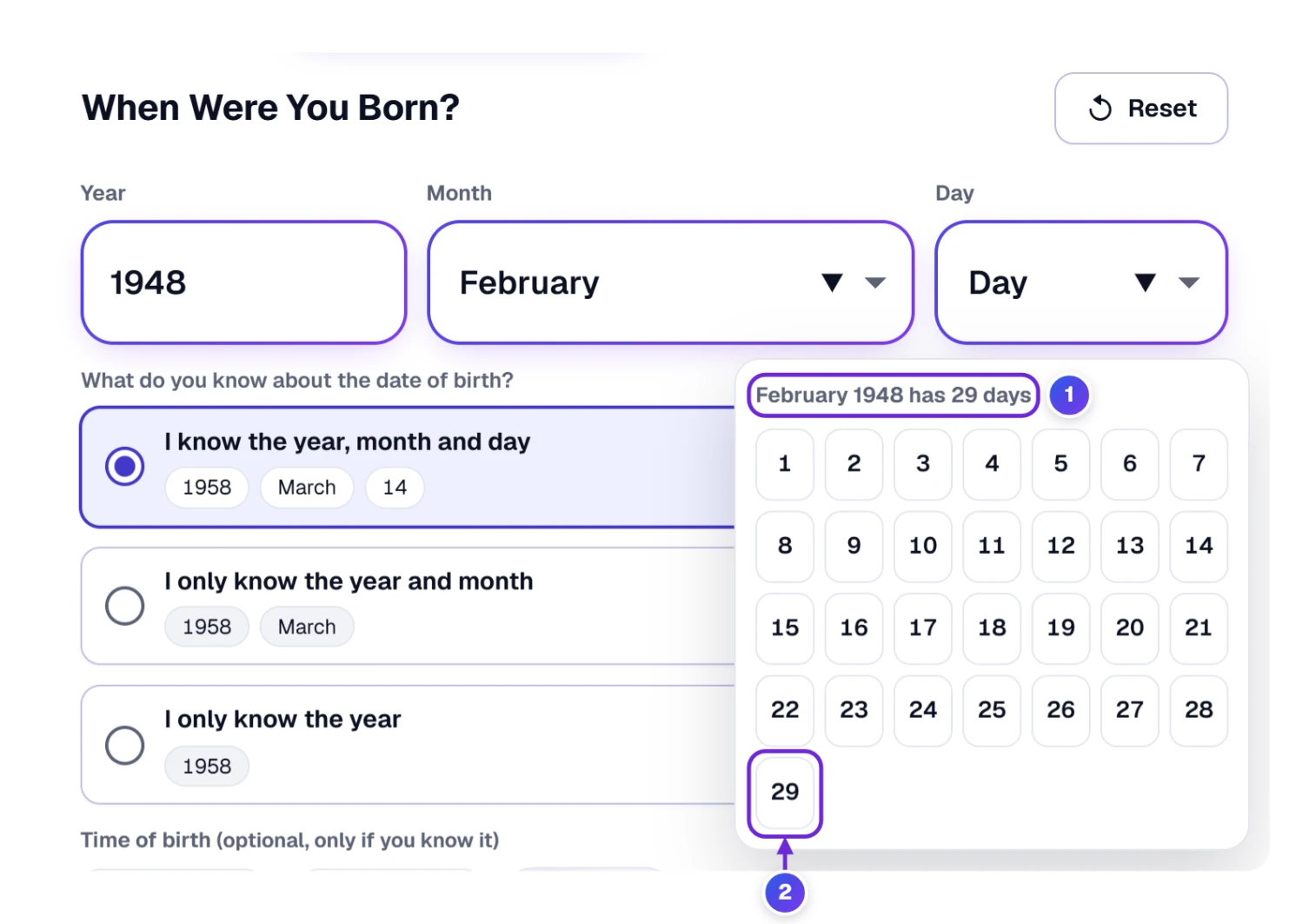
- Click the Day box. A grid of large buttons opens right under it.
- Read the heading 1: it tells you how many days the month has. February 1948 was a leap year, so it says February 1948 has 29 days and offers day 29 2.
- Click the day. The grid closes and you are done.
A few kind details happen by themselves. After you choose a month, the day grid opens on its own. The grid never opens off the edge of the screen. Days and months after today are greyed out, because nobody can be born in the future. And if you change the month to a shorter one (say from the 31st of March to April), the tool gently asks you to choose the day again instead of guessing.
Prefer the keyboard? Press Tab to reach a box, then Enter or the space bar to open it, the arrow keys to move, Enter to choose and Esc to close. On a phone or tablet you get your device’s own familiar list, which always fits the screen.
Reading Your Answer, Line by Line
The answer box says the same thing three ways, so it is easy to read and easy to pass on.
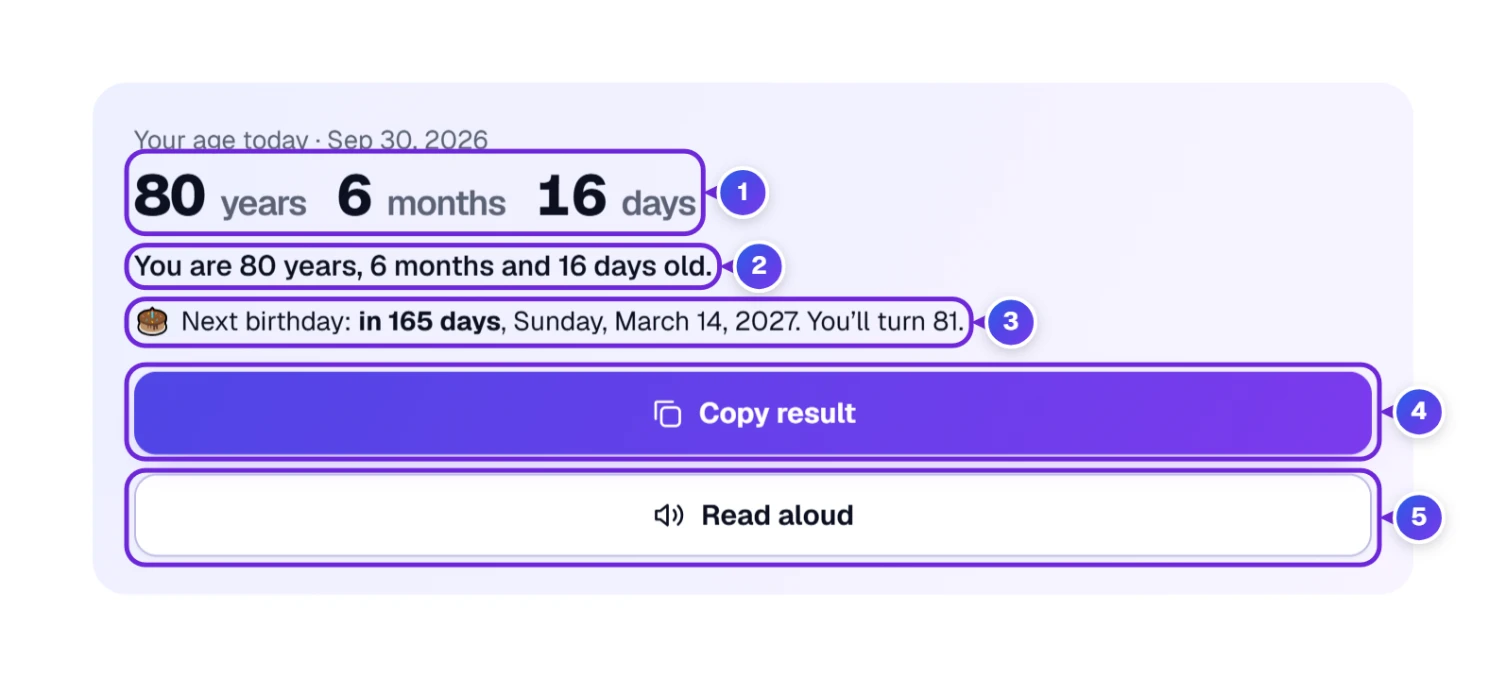
- 1 The big numbers: Dorothy is 80 years, 6 months and 16 days old on the day the picture was taken.
- 2 A plain sentence you can copy into an email or a form.
- 3 Next birthday: how many days are left, the date and weekday of that birthday, and the age she will turn. On the birthday itself it says Happy birthday!
- 4 Copy result copies the sentence and the next birthday, ready to paste anywhere.
- 5 Read aloud speaks the answer using the speech voice your device already has, handy when the text is small or your eyes are tired. Press it again (it now says Stop reading) to stop.
Just above the big numbers, a small line tells you which day the age is counted for, normally Your age today. That line changes when you ask about another day, as you will see in a moment.
Starting over for another person? Press Reset at the top right of the tool. Every box is emptied in one go.
Only Know the Year Someone Was Born?
This happens a lot with old family records, a pen pal, or a form that asks for an age when you only remember “born in 1958”. Without a birthday, nobody can give one exact age, but the tool can tell you the two possibilities.
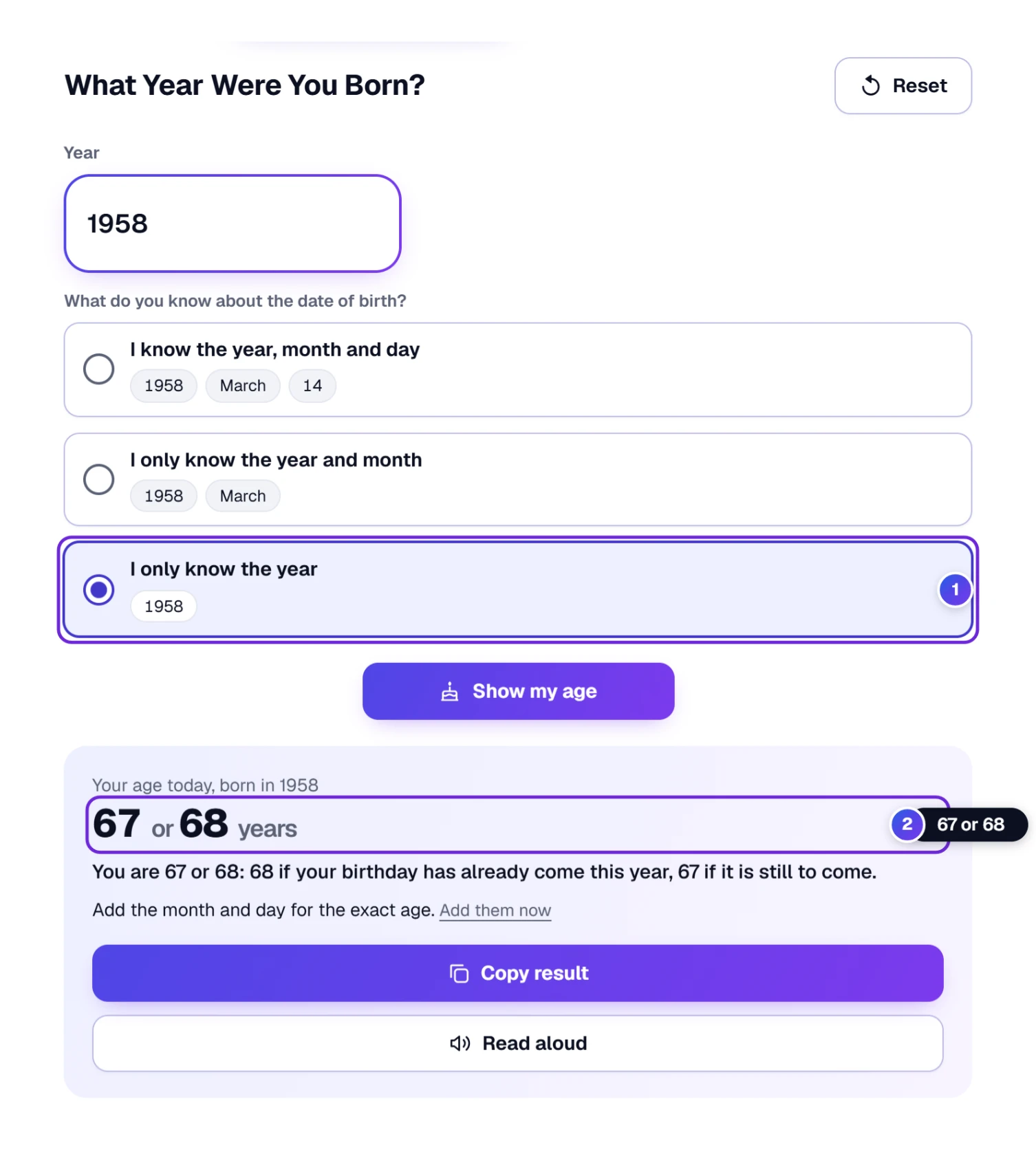
- Under the date boxes you will see three choices. Choose I only know the year 1.
- Type the year of birth, for example 1958.
- The answer 2 shows two ages, like 67 or 68: the lower one if the birthday has not come yet this year, the higher one if it has.
Remember the month too, like “born in March 1958”? Then choose the middle one of the three choices.
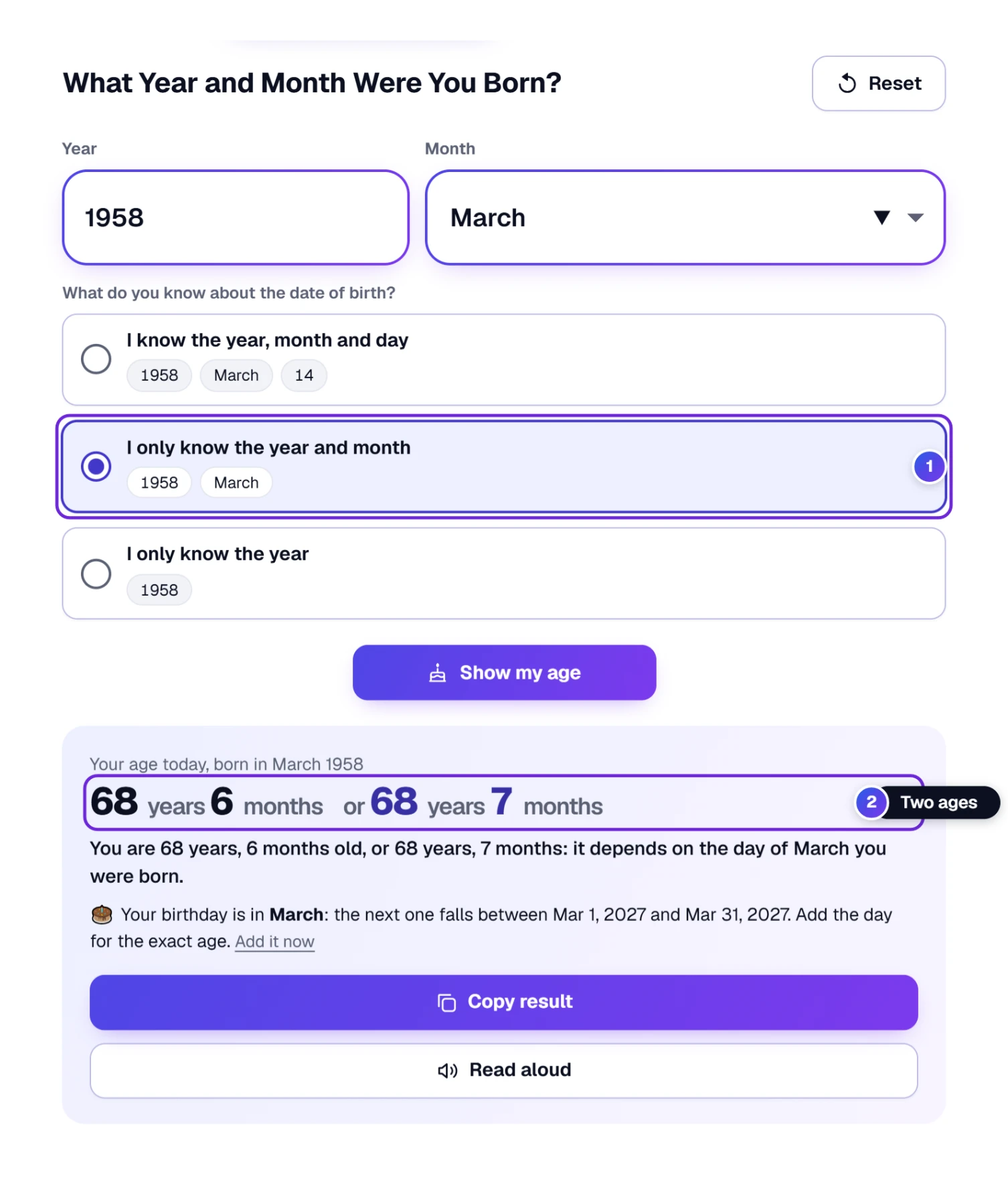
Choose I only know the year and month 1. The Day box steps aside, and the answer 2 shows two ages that are one month apart, for example 68 years, 6 months or 68 years, 7 months, because the day of March makes the difference. The tool also tells you when the next birthday falls, anywhere from the first to the last day of March. If the day turns up later, press Add it now and the cursor jumps to the Day box.
Found out the full date later? Choose I know the year, month and day again, the first of the three choices, and the boxes you hid come back. It is also the choice you find every time you open the page.
How Old on a Certain Day, Past or Future?
“How old will I be at my granddaughter’s wedding?” “How old was Dad when he joined the Navy?” “Is my son old enough on the first day of camp?” For all of these, you need the age on a day other than today. Under the answer you will find the box How old on which day?
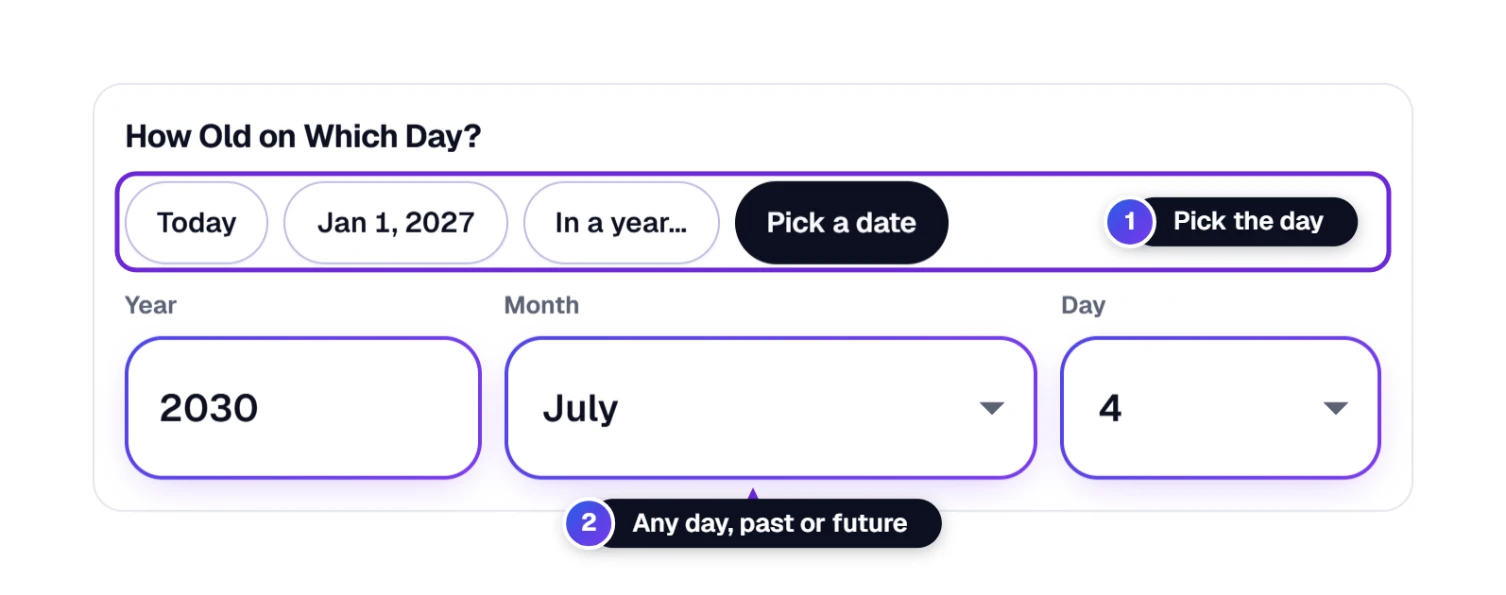
- Today: the normal answer.
- Jan 1 of next year, useful for forms and sports that count age on New Year’s Day.
- In a year…: type just a year, like 2035.
- Pick a date: any exact day 2, before or after today.
- Press Pick a date 1.
- Type the year, then choose the month and the day 2, just like the date of birth.
- Look back up at the answer box. The small line now says Age on Thursday, July 4, 2030, and the answer reads 84 years, 3 months and 20 days for Dorothy.
Choose a day in the past, and the sentence says “you were”; a day in the future, and it says “you will be”. If you choose a day before the person was born, the tool tells you kindly that the day is before the date of birth.
A Whole Year Instead of One Day
When you only care about the year (“how old will I be in 2035?”), press In a year… and type the year. Because the age changes on the birthday during that year, the tool gives you both ages at once.
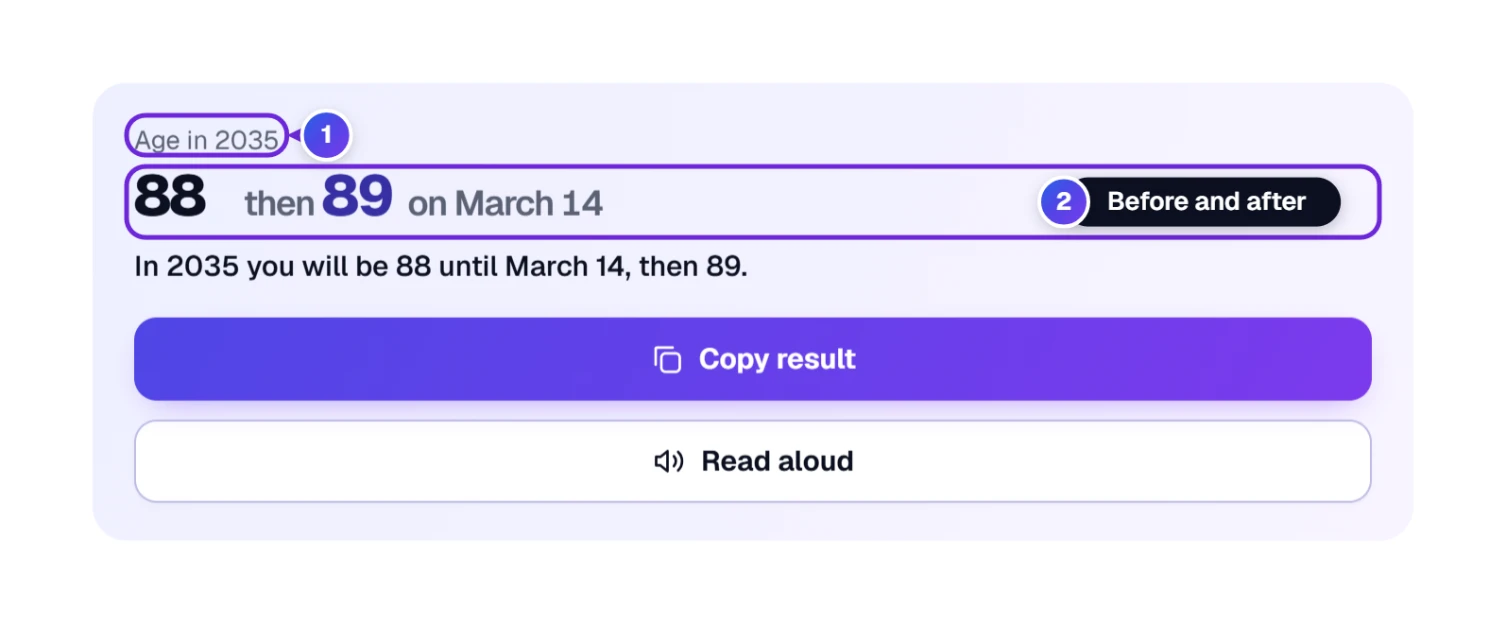
For Dorothy, 2035 1 gives 88 years → 89 years on March 14 2: she is 88 until her birthday, and 89 from March 14 on.
Your Age by Year: A Lifetime on One Page
Scroll a little further and you will find a small table called Your age by year. It lists every fifth year from now on, with the age before and after the birthday in each. It is perfect for planning: a big trip, a reunion, or just the year you will reach a certain age.
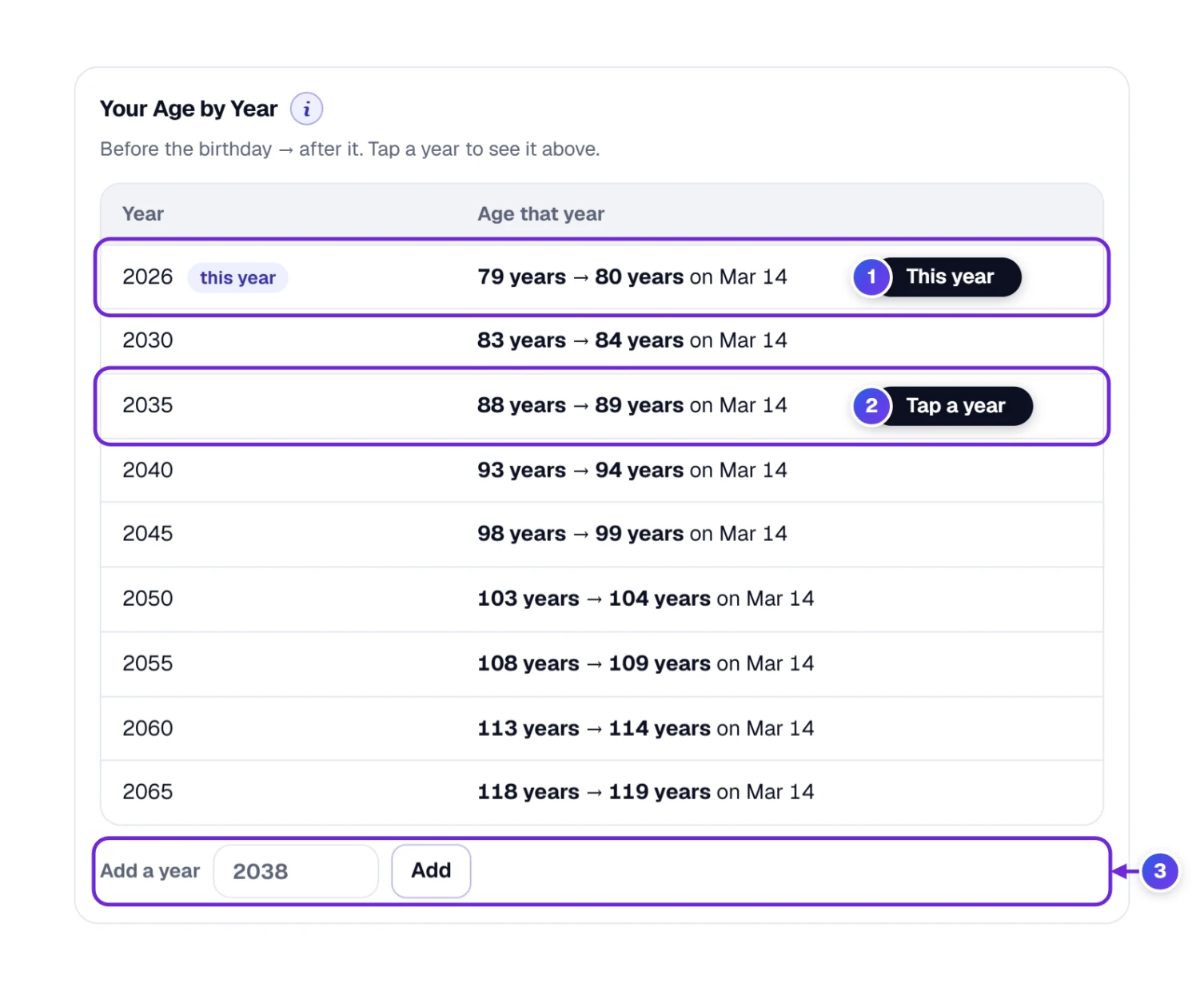
- Look for this year 1 in the first row of the table; it is marked this year.
- Tap or click any year 2 and the answer box at the top switches to In a year… with that year filled in.
- Missing a year you care about? Type it in Add a year 3 and press Add. It appears in the table in the right place.
How Many Days Old Am I? Weeks, Hours and Seconds Too
Some people love big numbers, and a “10,000 days old” party is a real tradition in some families. The box Your age in other units shows the same age counted in years (with decimals), months, weeks, days, hours, minutes and seconds.
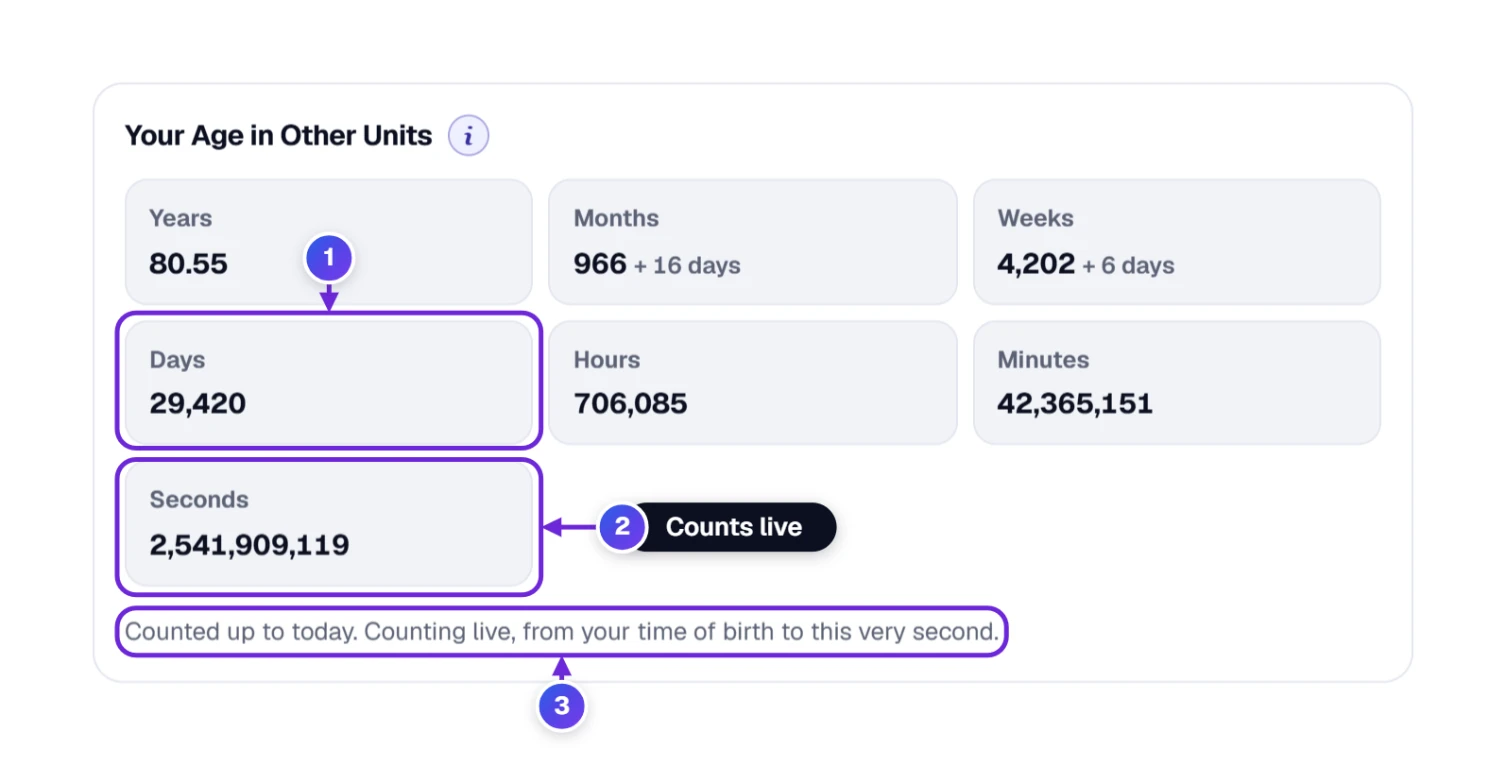
The days 1 are whole days since the date of birth. Without a time of birth, hours, minutes and seconds are counted from midnight, and the note 3 says so. If you know the time you were born, add it and the numbers become exact; the seconds 2 even tick along live while you watch.
Adding the Time of Birth
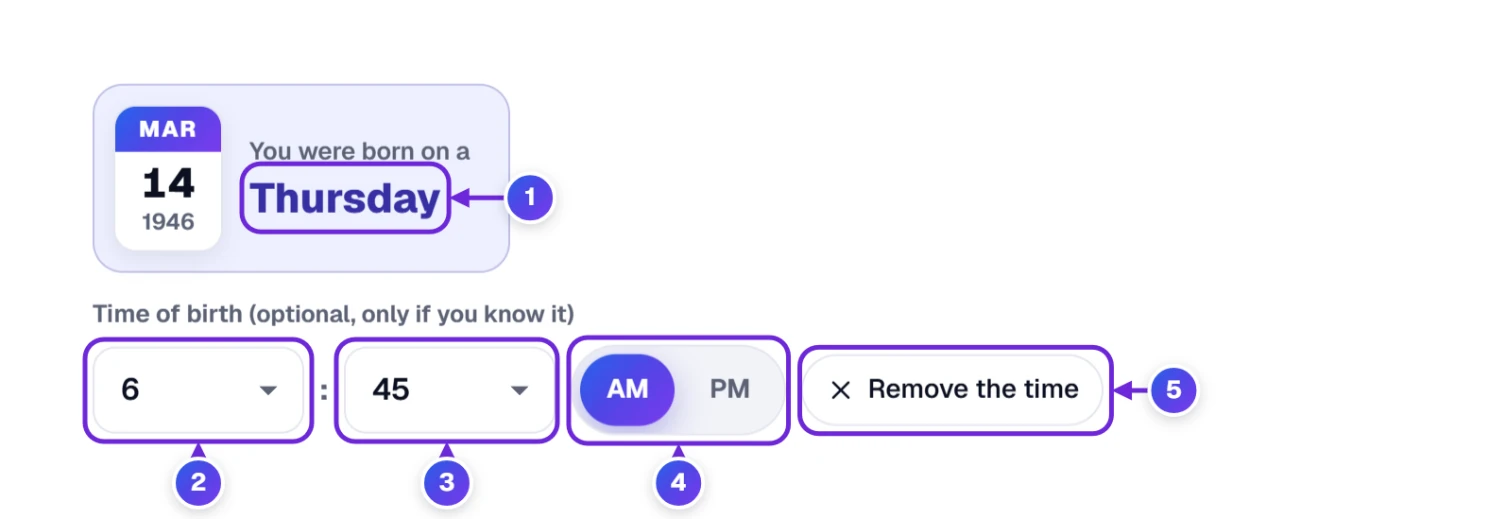
- Under the date of birth and the day of the week 1, find Time of birth (optional, only if you know it).
- Choose the Hour 2 and the Min (minute) 3. Many birth certificates show this time.
- Press AM or PM 4. Dorothy was born at 6:45 in the morning, so she picks AM.
- Changed your mind? Press Remove the time 5 and the tool goes back to counting from midnight.
The time only changes the hours, minutes and seconds. Your age in years, months and days stays the same, which is how people normally count age.
Big Birthdays and Fun Round-Number Milestones
Once there is an age, two more boxes appear, just for the joy of it.
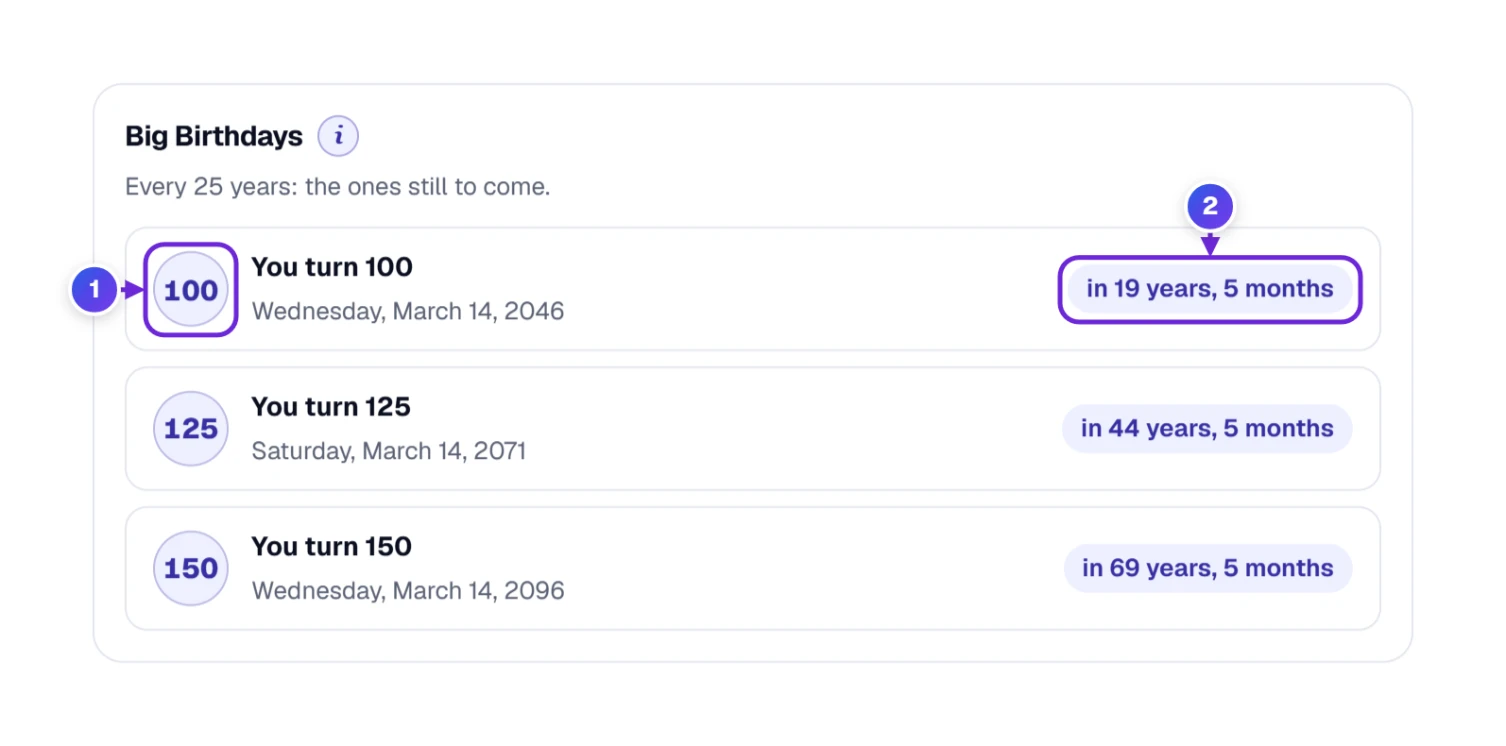
Big birthdays shows every 25th birthday still to come, up to 150, with the date, the day of the week and how long until then 2. Dorothy will turn 100 1 on Wednesday, March 14, 2046. It is a nice thing to put on the family calendar early.
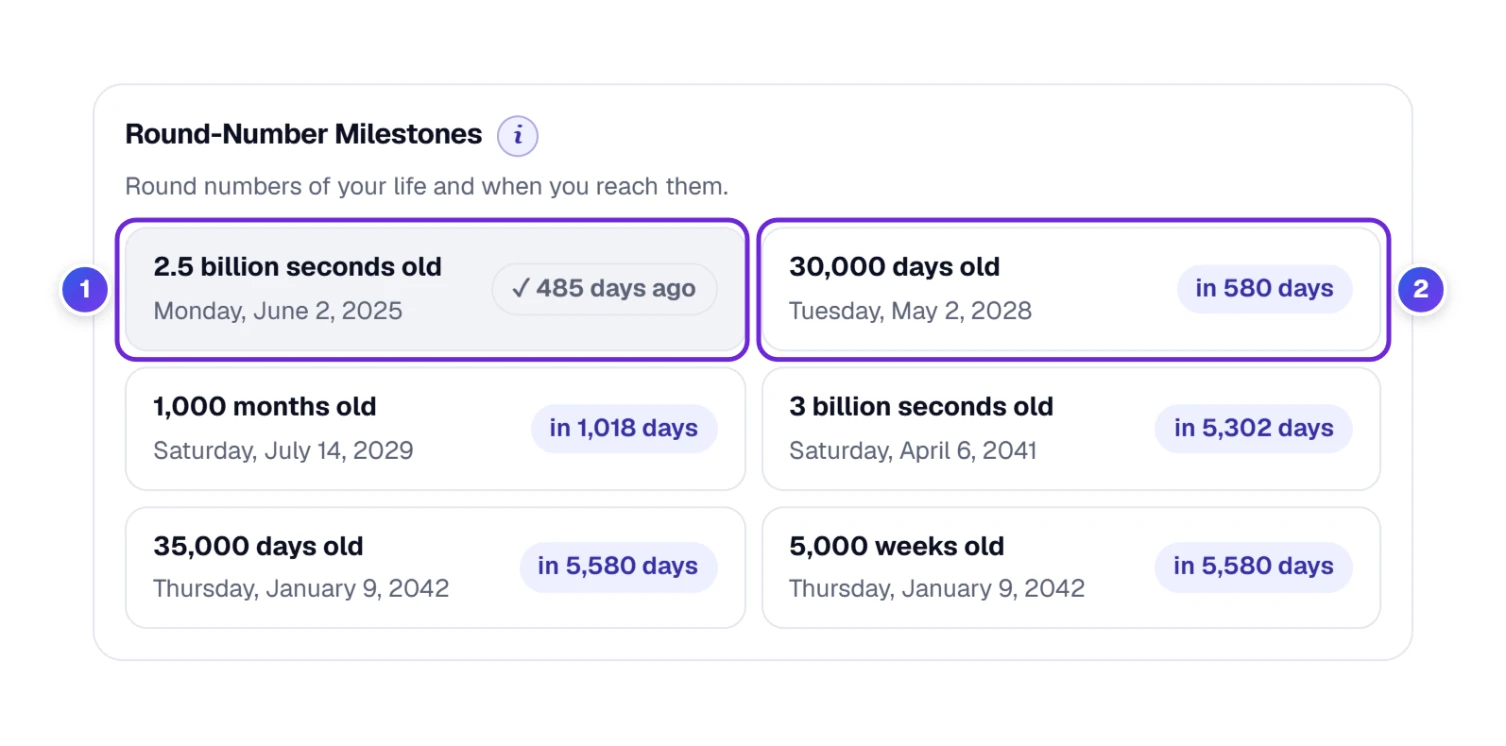
Round-number milestones finds the round numbers of a life (10,000 days old, 1,000 months old, 1 billion seconds old) and the date each one arrives. The last one already reached has a tick 1 and says how many days ago it was; the next few 2 show how many days are left. For a sense of scale: 10,000 days is about 27 years and 4 months, and 1 billion seconds is almost 32 years.
Ages for a Whole Class, Team or Family
Teachers, coaches, scout leaders and family historians often need many ages at once, usually on one particular day, like the first day of school or a league’s cut-off date. Typing each one by hand would eat up the afternoon. Switch to A group of people 1 instead.
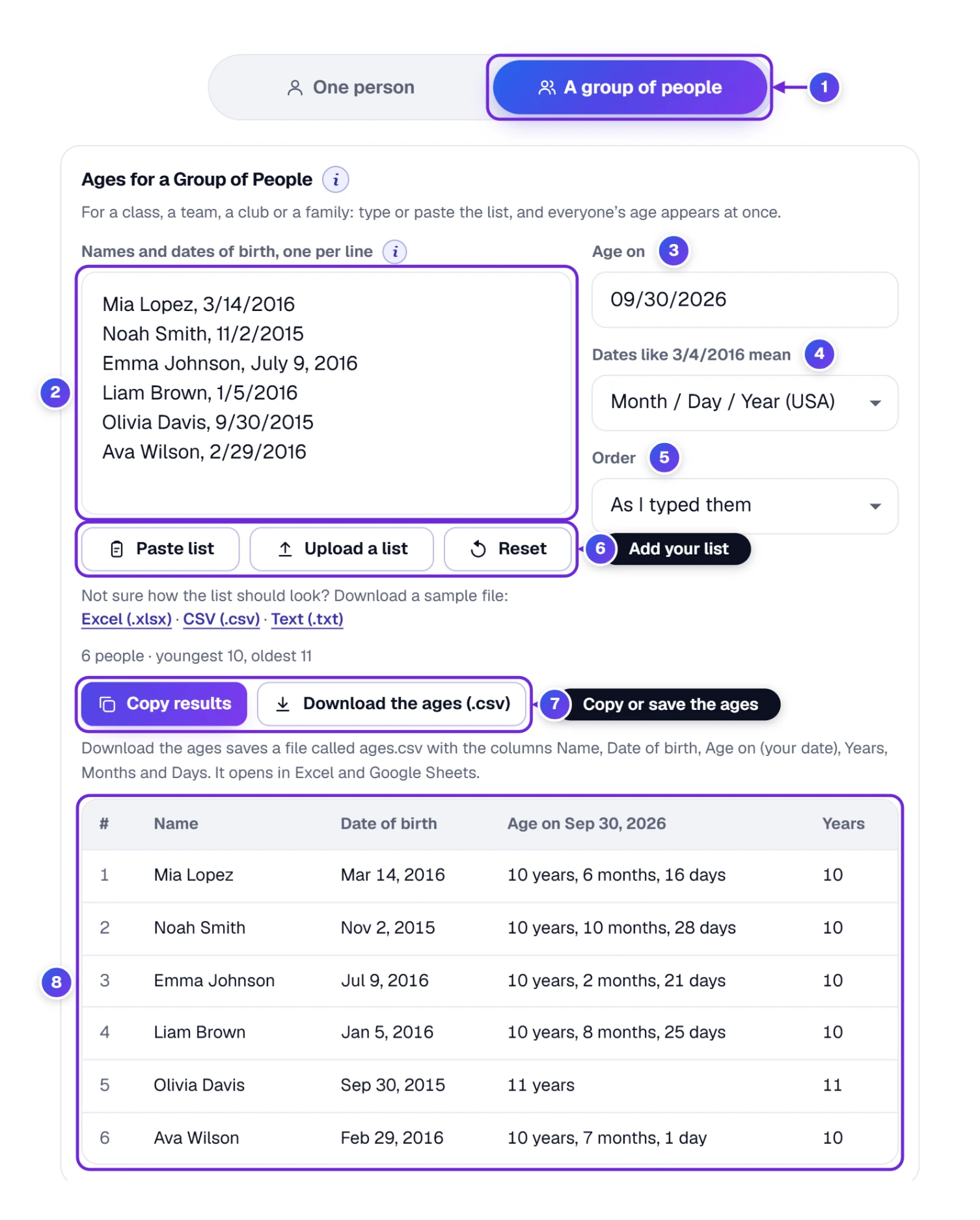
- Press A group of people 1 in the row of tabs above the date boxes.
- In the big box 2, put one person on each line: a name (if you like), a comma, then the date of birth, for example Mia Lopez, 3/14/2016. You can type, press Paste list, or press Upload a list 6 (the buttons just under the box) to open an Excel (.xlsx), .csv or .txt file.
- Set Age on 3 to the day that matters. It starts on today.
- Check Dates like 3/4/2016 mean 4. In the USA that is Month / Day / Year; pick Day / Month / Year if your list comes from a country that writes the day first.
- Choose the Order 5: As I typed them, Youngest first, Oldest first or By name (A to Z).
- Read the ages in the table 8, then use the buttons above it 7: Copy results to paste the table into a spreadsheet or a Word file, or Download the ages (.csv) to save a file called ages.csv with the columns Name, Date of birth, Age on your chosen day, Years, Months and Days. The line under the buttons says the same.
Some thoughtful touches you will notice:
- Dates can be written many ways: 3/14/2016, 2016-03-14, March 14, 2016 or 14 March 2016 all work.
- Children born on February 29, like Ava in the picture, are counted correctly, too.
- A line the tool cannot read is marked in plain words, for example No date found on this line, so you can fix just that one.
- Above the table, a short summary says how many people there are and the youngest and oldest age.
- Not sure how the list should look? Under the list box you can get a ready-made sample as Text (.txt), CSV (.csv) or Excel (.xlsx).
- The list holds up to 500 people. Reset empties it when you are done.
A small shortcut: paste several lines into the date-of-birth boxes on the One person tab and the tool notices it is a list, then moves you to A group of people.
Find a Date Again, and Decide What Shared Links Show
Underneath the tool you will find three small helpers.
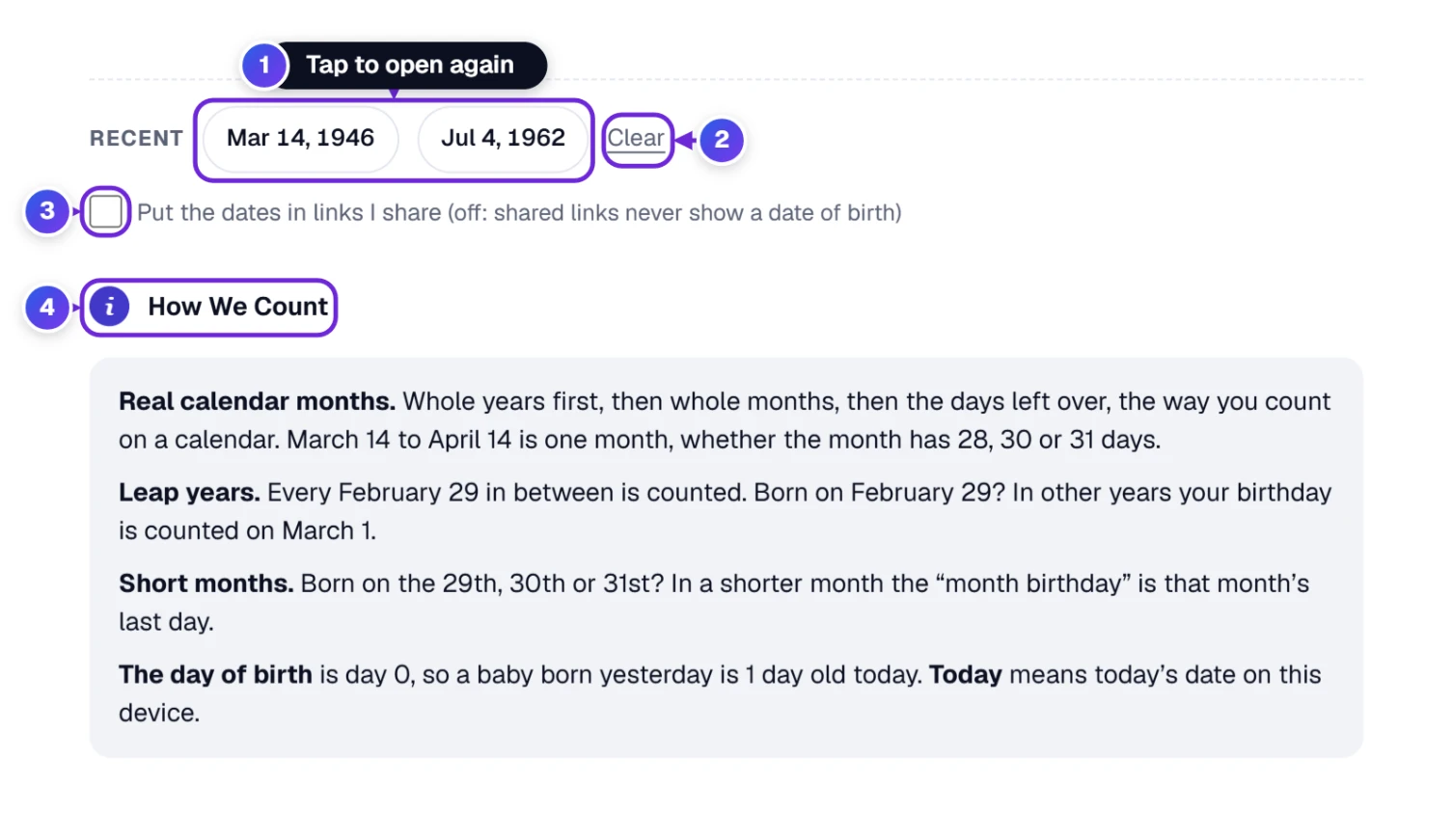
- 1 Recent keeps the last five dates of birth you looked at, on this device only. Tap one and it is filled in again, which saves typing if you check the same grandchildren every few months.
- 2 Clear forgets those recent dates, for example on a shared or library computer.
- 3 Put the dates in links I share is off at the start. While it is off, a link you share never shows a date of birth. Tick it only if you want the other person to open the tool with the same date already filled in.
- 4 How we count opens a short, plain explanation of the counting rules. We explain them below as well.
How Age Is Counted, and Why Calculators Sometimes Disagree
You may have noticed that two age calculators can give answers a day or two apart. That is not a mistake in either one; they count months differently. Some count a month as an average of about 30.4 days. Ours counts real calendar months, the same way you would with a wall calendar:
- Whole years first, then whole months, then the days left over. March 14 to April 14 is one month, whether that month has 28, 30 or 31 days.
- Leap years are counted. Every February 29 in between is included. The calendar we use has a leap day every four years, except in century years that cannot be divided by 400, so 2000 had one, but 1900 did not.
- Born on February 29? In years without that day, the birthday is counted on March 1.
- Born on the 29th, 30th or 31st? In a shorter month, the “month birthday” is that month’s last day.
- The day of birth is day 0. A baby born yesterday is 1 day old today.
- “Today” means today’s date on your own device.
| Born | Age on | The tool says | Why |
|---|---|---|---|
| January 31, 2025 | February 28, 2025 | 1 month, 0 days | February has no 31st, so its last day counts as the month birthday. |
| January 31, 2025 | March 1, 2025 | 1 month, 1 day | One day after that month birthday. |
| February 29, 2000 | February 28, 2025 | 24 years, 11 months, 30 days | 2025 has no February 29, so the birthday is on March 1 … |
| February 29, 2000 | March 1, 2025 | 25 years | … and here it is: the 25th birthday. |
| March 14, 2016 | March 13, 2026 | 9 years, 11 months, 27 days | One day short of the 10th birthday. |
| March 14, 2016 | March 14, 2026 | 10 years | Birthday: a new year begins. |
Check It With Pencil and Paper
Like to see it for yourself? Here is the same method the tool uses, worked out by hand. We will find Dorothy’s age on July 4, 2030.
- Years: 2030 − 1946 = 84. Has her birthday (March 14) come by July 4? Yes, so she is 84 years. (If not, you would take away one.)
- Months: count whole months from her last birthday, March 14: April 14, May 14, June 14. The next one, July 14, is after July 4, so 3 months.
- Days: from June 14 to July 4 is 20 days (16 days left in June, plus 4 in July).
- Put it together: 84 years, 3 months and 20 days, exactly what the tool says.
The tool does all this in a blink, including leap years and short months, which is where hand counting most often slips.
Two cases we checked on purpose while testing. Someone born on January 31 is exactly 1 month old on February 28, because February has no 31st and the month ends there; a calculator that counts days only would say 28 days. And a baby born on February 29, 2000 was 22 years, 11 months and 30 days old on February 28, 2023, then turned 23 the next morning, on March 1. Both match the rules described above.
Sending an Age to Family, or Printing It for a Form
Under the calculator you will find five buttons and the rating stars.
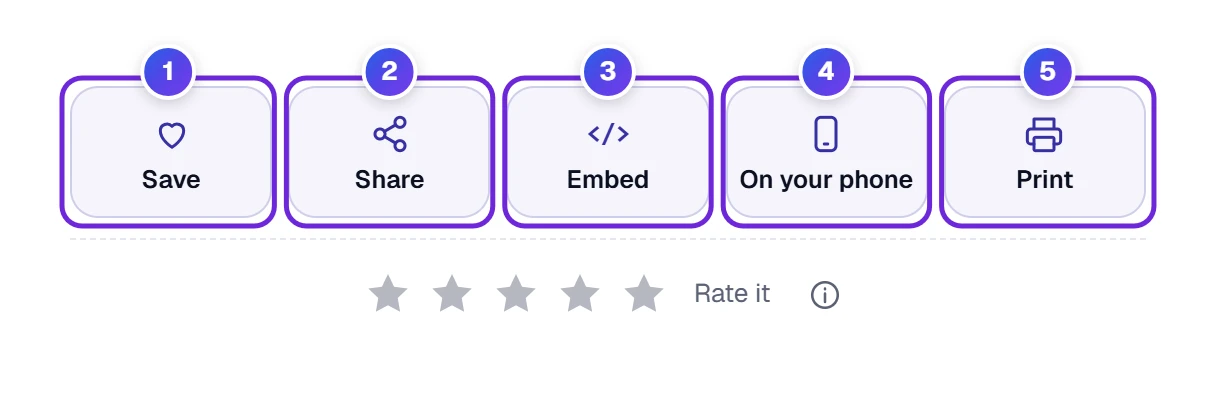
- 1 Save keeps the Age Calculator in your ToolHa favorites, so it is easy to find next time.
- 2 Share opens the window you see below.
- 3 Embed hands you a small block of code that puts this calculator on your own site, say a school, club or family blog.
- 4 On your phone displays a QR code you can scan with your camera, and the calculator opens right there. It appears on a computer; on a phone or tablet you are already there, so it stays hidden.
- 5 Print gives you a paper copy of the tool with your answer, or a PDF if you choose to save it.
- Last, the stars are there if you want to rate the tool.

Copy link puts the calculator’s address on your clipboard, Copy result copies the age sentence, and the app buttons start a message for you in WhatsApp, Facebook, X, email or other apps, already written. Remember: the link only carries the date of birth if you ticked Put the dates in links I share.
Keys That Jump Straight to a Box
Single keys can save a little time if you like the keyboard. They work any moment the cursor is not inside a box. Press ? to see the whole list.
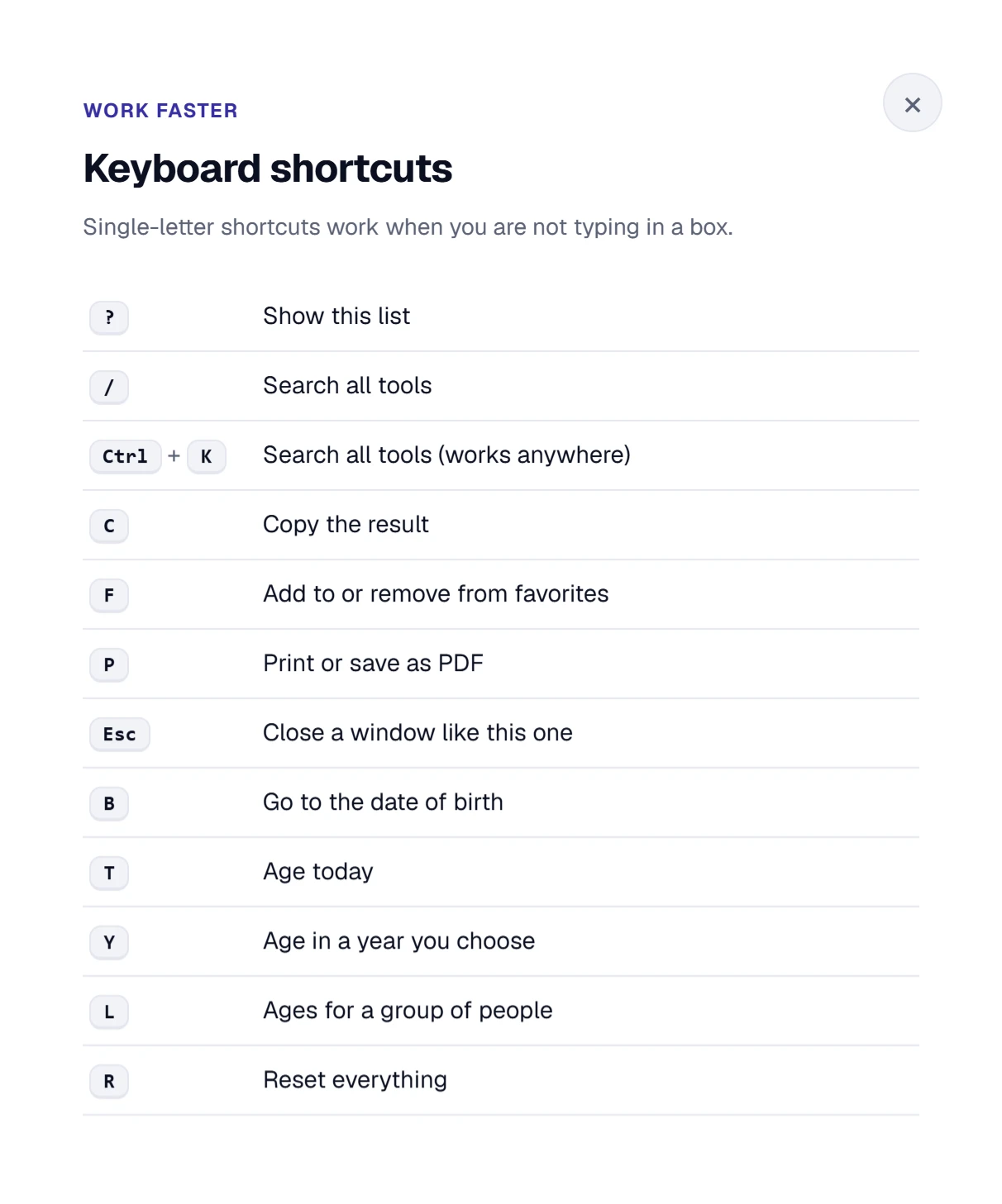
- B jumps to the date of birth.
- T shows the age today.
- Y opens In a year…
- L opens A group of people.
- R resets everything.
- F for favorites, P to print, Esc to close a window.
Checking an Age on Your Phone
Phones stack the boxes, so they are big and easy to tap. The Year box has its own row, and Month and Day sit side by side under it. When you tap Month or Day, your phone shows its own list or wheel, the one you already know from other apps. After you press Show my age, the page scrolls down to the answer for you.
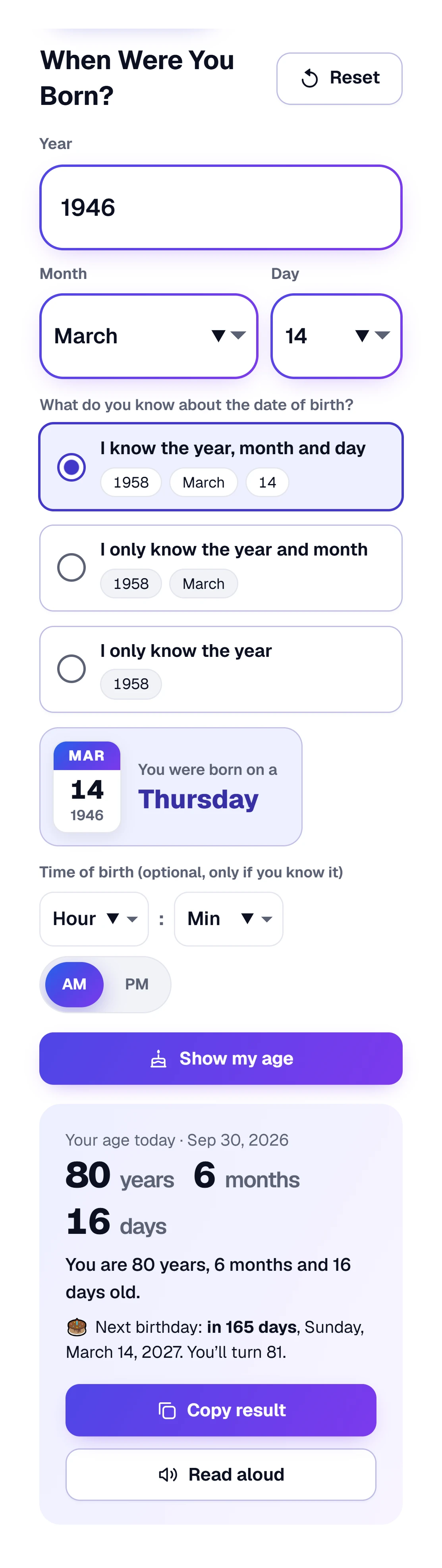
Want the calculator on your phone’s home screen, like an app? In your phone’s browser, open the Share or menu button and choose Add to Home Screen.
Your Recent Dates and Shared Links
Your recent dates and your choices (like the date order for lists) stay saved on this device, and Clear removes them. A date of birth only goes into a link if you tick Put the dates in links I share and then share a link.
If an Age Looks Wrong
| What happens | Why | What to do |
|---|---|---|
| The answer is one year off | The year was typed wrong, or the month and day are mixed up. | Check the Year box has all four digits and the right month is chosen. |
| “That date of birth is in the future” | The year or month is later than today. | Check the year. It is easy to type 2046 instead of 1946. |
| “Please choose the day again” | You changed to a month that does not have that day. | Pick the day again from the list. |
| A line in the group list is marked | The tool could not find a date on it, or the date does not exist. | Write the date like 3/14/2016 or March 14, 2016, and check Dates like 3/4/2016 mean. |
| Ages in the list look very wrong | The list uses day-first dates (14/3/2016) but the tool reads month first. | Choose Day / Month / Year. |
| Paste list does nothing | Your browser asks permission or blocks pasting from a button. | Click inside the list box and paste with Ctrl + V, or Command + V if you use a Mac. On a phone, long-press where the list goes and pick Paste. |
| An old Excel file will not open | Files ending in .xls are an older format. | In Excel choose File → Save As → Excel Workbook (.xlsx), or copy the columns and paste them. |
| Read aloud is missing | The browser has no built-in voice. | Try another up-to-date browser, such as Chrome, Edge or Safari. |
Age Questions People Ask Us
How Do I Calculate My Exact Age?
Type your date of birth into the Age Calculator and press Show my age. By hand: take the birth year from this year, and take away one if your birthday has not come yet. Then count the whole months since your last birthday, and then the days left over.
How Old Am I If I Was Born in a Certain Year?
Without the month and day you are one of two ages: this year minus your birth year if your birthday has already passed, or one less if it has not. Choose I only know the year and the calculator shows both. If you remember the month too, choose I only know the year and month for an answer in years and months.
How Do I Find Someone’s Age on a Specific Date?
Enter their date of birth, then under How old on which day? press Pick a date and choose the day. It works for past and future days, for example the age at a wedding, on a school cut-off date or on a birthday years from now.
How Are Leap Years and February 29 Birthdays Counted?
Every February 29 between the two dates is counted. Someone born on February 29 is counted as having a birthday on March 1 in years without that day.
Why Do Age Calculators Sometimes Give Different Months and Days?
Some count a month as an average of about 30.4 days. This calculator counts real calendar months, so March 14 to April 14 is always exactly one month, the way people count on a calendar.
Can I Work Out Ages for a Whole List of People?
Yes. Open A group of people, paste or upload up to 500 names with dates of birth, choose the Age on day, and copy the results, or save them as a CSV file that opens in Excel or Google Sheets.
Is the Age Calculator Free, and Is My Date of Birth Saved?
Yes, it is free and needs no account. Your recent dates stay on your device, and you can wipe them whenever you like.